Add or reduce seats, change SLA tier, get an invoice copy or fix a failed direct debit
Every subscription change is a ticket with a known approval chain and turnaround — here is which request to raise, who has to say yes, and how long each takes.
Before you start
- Raise these at support.curaeon.com.au under Billing & subscriptions, picking the matching sub-category (Invoices, Seats/licences, Tier changes or Payment issues).
- Where a request needs your practice's approval, that is your nominated administrator confirming on the ticket — even if they raised it.
- Turnarounds are in business days on your state's calendar. None of them are prices: where a change is charged, the amount is shown in AUD ex GST on the request form, and your agreement is the reference.
The four requests
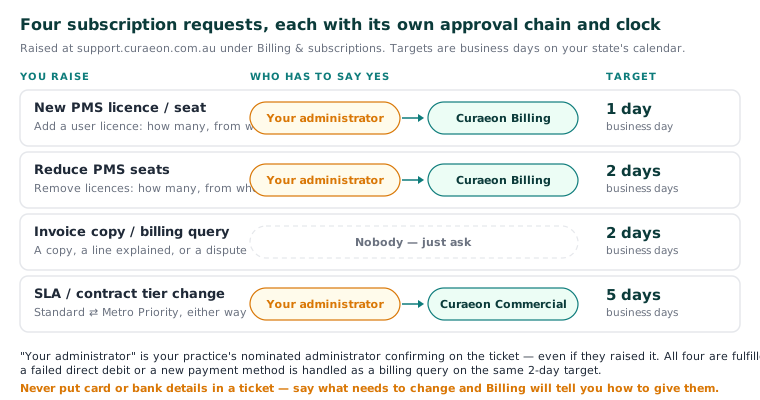
| You want to | Raise | Who approves | Target |
|---|---|---|---|
| Add a user licence | New PMS licence / seat | Your administrator, then Curaeon Billing | 1 business day |
| Remove user licences | Reduce PMS seats | Your administrator, then Curaeon Billing | 2 business days |
| An invoice copy, or a question about one | Invoice copy / billing query | Nobody — just ask | 2 business days |
| Move between Standard and Metro Priority | SLA / contract tier change | Your administrator, then Curaeon Commercial | 5 business days |
All four are fulfilled by the Billing team.
Adding or reducing seats
Say how many, and from when. Adding a seat is the licence; the person's Curaeon account is created in your own Settings → Users (KB-034 — Choose the right role and permissions for a new staff member), and a support-portal login for them is a separate request (KB-003 — Add or deactivate a portal user for your clinic).
Changing SLA tier
Standard is available everywhere in Australia. Metro Priority is for practices within 50 km of a stocked metro spare pool — Sydney, Melbourne and Brisbane at launch — and changes response, resolution and spare-swap commitments, not the software. The two side by side, with honest guidance on which suits you, are in KB-005 — Your SLA tier — Standard vs Metro Priority. An upgrade is a ticket ("Upgrade to Metro Priority"), not a new contract; a downgrade goes the same route.
Your request catalogue shows only what your tier is entitled to — a Standard-tier practice doesn't see the 4-hour swap item — so if you can't find something, that's usually why.
Invoice copies and disputes
No approval needed. Say which invoice (number or month) and whether you want a copy, an explanation of a line, or to dispute it — a dispute is the same request under the sub-category Dispute, on the same 2-day target.
A failed direct debit or a new payment method
Raise a ticket under Payment issues → Failed direct debit or Update payment method. Don't put card or bank details in the ticket — say what needs to change and the Billing team will tell you how to give them the details. Payment issues have no separate catalogue clock; they're handled as a billing query, so expect a response within 2 business days.
If that didn't work
If a billing ticket has passed its target with no reply, say so on the ticket — a missed target is flagged to the Support Manager automatically, and your note speeds that up.
Still stuck? Raise a ticket at support.curaeon.com.au or call 1300 XXX XXX. If your clinic can't see patients right now, call and choose option 1. Support is staffed Monday to Friday, 8:00–18:00 Sydney time; outside those hours a call or text to the same number is answered on a best-effort basis.
Related articles
- KB-005 — Your SLA tier — Standard vs Metro Priority — Your SLA tier — Standard vs Metro Priority
- KB-003 — Add or deactivate a portal user for your clinic — Add or deactivate a portal user for your clinic
- KB-034 — Choose the right role and permissions for a new staff member — Choose the right role and permissions for a new staff member
- KB-114 — Your Curaeon licence: seats, renewal, and requesting more from Settings → Practice — Your Curaeon licence: seats, renewal, and requesting more from Settings → Practice