Appliance appears offline — five checks before you call
Five quick checks that resolve most "appliance offline" reports in under five minutes — and if they don't, you'll have exactly the information our team needs.
First things first: if your clinic cannot see patients right now, skip this article — call 1300 XXX XXX and choose option 1. Support is staffed Monday to Friday, 8:00–18:00 Sydney time; outside those hours a call or text to the same number is answered on a best-effort basis.
Before you start
You'll need physical access to the appliance (usually your comms cupboard) and about five minutes. Any staff member can do these checks — no technical knowledge needed.
The five checks
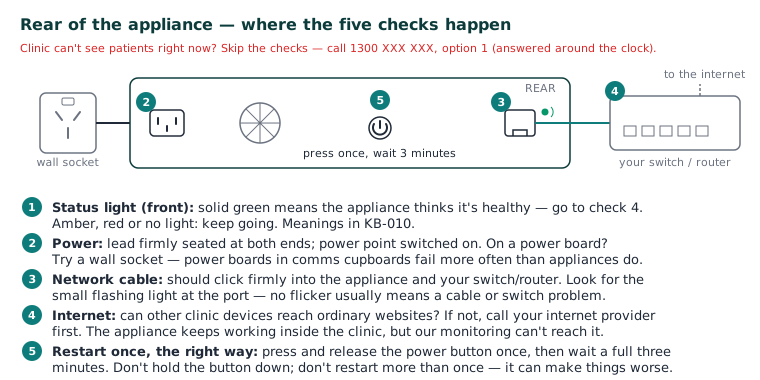
- Look at the status light. Solid green means the appliance thinks it's healthy — the problem is more likely your clinic network (go to check 4). Amber, red, or no light: keep going. (Light meanings: KB-010 — Appliance status lights and what they mean.)
- Check power. Is the power lead firmly seated at both ends? Is the power point switched on? If the appliance is plugged into a power board, try a wall socket — power boards in comms cupboards fail more often than appliances do.
- Check the network cable. The network lead should click firmly into the appliance and your switch/router. Look for the small flashing light where the cable enters the appliance — no flicker usually means a cable or switch problem, not an appliance problem.
- Check your internet. Can other devices in the clinic reach ordinary websites? If nothing can, contact your internet provider first — the appliance keeps working inside the clinic during an internet outage, but our monitoring (and remote support) can't reach it.
- Restart once — the right way. Press and release the power button once and wait a full three minutes. Don't hold the button down, and don't restart more than once — repeated forced restarts can make things worse.
If that didn't work
Note the status-light colour and anything unusual (noise, heat, smell), then:
Still stuck? Raise a ticket at support.curaeon.com.au — choose Appliance issue and tick the diagnostics-consent box so we can pull the appliance's technical logs (they contain no patient information). Or call 1300 XXX XXX. If your clinic can't see patients, call and choose option 1. Support is staffed Monday to Friday, 8:00–18:00 Sydney time; outside those hours a call or text to the same number is answered on a best-effort basis.
Good to know: our monitoring usually detects an offline appliance within ten minutes and raises a ticket automatically — you may find we're already on it.
Related articles
- KB-010 — Appliance status lights and what they mean — Appliance status lights and what they mean
- KB-012 — What happens during an appliance spare-swap — What happens during an appliance spare-swap
- KB-013 — Preparing your comms cupboard — appliance environment guide — Preparing your comms cupboard — appliance environment guide