Draft. This article is awaiting technical review and may change — if anything here conflicts with advice from our team, follow the team.
What happens during an appliance spare-swap
When your appliance has a confirmed hardware fault, we replace it rather than repair it on site — here's the process, the timing you're entitled to, and what happens to your data.
The timeline
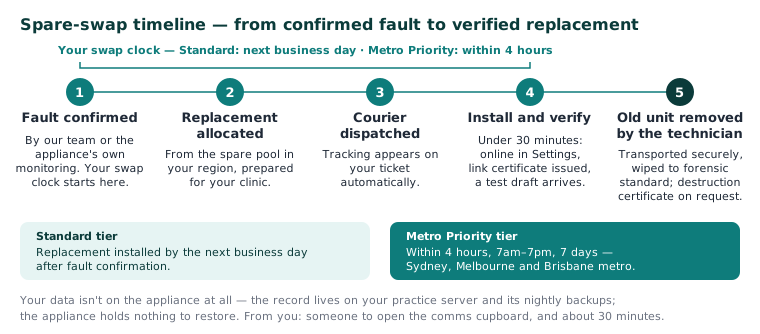
- Fault confirmed. Our team (or the appliance's own monitoring) confirms it's genuinely hardware. Your swap clock starts here — not when the courier feels like it.
- Replacement allocated from the spare pool in your region and prepared for your clinic.
- Courier dispatched. Tracking appears on your ticket automatically.
- Technician installs and verifies. The changeover typically takes under 30 minutes. Verification means: the appliance shows as online under Settings → AI Appliance, its link to your server is secured with a certificate of its own (and the old unit's certificate is revoked), and a scribe draft arrives on a test consult.
- The old unit leaves with the technician — see "Your data", below.
Timing: Standard tier — replacement installed by the next business day after fault confirmation. Metro Priority tier — within 4 hours, 7am–7pm, 7 days (Sydney, Melbourne and Brisbane metro). Your tier shows on your portal under Your plan.
Your data
This is the part practices worry about, so plainly:
- The appliance holds no patient record. Your clinical data lives on your practice server, in its database and object store, and is backed up there — nightly on a schedule or on demand, with each dump checksummed and kept by a separate backup custodian the server cannot delete from (KB-067 — Set up nightly backups, a second copy and a monthly restore drill). The appliance is the box that does the scribe's listening and drafting; it pulls audio for a consult, returns the transcript and draft to your server, and keeps nothing to restore. Nothing is stranded on the broken unit, and there is nothing to restore onto the new one.
- The old appliance is transported securely, wiped to forensic standard, and a data destruction certificate is issued — ask on your ticket if you'd like a copy for your own records. Units that can't be wiped (for example, a dead drive) are physically destroyed, with the same certificate.
What we need from you
- Someone who can let the technician into the comms cupboard.
- About 30 minutes of tolerance. Only the AI scribe is affected: consultations continue as normal with notes typed, and the technician will time the changeover around your bookings where possible.
Questions about a swap in progress? Everything lives on your ticket at support.curaeon.com.au, including live courier tracking. Urgent? Call 1300 XXX XXX.
Related articles
- KB-010 — Appliance status lights and what they mean — Appliance status lights and what they mean
- KB-011 — Appliance appears offline — five checks before you call — Appliance appears offline — five checks before you call
- KB-057 — Check appliance health and link security in Settings → AI Appliance, and revoke a certificate — Check appliance health and link security in Settings → AI Appliance, and revoke a certificate