Draft. This article is awaiting technical review and may change — if anything here conflicts with advice from our team, follow the team.
Preparing your comms cupboard — appliance environment guide
The appliance is a serious computer doing serious work — a good home for it prevents the two failure causes we see most: heat and power. Ten minutes with this checklist saves outages later.
The checklist
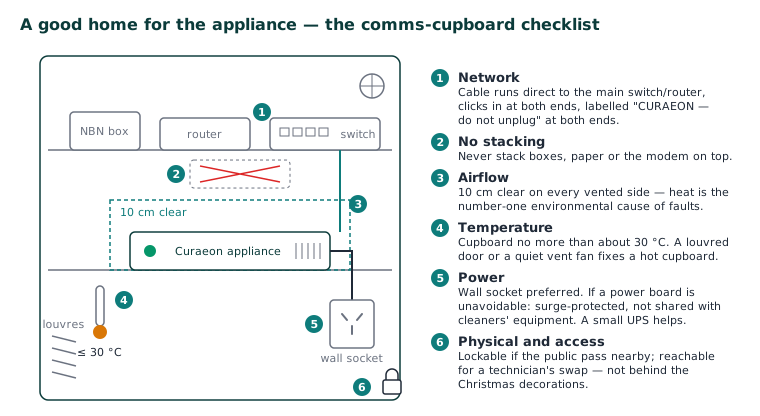
- Airflow: 10 cm clear on every vented side; never stack boxes, paper or the modem on top. Heat is the number-one environmental cause of faults we see (KB-010 — Appliance status lights and what they mean — pulsing red is the overheating warning).
- Temperature: the cupboard shouldn't exceed about 30 °C. A closed cupboard with a router, switch, NBN box and appliance all radiating heat often does — a louvred door or a quiet vent fan fixes it cheaply.
- Power: wall socket preferred. If a power board is unavoidable, use a surge-protected one and don't share it with cleaners' equipment sockets — vacuum-cleaner power events corrupt more than you'd think. A small UPS (uninterruptible power supply) is a worthwhile upgrade for practices with flaky power; the appliance rides out blips and shuts down gracefully in longer outages.
- Network: the appliance's cable should run directly to your main switch/router, seated with a click at both ends, and ideally labelled at both ends too ("CURAEON — do not unplug").
- Physical: lockable cupboard if patients or the public pass nearby; the appliance holds your clinical data and deserves the same physical care as your paper records did.
- Access: our technicians need to reach it for a swap (KB-012 — What happens during an appliance spare-swap) — "behind the Christmas decorations, above the water heater" is a real example we'd rather not repeat.
Moving the appliance?
Relocating within the practice, or moving premises: raise the Appliance planned relocation request in the portal first. Appliances that get unplugged and moved casually tend to reappear on our monitoring with network problems — a scheduled 30-minute visit avoids the surprise.
Related articles
- KB-010 — Appliance status lights and what they mean — Appliance status lights and what they mean
- KB-011 — Appliance appears offline — five checks before you call — Appliance appears offline — five checks before you call