Pathology results not filing — what to check
"Missing" results are usually unmatched, not missing — they've arrived but haven't attached to the right patient or doctor. Three checks find nearly all of them.
1. Check the Lab feed's "Needs a patient" lane
Results → Lab feed → Needs a patient. A result lands here instead of filing when the lab's copy of the patient's details doesn't line up with yours — a maiden name, a middle name the lab has as a first name, a transposed date of birth. Matching is deliberately cautious: filing to the wrong patient is worse than waiting. The pane on the right shows exactly what the lab said the patient was; Assign to a patient files it, and it's worth tidying whichever record was wrong so the next result files itself. The neighbouring lanes catch the other cases: Disagrees (a match, but the details conflict), Demographics (the lab knew more than you do) and Unreadable (a message the server could not parse).
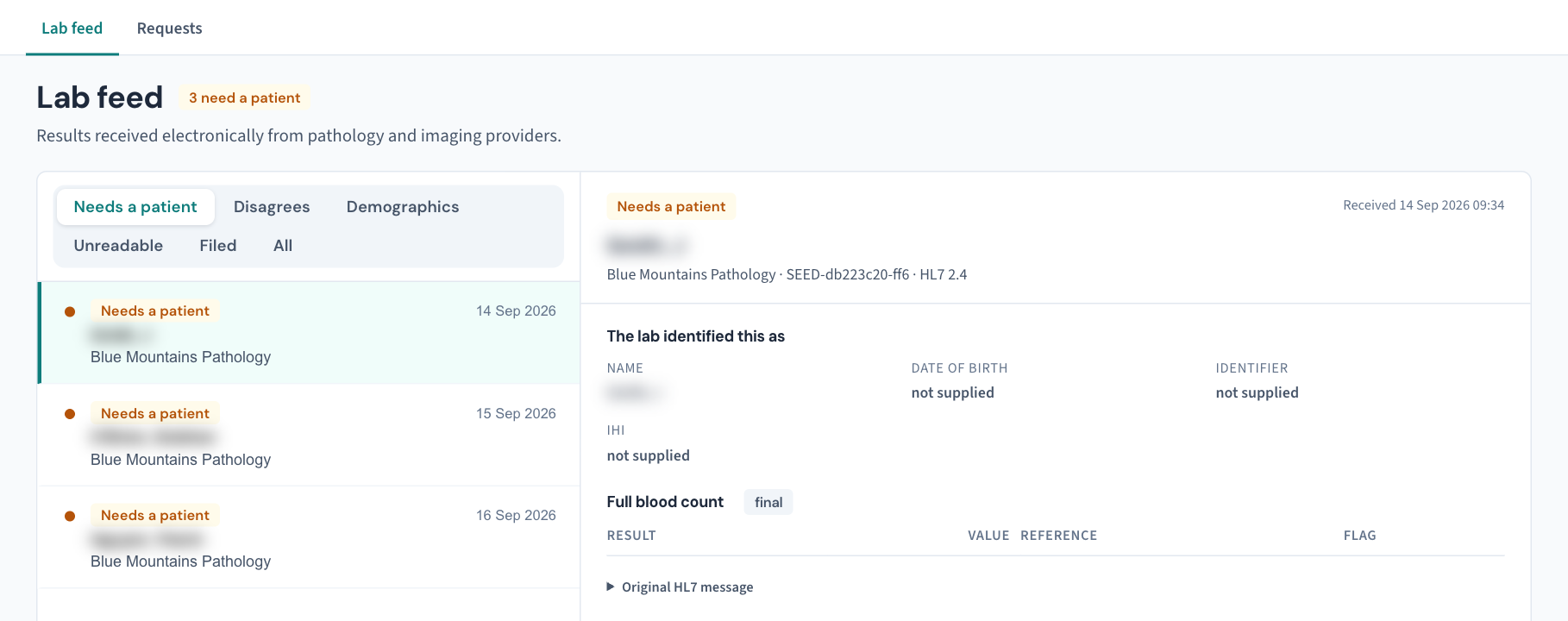
If that lane is a surprise to you, make it part of the daily results routine — it's the single most common home of a "missing" result.
2. Check the addressing
Results file to the requesting doctor named on the request form. The usual suspects:
- A registrar or locum whose provider number isn't yet recorded here — their results may be arriving under a supervisor's name or going unmatched.
- Requests made on another practice's stationery (or an old provider number) — the lab sends the result to where the form says, not to where the doctor is today.
Check that everyone currently consulting, including part-timers and locums, has their provider number recorded under Settings → Users. Once a result is filed, the Inbox has two different filters — Practitioner (patients whose usual GP you are) and Assigned to (items routed to you) — and a result that "isn't in my inbox" is often sitting under the other one (KB-046 — Work the results Inbox: Practitioner vs Assigned to, routing, COPY and corrected results, Follow-up).
3. Check the feed itself
If nobody in the practice has received anything from a particular lab today:
- There is no public status page for your results feed. Results arrive on your own practice server, so its health is visible on site, not on a website: the version banner at the top of every screen (KB-037 — Screens blank or behaving oddly after an update: the version-mismatch banner) and Settings → AI Appliance (KB-082 — What to have ready before you contact support). Curaeon's own status page at status.curaeon.com.au covers Curaeon's hosted services and national services such as Medicare and eRx — not your server or your lab feed.
- The All lane of the Lab feed lists every electronic message received, so you can see when the last one from that lab came in — a lab that was flowing this morning and stopped is a different question from one that has never appeared.
- One lab silent but others flowing usually means the issue is at the lab's end — raise a ticket and we'll confirm and chase it with them (you get one ticket; we handle the lab).
The urgent-result rule
For a clinically urgent result you're waiting on right now: phone the laboratory directly — every lab runs a results phone line for exactly this, and no filing question should ever sit between a doctor and an urgent result. Sort the technical side afterwards.
Raise it: support.curaeon.com.au → Raise a ticket, starting the one line with "Pathology". Include the lab name, the approximate collection date, and the requesting doctor — not the patient's name; a specimen or request number from the lab is plenty if you have it.
Related articles
- KB-046 — Work the results Inbox: Practitioner vs Assigned to, routing, COPY and corrected results, Follow-up — Work the results Inbox: Practitioner vs Assigned to, routing, COPY and corrected results, Follow-up
- KB-082 — What to have ready before you contact support — What to have ready before you contact support