Results and incoming letters FAQ
The questions doctors and the desk ask most about results and electronic letters, answered in place — what each screen is for, what the flags mean, and which situations are a call to support.
A result is in the Lab feed but not on the patient. Why?
It could not be matched confidently. Results are matched to the patient by their identifiers, name and date of birth, and the matching is deliberately cautious — filing to the wrong patient is worse than waiting. Open the Lab feed and assign the unmatched message by hand. KB-019 — Pathology results not filing — what to check has the checks to run when a result seems to be missing.
What is the difference between Practitioner and Assigned to?
They answer different questions. Practitioner shows items for patients whose usual GP you are. Assigned to shows items routed to you — the letter addressed to you, whoever the patient usually sees. A locum's referral coming back to the locum is exactly where the two differ (KB-046 — Work the results Inbox: Practitioner vs Assigned to, routing, COPY and corrected results, Follow-up).
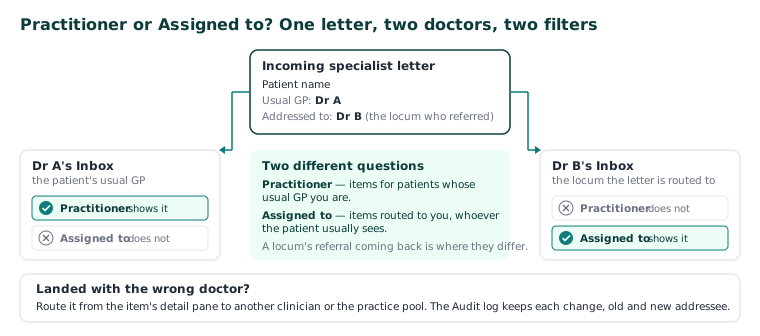
A letter has landed with the wrong doctor. How do I move it?
Open the item's detail pane and route it to another clinician, or back to the practice pool. Any item can be routed until it is actioned, and every routing change is in the Audit log with the previous and the new addressee. A scanned page filed to the wrong doctor is fixed the same way — from the Inbox, not by refiling.
What does COPY on a result mean?
It was addressed to somebody else and copied to this practice. It is for information; the addressee is responsible for actioning it.
A result says it was withdrawn or corrected. Which one do I read?
The corrected one. A correction supersedes the result it corrects, and it comes back to whoever reviewed the original. The withdrawn result is kept and marked because it is what was on file at the time — its still being there is not a fault.
Where do incoming electronic letters go?
Referrals, discharge summaries and specialist letters arriving electronically are filed to the patient record as incoming correspondence and appear in the Inbox for review. Opening the inbox item opens the letter. Paper reaches the same Inbox through the scanning tray (KB-092 — Documents and scanning FAQ).
An incoming letter has nothing to open.
The message could not be stored, but it is kept. Ask your administrator to check that object storage is running.
Important: If results stop arriving entirely, or a result appears on the wrong patient's record, call support rather than working around it.
What is Follow-up for?
It is the safety net: results and correspondence nobody has actioned. A result that arrives, is filed and is never looked at is the commonest serious failure in general practice, and the screen exists to make it visible. Reviewing an item records who read it and when, and a recall can be raised from the review (KB-051 — Run recalls: book from a recall, and why a recall stays open or comes back).
How do I see whether a value is trending — is the HbA1c coming down?
Open the patient's Results tab. The cumulative view shows one row per analyte and one column per collection, so the question is a row read left to right rather than five reports opened one at a time. Superseded reports do not appear — the amended result is the result (KB-077 — Read a patient's results over time — the cumulative view).
The Inbox says it has left some rows out. Why?
The patient's record is restricted and you are not named on it. The Inbox, Follow-up, the Lab feed and Requests leave a restricted record's rows out for anyone it is not open to, and say how many, so a list never looks finished when it is not (KB-061 — Restrict a patient's record, and open one in an emergency).
Still stuck? Raise a ticket at support.curaeon.com.au or call 1300 XXX XXX. If your clinic can't see patients right now, call and choose option 1. Support is staffed Monday to Friday, 8:00–18:00 Sydney time; outside those hours a call or text to the same number is answered on a best-effort basis.
Related articles
- KB-046 — Work the results Inbox: Practitioner vs Assigned to, routing, COPY and corrected results, Follow-up — Work the results Inbox: Practitioner vs Assigned to, routing, COPY and corrected results, Follow-up
- KB-019 — Pathology results not filing — what to check — Pathology results not filing — what to check
- KB-077 — Read a patient's results over time — the cumulative view — Read a patient's results over time — the cumulative view
- KB-107 — Order a test, add copy-to recipients, and chase a result that never came back on the Requests screen — Order a test, add copy-to recipients, and chase a result that never came back on the Requests screen