Raise, correct and claim an invoice, including when "Send to Medicare…" is blocked
Bill a visit, fix an invoice that has already gone out, and read the Send to Medicare… preview — including what it means today, before your Tyro onboarding is complete.
Before you start
Billing is front-desk work. The practice's own fee schedule lives in Settings → Fees, and the items you bill come from the MBS schedule the practice has loaded.
Raise an invoice
- Open Billing → Consults. It lists visits ready to bill, with what was recorded in each.
- Choose Record and add items to the invoice from the MBS schedule. Curaeon does not suggest item numbers — a Medicare claim is a legal assertion by the billing practitioner, and the software does not put words in their mouth (KB-056 — Why the scribe never writes the Assessment or suggests item numbers).
- Under Invoices, issue the invoice, take payment and receipt it.
Two checks run behind the scenes: consult-time and consult-issue flag unbilled visits, items not priced, and a visit billed against the wrong patient or provider. Work those flags rather than hunting for them.
Correct an invoice
An invoice that has been sent cannot be edited. Correcting it voids and reissues: the original stays on the account as voided, and a fresh invoice carries the correction. That keeps the history honest — nobody can later wonder which version the patient was given.
Claim through Tyro Health Online
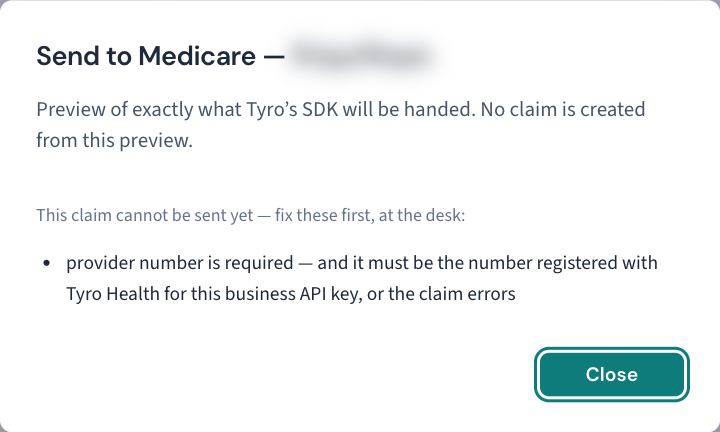
Claiming goes through Tyro Health Online. Medicare Online is not integrated (KB-058 — What Curaeon connects to Services Australia today (AIR, IHI, PBS authorities, Medicare, MyMedicare), and the manual workaround for each). A queued claim on an invoice has a Send to Medicare… button, and what it does depends on where the practice is with Tyro:
- Before Tyro onboarding completes, the button is an honest preview. It shows exactly what will be sent and creates nothing — no claim goes anywhere. Use it to check the claim is complete.
- Once onboarding completes, the same button opens Tyro's own claim form with that detail.
When "Send to Medicare…" is blocked
The preview names, in plain words, the fact that blocks a claim so it can be fixed at the desk. The manual gives two examples:
| The preview says | Fix it here |
|---|---|
| A missing provider number | The practitioner's provider number for this location — an administrator sets it against the practitioner. |
| A missing individual reference number | The patient's Medicare details on their record. |
Fix the missing detail, return to the invoice, and open Send to Medicare… again.
A claim that Medicare rejects after it was sent is a different question, covered in KB-017 — Medicare claim rejections — common causes and fixes.
Good to know: looking at a patient's invoices, or the details a claim is sent with, is recorded on their access history as Billing viewed or Medicare claim details viewed — not as opening their chart. The practice-wide invoice list is not recorded.
If that didn't work
If the preview names a detail that is present on the record, or an issued invoice refuses to void, raise a ticket with the invoice number — never the patient's name or Medicare number.
Still stuck? Raise a ticket at support.curaeon.com.au or call 1300 XXX XXX. If your clinic can't see patients right now, call and choose option 1. Support is staffed Monday to Friday, 8:00–18:00 Sydney time; outside those hours a call or text to the same number is answered on a best-effort basis.
Related articles
- KB-053 — Month-end and end of day: aged debtors, statement runs and bank reconciliation — Month-end and end of day: aged debtors, statement runs and bank reconciliation
- KB-017 — Medicare claim rejections — common causes and fixes — Medicare claim rejections — common causes and fixes
- KB-058 — What Curaeon connects to Services Australia today (AIR, IHI, PBS authorities, Medicare, MyMedicare), and the manual workaround for each — What Curaeon connects to Services Australia today (AIR, IHI, PBS authorities, Medicare, MyMedicare), and the manual workaround for each
- KB-108 — Bank lines that won't match, statement reprints and brought-forward balances: the ledger FAQ — Bank lines that won't match, statement reprints and brought-forward balances: the ledger FAQ
- KB-118 — Set what your practice charges for private and DVA billing in Settings → Fees — Set what your practice charges for private and DVA billing in Settings → Fees