What Curaeon connects to Services Australia today (AIR, IHI, PBS authorities, Medicare, MyMedicare), and the manual workaround for each
A plain statement of which Services Australia programs Curaeon talks to right now — none of them directly — and exactly what your practice does instead for each one.
The short version
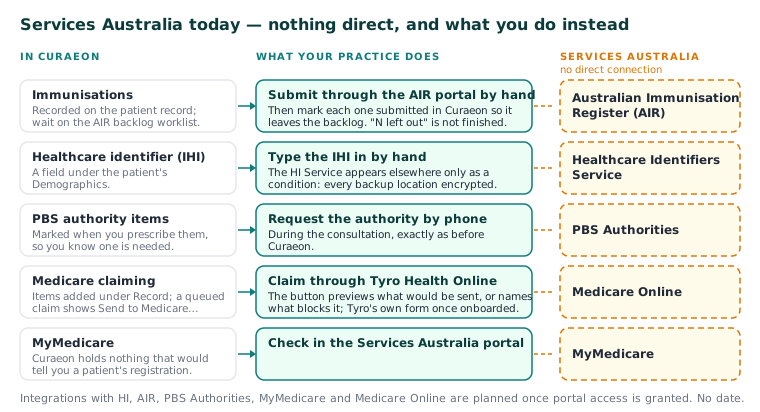
Curaeon does not currently integrate with Services Australia programs. The manual says so in as many words. Here is what each program looks like in the software today:
| Program | Today |
|---|---|
| Immunisations (AIR) | Recorded to a worklist, submitted through the AIR portal by hand |
| Healthcare identifiers (IHI) | IHI entered manually on the patient record |
| PBS authorities | Requested by phone during the consultation |
| Medicare claiming | Through Tyro Health Online |
| MyMedicare | Checked in the Services Australia portal |
Integrations with Healthcare Identifiers, AIR, PBS Authorities, MyMedicare and Medicare Online are planned once portal access is granted. There is no date to give you, and we would rather say that than guess one. Anything not in the table — My Health Record, for example — is not described in the manual as an integration; ask us on a ticket rather than assume.
Immunisations: the AIR backlog routine
Immunisations are recorded on the patient record as usual — vaccine, batch, site, route and who administered them. Vaccine stock and cold-chain records live in Settings.
- Open the AIR backlog worklist. It lists every immunisation awaiting submission to the Australian Immunisation Register.
- Submit each one through the AIR portal yourself.
- Back in Curaeon, record against the immunisation that you have submitted it, so it leaves the backlog.
The backlog leaves out rows for any patient whose record is restricted to named staff, and says how many it left out — so a list marked "N left out" is not finished (KB-061 — Restrict a patient's record, and open one in an emergency). A patient's Immunisations tab also shows what is still awaiting submission.
Healthcare identifiers (IHI)
Curaeon does not connect to the Healthcare Identifiers Service. The IHI is a field under the patient's Demographics, typed in by hand. Where the manual mentions the HI Service otherwise, it is as a condition to meet — every place a backup is kept must be encrypted (KB-067 — Set up nightly backups, a second copy and a monthly restore drill) — not as something the software talks to.
PBS authorities
Authority items are marked when you prescribe them, so you know one is needed. The authority itself is requested by phone during the consultation, exactly as before Curaeon.
Medicare claiming
Claiming goes through Tyro Health Online, not Medicare Online. A queued claim on an invoice has a Send to Medicare… button. It shows exactly what will be sent — or names, in plain words, the fact that blocks it (a missing provider number, a missing individual reference number) so the front desk can fix it there. Once your practice's Tyro onboarding completes, the same button opens Tyro's own claim form; until then it is an honest preview that creates nothing.
Items are added to an invoice under Record, from the MBS schedule the practice has loaded. Curaeon does not suggest item numbers: a claim is the billing practitioner's legal assertion.
MyMedicare
A patient's MyMedicare registration is checked in the Services Australia portal. Curaeon holds nothing that would tell you.
Related articles
- KB-017 — Medicare claim rejections — common causes and fixes — Medicare claim rejections — common causes and fixes
- KB-020 — NASH certificates — why they matter and how renewal works — NASH certificates — why they matter and how renewal works
- KB-061 — Restrict a patient's record, and open one in an emergency — Restrict a patient's record, and open one in an emergency
Still stuck? Raise a ticket at support.curaeon.com.au or call 1300 XXX XXX. If your clinic can't see patients right now, call and choose option 1. Support is staffed Monday to Friday, 8:00–18:00 Sydney time; outside those hours a call or text to the same number is answered on a best-effort basis. - KB-129 — Read Settings → HI Service: the connection, the NASH certificate, and what the HI Service returned and disclosed — Read Settings → HI Service: the connection, the NASH certificate, and what the HI Service returned and disclosed