Why the scribe never writes the Assessment or suggests item numbers
Two things the scribe will never do, by design — so that nobody raises a ticket for behaviour that is working exactly as built.
The short version
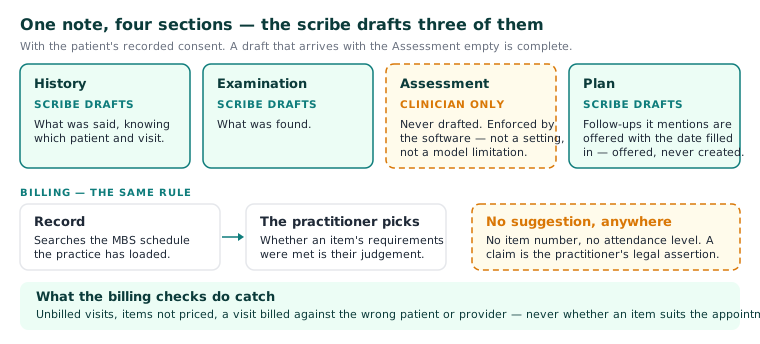
A consult note has four sections: History, Examination, Assessment and Plan. With the patient's recorded consent, the scribe drafts three of them — History, Examination and Plan. It does not draft the Assessment, and nothing anywhere in Curaeon suggests an MBS item number or an attendance level. These are the first two of the manual's "three things to know" about the scribe; the third is that nothing leaves the practice.
"The Assessment is blank — is the scribe broken?"
No. The scribe does not diagnose. It never writes an Assessment, and that boundary is enforced by the software, not by convention. It is not a setting and not a model limitation. The clinician's assessment is the clinician's — the scribe drafts what was said and found, and the judgement about what it means stays with the person who examined the patient.
So a draft that arrives with History, Examination and Plan filled and Assessment empty is complete. Type the Assessment as you would in any other system.
"Why doesn't it suggest an item number?"
Because a Medicare claim is a legal assertion by the billing practitioner, and the software does not put words in their mouth. The scribe does not choose billing items, and neither does the billing screen: Record searches the MBS schedule the practice has loaded and the practitioner picks. Whether an item's requirements were met is the practitioner's judgement, made from what they did — not something to infer from a transcript.
What Curaeon does do on the billing side is catch unambiguous errors. The consult-time and consult-issue checks flag unbilled visits, items not priced, and a visit billed against the wrong patient or provider (KB-052 — Raise, correct and claim an invoice, including when "Send to Medicare…" is blocked). They never judge whether an item suits the appointment.
"Can this be switched on for our practice?"
No, and there is no request to make. Both behaviours are the product working as designed, for every practice, on every build.
What the scribe does instead
- Drafts History, Examination and Plan from the consultation, knowing which patient and which visit it is in.
- Offers follow-ups the Plan mentions, with the date filled in — offered, never created (KB-055 — Dictate into a section, refine a draft, and manage style memory and suggested follow-ups).
- Drafts a letter from the consult into the letter editor for review.
- Leaves every decision — what the assessment is, what to bill, whether to accept a draft at all — with the clinician.
The habit that matters is the same as always: the draft is a draft, reviewed before it enters the record (KB-014 — AI scribe — getting the best transcription quality).
Related articles
- KB-014 — AI scribe — getting the best transcription quality — AI scribe — getting the best transcription quality
- KB-015 — AI scribe consent workflow explained — AI scribe consent workflow explained
- KB-052 — Raise, correct and claim an invoice, including when "Send to Medicare…" is blocked — Raise, correct and claim an invoice, including when "Send to Medicare…" is blocked