Assess a possible data breach: the 30-day NDB and 12-hour Services Australia clocks
Open an assessment from a security alert, keep both legal clocks in view, and record each decision once — so the practice meets its obligations and can show that it did.
Before you start
You need to be an administrator, and an alert on Settings → Security review to start from (KB-064 — Sign off the weekly Security review, and act on alerts and audit-log check warnings). This article is about the practice's own register inside Curaeon. Whether an incident is a breach, and who must be told, is the practice's decision under its own privacy procedure; Curaeon keeps the record and the clocks, and does not decide for you.
The two clocks, as the manual states them
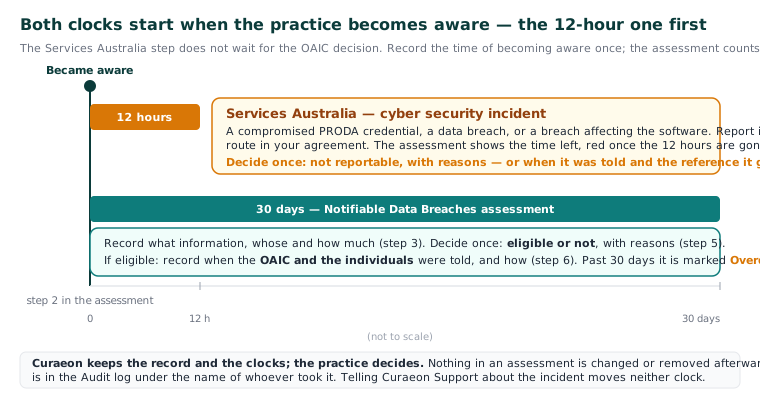
- Notifiable Data Breaches scheme. A suspected eligible data breach must be assessed within 30 days of the practice becoming aware, and if it is eligible the OAIC and the people affected told.
- Services Australia. A cyber security incident — a compromised PRODA credential, a data breach, or a breach affecting the software — is reported to Services Australia no later than 12 hours after becoming aware, by the route in the practice's agreement with Services Australia. Questions about the policy go to ITSA@Servicesaustralia.gov.au.
The 12-hour step does not wait for the OAIC decision. Start there.
Steps
- On the alert, choose Assess as a possible data breach.
- Record when the practice became aware. Both clocks run from this.
- Record what information, whose and how much. The assessment is due 30 days after the date you gave.
- Deal with the Services Australia clock first. The assessment shows the time left, turning red once the 12 hours have run out, until you decide it is not reportable or record the report. Decide once, with the reasons. For a reportable incident, record when Services Australia was told and the reference it gave — once.
- Decide the NDB question: eligible or not, with the reasons. This too is decided once.
- For an eligible breach, record when the OAIC and the individuals were told, and how — once.
What Curaeon does with it
- Nothing in an assessment is changed or removed afterwards. That is the point of it.
- One past its 30 days is marked Overdue.
- Each step is in the Audit log under the name of whoever took it; the scope and reasons stay in the register.
- Export CSV on the Audit log, and Print access report for an affected patient (KB-063 — Answer "who has seen my record?": print a patient access report), are the evidence the manual names for a breach review.
Tell us as well
If the incident touches Curaeon — the server, the appliance, an account, a message that went to the wrong place — raise a ticket and say it is a possible data breach. Give times and what you observed, and no patient details (KB-007 — Why we never need patient details in a support ticket). Our team escalates it on their side (KB-029 (internal)) and will contact you directly. Our involvement does not move either of your clocks.
Good to know
Emergency access to a restricted record raises an alert on its own (KB-061 — Restrict a patient's record, and open one in an emergency); assess it only if the reason given does not stand up. A patient asking who has seen their record is not a breach by itself (KB-063 — Answer "who has seen my record?": print a patient access report).
Still stuck? Raise a ticket at support.curaeon.com.au or call 1300 XXX XXX. If your clinic can't see patients right now, call and choose option 1. Support is staffed Monday to Friday, 8:00–18:00 Sydney time; outside those hours a call or text to the same number is answered on a best-effort basis.
Related articles
- KB-064 — Sign off the weekly Security review, and act on alerts and audit-log check warnings — Sign off the weekly Security review, and act on alerts and audit-log check warnings
- KB-029 (internal) — Security escalation — when and how
- KB-007 — Why we never need patient details in a support ticket — Why we never need patient details in a support ticket