Answer "who has seen my record?": print a patient access report
Produce, on your letterhead, the list of who opened a patient's record, why, and what left the practice about them — without adding yourself to the answer.
Before you start
Only administrators can read the Audit log, so this is an administrator's task, and your own reading of the log is recorded too. Nothing here needs a ticket: the practice answers this request itself, from its own server.
Steps
- Open Settings → Audit log.
- Under Patient, search for the patient — by name, date of birth or Medicare number. The search finds former patients and patients who have died, marked as such, since they are the people most likely to ask. Finding a patient this way does not open their record, so answering the question does not add you to the answer.
- Set the date range if the patient asked about a period. The dates are the practice's days.
- Choose Print access report.
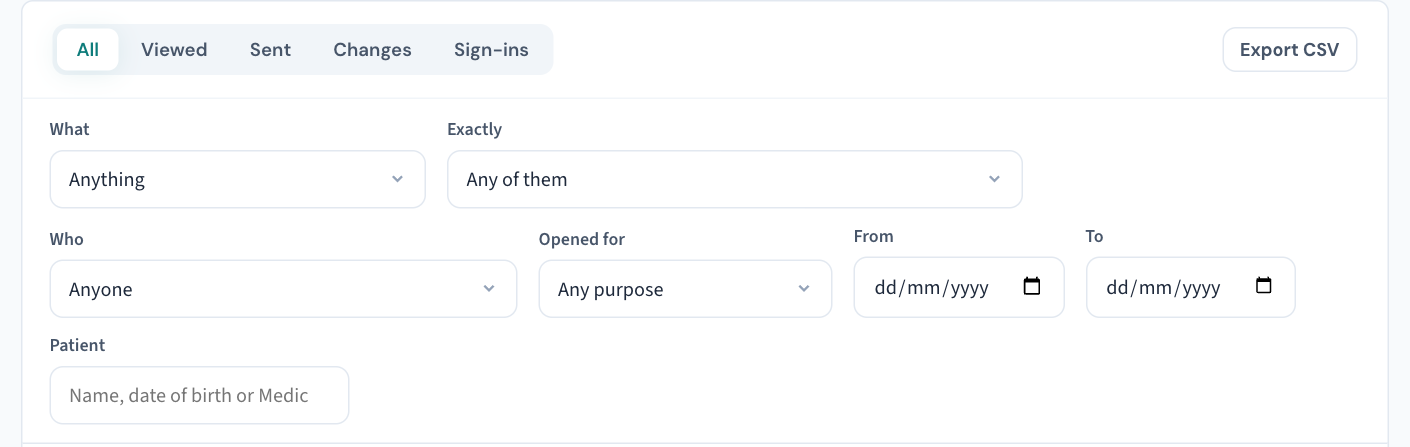
If you are already looking at a row about the patient, Only this patient on that row does the same narrowing. Administrators can also reach the history from Access history on the chart.
What the report contains
On the letterhead:
- who opened the record and how often, with the Purpose each gave (KB-062 — Why Curaeon asks your reason for opening a record);
- the documents and prescriptions sent out of the practice and to whom — each saying, where known, that the receiving system confirmed it arrived, or that it did not arrive and why;
- then every change and every opening. Each change says what it did — which detail changed, from what to what, or the reason given for an emergency access (KB-061 — Restrict a patient's record, and open one in an emergency).
It also includes a page printed that listed the patient among others (a day sheet, a statement run, a letter run), a relationship added or ended from another patient's chart, and the records merged into theirs. An API key is listed as an API key, not by the role it borrows.
What it does not list, and why
- Copies taken of many patients at once — a practice-wide export or report, a backup, a list read by an integration. Those are recorded against the practice, and the Audit log shows them.
- Anything before recording began. Where the report reaches back before the practice began recording in Curaeon, or before openings were recorded, it says from what date — so an empty section is not read as nobody having looked.
- A month removed from the audit log past the practice's retention period (KB-066 — Keep, hold or destroy patient records past retention).
If you need the raw rows instead
Export CSV downloads every event the filters match, readable without Curaeon — for a patient's request, a regulator or a breach review. The export is recorded in the log with its filters and row count; an export cut short is not saved.
Good to know
- The report still works for a record destroyed at the end of its retention period: it says when the record was destroyed, by whom, and that what follows is the log, not the record.
- Filters stay in the address, so a filtered view can be bookmarked or sent to a colleague.
- How the report reaches the patient is your practice's privacy procedure, not a software step — and never a support ticket (KB-007 — Why we never need patient details in a support ticket).
Related articles
- KB-062 — Why Curaeon asks your reason for opening a record — Why Curaeon asks your reason for opening a record
- KB-066 — Keep, hold or destroy patient records past retention — Keep, hold or destroy patient records past retention
- KB-007 — Why we never need patient details in a support ticket — Why we never need patient details in a support ticket
- KB-101 — Find who did what in the Audit log: kinds, Sign-ins, Exactly, Who and a bookmarkable view — Find who did what in the Audit log: kinds, Sign-ins, Exactly, Who and a bookmarkable view
- KB-099 — Print a staff member's activity report for an investigation or a handover — Print a staff member's activity report for an investigation or a handover