Sign off the weekly Security review, and act on alerts and audit-log check warnings
Ten minutes each Monday that gives your practice accreditation evidence, and a clear list of which warnings on the audit-log strip mean "contact support".
Before you start
You need to be an administrator. Settings → Security review is ready every Monday with the week before (and each whole week missed while the server was off, up to a year back). Nothing in it accuses anyone — an after-hours open may be the on-call doctor. It puts the log in front of someone who knows the practice.
Sign off the week
- Open Settings → Security review.
- Read each section — failed sign-ins and lockouts; sign-ins from a new address or outside hours; exports and backup downloads; documents sent out of the practice; records opened after hours or with no purpose given (KB-062 — Why Curaeon asks your reason for opening a record); one patient's trail looked up in the audit log; emergency access and refusals (KB-061 — Restrict a patient's record, and open one in an emergency); records of possible relatives; a hundred or more patients opened in a day; permission changes; rare changes such as a record destroyed or a legal hold released; and nightly audit-log checks that failed or did not run.
- A name or patient opens the Audit log on that week only, if you need to look further.
- Sign it off with a note of anything you followed up. A week with something in it asks for that note before it will sign — a signature with nothing beside it records only that somebody clicked, and it is what an accreditor is shown. A quiet week signs off with nothing to say.
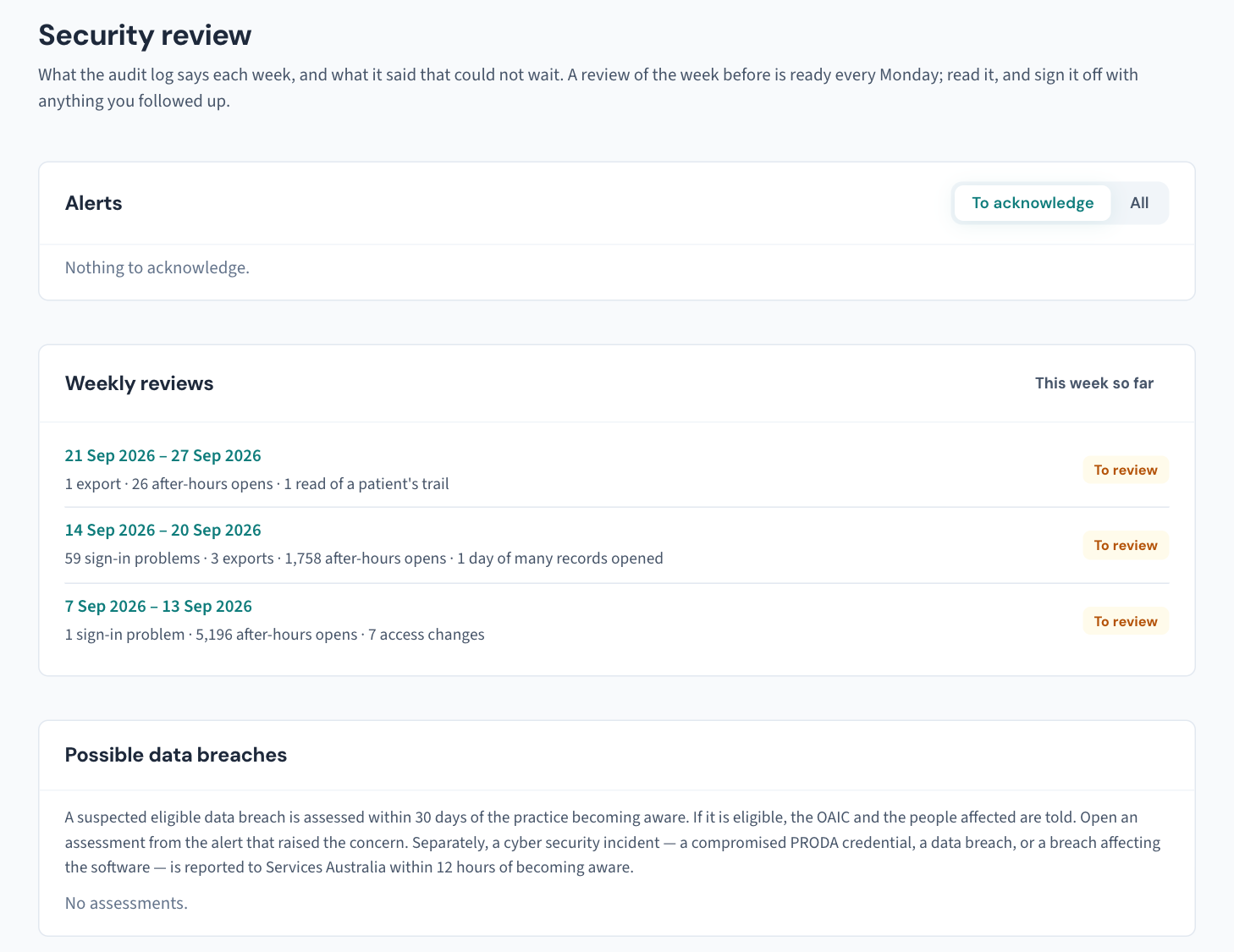
If you appear in the week yourself, you may still sign it — with one administrator there is nobody else — and the page and the audit log both say so. Print gives a kept week on the letterhead; Show older weeks reaches back as far as the log goes.
Act on an alert
Alerts come at once, not on Monday: a burst of lockouts, an export by someone who is not an administrator, emergency access to a restricted record, or an audit log that no longer verifies or could not be checked. While one is unacknowledged, every administrator's sidebar carries Security alerts with the number on it; Curaeon sends nobody a message.
- Open the alert and find out what happened.
- Acknowledge it with what you found.
- If personal information may have gone where it should not, start an assessment from the alert (KB-065 — Assess a possible data breach: the 30-day NDB and 12-hour Services Australia clocks).
Your dashboard shows the last seven days as tiles; any alert or review waiting comes first.
The strip on the Audit log
The strip at the top of Settings → Audit log says when the chain was last checked (nightly at 02:30) and whether it holds, with the last record sealed and the start of its fingerprint. Write those two down on the weekly sign-off — an anchor nobody with access to the server can change. Check now runs the check at once.

| The strip says | What to do |
|---|---|
| The chain does not hold, naming the record | Someone changed the database directly. Keep the backups as they are and contact support. It stays on the strip until its alert is acknowledged with what was found. |
| A backup was restored, and at which record | Expected after a restore. Acknowledge the alert with who restored it and why. If nobody restored a backup, contact support. |
| A copied file is missing, unreadable or does not check out | The records are fine; the copy outside the database is not. See to the backup folder (KB-067 — Set up nightly backups, a second copy and a monthly restore drill). |
| The nightly check is not running | More than 26 hours since the last check. Press Check now; the nightly check retries every quarter hour. |
| The server runs as the login that owns the tables | An older installation or a test server. Tell whoever runs the server. |
Related articles
- KB-065 — Assess a possible data breach: the 30-day NDB and 12-hour Services Australia clocks — Assess a possible data breach: the 30-day NDB and 12-hour Services Australia clocks
- KB-061 — Restrict a patient's record, and open one in an emergency — Restrict a patient's record, and open one in an emergency
- KB-063 — Answer "who has seen my record?": print a patient access report — Answer "who has seen my record?": print a patient access report
- KB-100 — Keep the audit log for accreditation: the yearly archive, the copies beside the backups, and removing months past the period — Keep the audit log for accreditation: the yearly archive, the copies beside the backups, and removing months past the period
- KB-101 — Find who did what in the Audit log: kinds, Sign-ins, Exactly, Who and a bookmarkable view — Find who did what in the Audit log: kinds, Sign-ins, Exactly, Who and a bookmarkable view
Still stuck? Raise a ticket at support.curaeon.com.au or call 1300 XXX XXX. If your clinic can't see patients right now, call and choose option 1. Support is staffed Monday to Friday, 8:00–18:00 Sydney time; outside those hours a call or text to the same number is answered on a best-effort basis. - KB-127 — Connect an outside system: create, scope, rotate and revoke API keys and webhooks in Settings → API access — Connect an outside system: create, scope, rotate and revoke API keys and webhooks in Settings → API access