Read Quality measures, registers and preventive care due — and why they are not the PIP QI extract
Use Settings → Quality to see what the practice is and is not recording, turn a percentage into a worklist of patients to fix, and avoid quoting a number that looks official but is not.
Before you start
Quality measures is under Settings (the sidebar says Quality measures; the manual calls it Settings → Quality). It is built from the practice's own records and counts active patients — the page states how it defines them. It is available to clinicians and practice managers; reception does not query patients by diagnosis.
The warning at the top, and why it matters
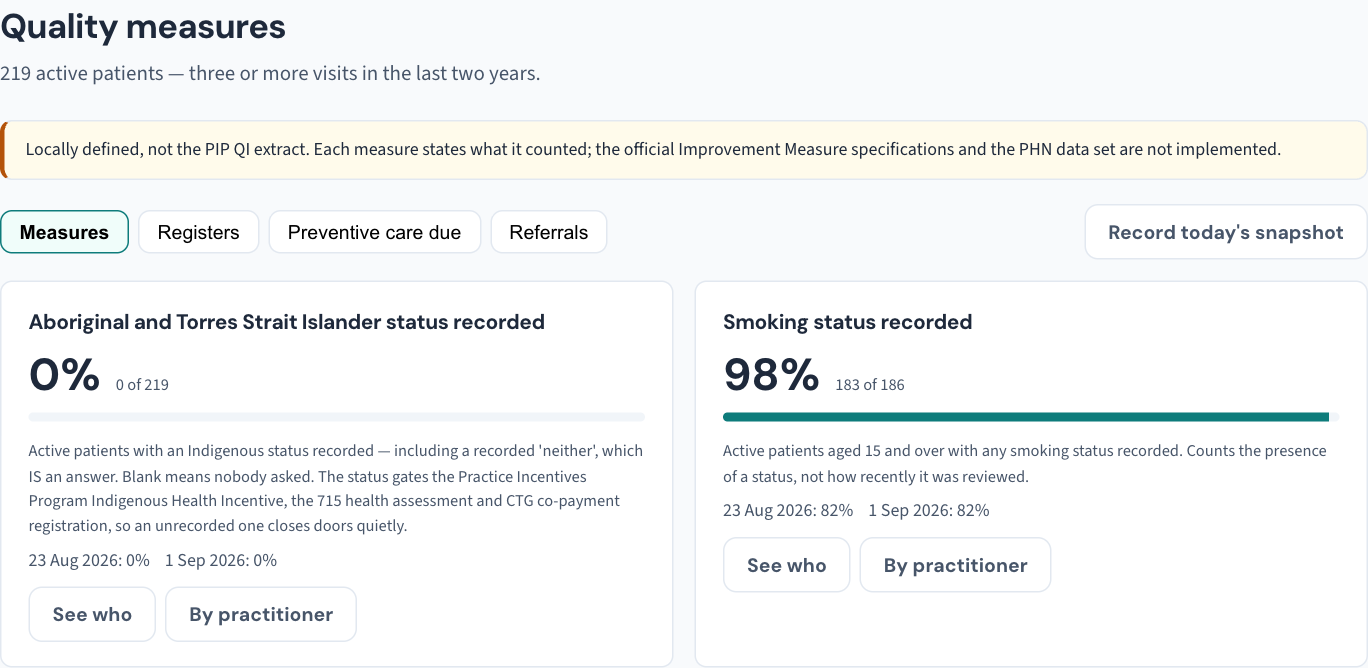
The page says at the top that it is locally defined, not the PIP QI extract. The official Improvement Measures have exact denominators and exclusion rules, and the PHN data set is not implemented here. A number that looks official but is not is worse than no number — so do not put these percentages in a PIP QI submission or describe them as the Improvement Measures. Use them for what they are: a mirror of the practice's own recording.
Read a measure
- Open Settings → Quality measures. The Measures tab shows one tile per measure — smoking status recorded, weight and height recorded, HbA1c recorded for patients with diabetes, and so on.
- Read the percentage and the sentence under it. Each measure states exactly what it counted and what it left out. Two measures with similar names can count different populations.
- Read the dated figures beneath. Each measure shows what it was on earlier dates, so a change in recording shows as a trend rather than one number.
- Choose See who to turn the measure into a list of the patients it counts against — the ones with the gap — and By practitioner to see where the recording is and is not happening.
The other tabs
- Registers — the practice's registers of patients by condition.
- Preventive care due — the due lists: patients whose screening or preventive item is due.
- Referrals — overdue referrals.
Each is a list of patients, and each is recorded in the Audit log as a report that lists patients — opening one does not open any chart.
Record today's snapshot keeps today's figures as a dated point, so a quality-improvement cycle has a before and an after to show an accreditor.
What the lists leave out
Every list under Quality leaves a restricted record's rows out for anyone not named on it, and says how many it left out. The counts on each list still include them, because they describe the practice (KB-061 — Restrict a patient's record, and open one in an emergency).
Where the other numbers live
- Reports → Find patients answers a one-off question by combining criteria — current smokers with a BMI over 30, everyone with asthma under one doctor — and exports the list to CSV; confidential diagnoses never match and never appear (KB-080 — Find patients by clinical criteria and export the list).
- Reports → your dashboard shows each role its own work — a doctor's consults, care plan reviews due and their own billing with the practice average as unnamed context. No dashboard compares named practitioners against each other or a target: analytics that rank doctors by revenue are how a practice ends up upcoding, and Curaeon does not do it.
- Reports → Practice reports (practice managers) is the report builder over allow-listed dimensions and measures, with saved reports and CSV export.
- Utilities → Data quality is the front-desk companion: patients missing a Medicare number, date of birth, mobile or a deliverable address (KB-081 — Fix data-quality gaps before they become rejected claims or lost letters).
If a measure looks wrong
A patient counted as lacking something they have usually has it recorded somewhere the measure does not read — a diagnosis in free text rather than coded (KB-081 — Fix data-quality gaps before they become rejected claims or lost letters covers the coding backlog), or an observation on a date outside the measure's window. Read the measure's own sentence first; it says what it reads.
Still stuck? Raise a ticket at support.curaeon.com.au or call 1300 XXX XXX. If your clinic can't see patients right now, call and choose option 1. Support is staffed Monday to Friday, 8:00–18:00 Sydney time; outside those hours a call or text to the same number is answered on a best-effort basis.
Related articles
- KB-080 — Find patients by clinical criteria and export the list — Find patients by clinical criteria and export the list
- KB-081 — Fix data-quality gaps before they become rejected claims or lost letters — Fix data-quality gaps before they become rejected claims or lost letters
- KB-095 — Start here: I'm the practice manager — Start here: I'm the practice manager