Fix data-quality gaps before they become rejected claims or lost letters
Work the Data quality list in Utilities so a missing Medicare number or a broken address is fixed while the patient is at the desk — not discovered as a rejected claim, a reminder that never went, or a letter that came back.
Before you start
Utilities is for admin and reception. Another role can be given it with the utilities.run permission under Settings → Permissions (KB-034 — Choose the right role and permissions for a new staff member). The list covers active patients only.
What the list catches
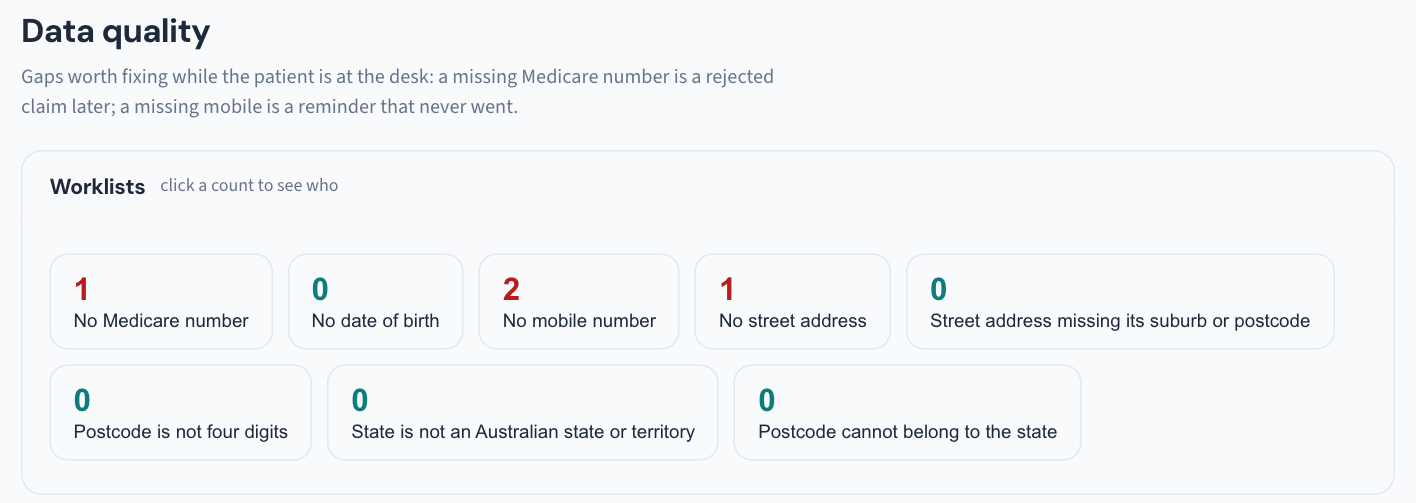
Two kinds of gap, both chosen because of what they cost later:
Missing details — active patients with no Medicare number, date of birth, mobile or street address: a claim that cannot be sent (KB-052 — Raise, correct and claim an invoice, including when "Send to Medicare…" is blocked), a reminder with nowhere to go (KB-060 — Patient emails or SMS reminders not arriving: check Settings → Patient messaging), a letter with no address.
Address checks that need no licensed data — the entries that guarantee a letter will not arrive:
- a street address missing its suburb or postcode;
- a postcode that is not four digits;
- a state that is not one of the eight;
- a postcode that cannot belong to its state.
Steps
- Open Utilities → Data quality.
- Work the list from the top, ideally with the patient in front of you or on the phone — the manual's point is that these are gaps worth fixing while the patient is at the desk.
- For a real gap, open the patient's record and correct the detail. The patient leaves the list.
- For a record that is right as it stands — the overseas visitor with no Medicare card, the cross-border address whose postcode belongs to the neighbouring state — choose confirmed correct. The patient leaves the list without you editing a correct record.
Tip: The confirmation remembers the details it was given for. If any of those details later change, the patient comes back onto the list. So you can confirm freely; you are not hiding the record for good.
- If you confirm by mistake, the toast offers Undo. The withdrawal is kept, not deleted — the Audit log shows both.
Make it routine
A short weekly pass keeps the list near empty. Pair it with Duplicate patients in the same drawer — records that look like one person; nothing merges from there, each pair opens Settings → Merge patients for a person to decide (KB-042 — Find and merge duplicate patient records) — and with Failed reminders, where a missing or wrong mobile is the usual reason (KB-060 — Patient emails or SMS reminders not arriving: check Settings → Patient messaging).
Important: Data quality fixes the cause, not the consequence. A reminder that already failed is retried from Failed reminders; a claim blocked for a missing detail is dealt with on its invoice, where Send to Medicare… names what was missing. The manual does not say that fixing a detail here resends anything on its own.
Where the manual is silent
The manual does not say whether the list checks email addresses (only mobile is named), whether postal address is checked separately from street address, or whether the list can be exported or printed. If any of these matters to your practice, raise a ticket under Clinical software.
Still stuck? Raise a ticket at support.curaeon.com.au or call 1300 XXX XXX. If your clinic can't see patients right now, call and choose option 1. Support is staffed Monday to Friday, 8:00–18:00 Sydney time; outside those hours a call or text to the same number is answered on a best-effort basis.
Related articles
- KB-042 — Find and merge duplicate patient records — Find and merge duplicate patient records
- KB-052 — Raise, correct and claim an invoice, including when "Send to Medicare…" is blocked — Raise, correct and claim an invoice, including when "Send to Medicare…" is blocked
- KB-060 — Patient emails or SMS reminders not arriving: check Settings → Patient messaging — Patient emails or SMS reminders not arriving: check Settings → Patient messaging
- KB-080 — Find patients by clinical criteria and export the list — Find patients by clinical criteria and export the list
- KB-133 — Find your way around Utilities: every section, what it is for and who can open it — Find your way around Utilities: every section, what it is for and who can open it