NASH certificates — why they matter and how renewal works
The five-minute background every practice manager should have. (Ready to renew right now? Skip to the step-by-step: KB-021 — NASH certificate renewal — step-by-step.)
What it is
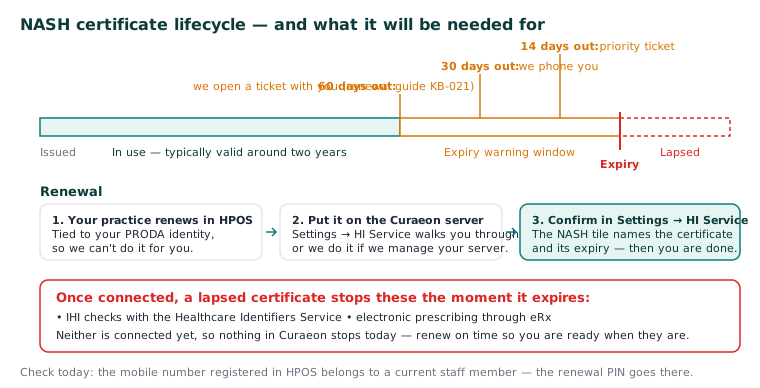
A NASH PKI certificate (National Authentication Service for Health) is your practice's digital identity for Australia's health infrastructure. It's how national systems know that a request genuinely comes from your organisation. Certificates are issued per organisation site and last around two years.
What it does in Curaeon — today, and when connected
Honesty first: today, nothing in your Curaeon stops when a NASH certificate lapses, because the services that would use it are not connected yet. The manual says so, and the Settings → HI Service page says it in as many words: Curaeon does not yet connect to the Healthcare Identifiers Service, and IHIs typed by hand are stored as not checked until it does (KB-058 — What Curaeon connects to Services Australia today (AIR, IHI, PBS authorities, Medicare, MyMedicare), and the manual workaround for each).
When those connections are switched on, the certificate is what they sign in with, and a lapsed one stops them the moment it expires — there is no grace period:
- IHI checks with the HI Service — validating a patient's Healthcare Identifier against the national record.
- Electronic prescribing (eRx) — the eRx Script Exchange signs in with the same NASH certificate.
Those are the two the product names. Secure messaging and My Health Record are not described in the manual as depending on it, so we don't claim that here — ask on a ticket if your practice needs to know.
It's still worth taking seriously now: an expired NASH is one of the very few things that can stop a connected service with no hardware fault and no software bug anywhere — everything looks fine, and nothing goes through. Keeping it current is how you're ready on the day the connection is turned on.
How Curaeon helps you stay ahead of it
What tells you the date is coming, and what does not yet:
- Settings → HI Service shows the certificate on its NASH certificate tile — who it names and the days until it expires. The tile turns red 30 days before expiry.
- We do not yet remind you. Opening a ticket with you 60 days before expiry, and following up at 30 and 14 days, is planned and not built. Until it is, put the expiry date in the practice's own calendar with a reminder 60 days ahead, and follow the renewal walkthrough then (KB-021 — NASH certificate renewal — step-by-step).
- If you want help with a renewal, raise a ticket and say it is for a NASH certificate renewal.
The renewal itself is done by your practice in HPOS (it's tied to your PRODA identity, so we can't do it for you). Installing the new certificate is done on your own practice server, from Settings → HI Service, which walks through it — or by us, if we manage your server. Do not attach the certificate to a ticket: it is a credential, and it never needs to leave the building (KB-021 — NASH certificate renewal — step-by-step).
The one thing to check today
That the mobile number registered in HPOS belongs to a current staff member — the renewal PIN goes there, and a former employee's number is the single most common reason renewals stall.
Questions? Raise a ticket at support.curaeon.com.au.
Related articles
- KB-021 — NASH certificate renewal — step-by-step — NASH certificate renewal — step-by-step
- KB-018 — eRx not reaching the pharmacy — checklist — eRx not reaching the pharmacy — checklist
- KB-058 — What Curaeon connects to Services Australia today (AIR, IHI, PBS authorities, Medicare, MyMedicare), and the manual workaround for each — What Curaeon connects to Services Australia today (AIR, IHI, PBS authorities, Medicare, MyMedicare), and the manual workaround for each
- KB-129 — Read Settings → HI Service: the connection, the NASH certificate, and what the HI Service returned and disclosed — Read Settings → HI Service: the connection, the NASH certificate, and what the HI Service returned and disclosed