Dictate into a section, refine a draft, and manage style memory and suggested follow-ups
Get more from the scribe than a first draft: speak a paragraph straight into a section, re-draft one section without disturbing the rest, tell it how you like your drafts written, and turn a Plan into follow-ups and a letter.
Before you start
Everything here runs on the appliance in your practice, so the same rule as scribing applies: audio and text are processed on your LAN and nothing is sent to a cloud service. For the basics — consent, microphone placement, reviewing a draft — see KB-015 — AI scribe consent workflow explained and KB-014 — AI scribe — getting the best transcription quality.
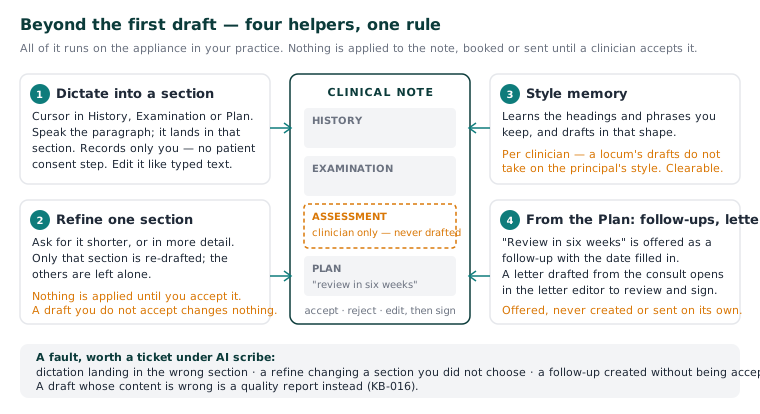
Dictate into a section
Where the scribe listens to a whole consultation, dictation takes what you say and puts it in the section you are working in — for the times you would rather speak a paragraph than type it.
- Put the cursor in the section (History, Examination or Plan).
- Start dictation and speak the paragraph.
- Read it, edit it like anything you typed, and carry on.
Refine one section
Refine a section re-drafts one section rather than the whole note.
- Choose the section you want changed.
- Ask for it shorter, or in more detail. The other sections are left alone.
- Read the result. Nothing is applied until you accept it — what you accept is what is in the note, and a draft you do not accept changes nothing.
The drafter knows which consult it is in — the patient, their age and sex, and what has already been recorded in this visit — which is why a draft reads like it is about this patient. It never writes the Assessment (KB-056 — Why the scribe never writes the Assessment or suggests item numbers).
Style memory
Style memory is a short note you write to the scribe about how you like your drafts: phrasing and layout, not content. For example: "Bullet points in the plan. No abbreviations. Spell out left and right." The scribe follows it in every draft it writes for you. It does not learn from your notes by itself; it knows only what you type here.
- Open Preferences in the sidebar, then Scribe style.
- Type your preferences, up to 1,000 characters.
- Choose Save style. It applies from your next recording.
Three things to know:
- It is per clinician and saved to your account, so it follows you to any computer. A locum's drafts do not take on the practice principal's style.
- To clear it, empty the box and choose Save style.
- It changes how a draft is worded, never what the scribe may write. The scribe still never drafts the Assessment (KB-056 — Why the scribe never writes the Assessment or suggests item numbers).
The whole Preferences screen is in KB-131 — Set up Preferences: your start screen, calendar view, colours, notifications and privacy.
Follow-ups the Plan mentions
If the drafted Plan says to review in six weeks, that is offered as a follow-up to create, with the date filled in. It is offered, never created: the note is a record, and making a commitment on the practice's behalf is a decision, not a transcription. Accept the offer and the follow-up exists; ignore it and nothing is booked or recalled.
A letter from the consult
A letter can be drafted from what the consult already contains. It opens in the letter editor for review like any other letter — a draft to edit and sign, not correspondence that leaves on its own. From there it is an ordinary letter (KB-049 — Build and import letter templates: Word upload, merge fields, pronoun fields, snippets).
If that didn't work
Dictation landing in the wrong section, a refine changing a section you did not choose, or a follow-up created without being accepted would each be a fault — raise it under AI scribe with the room and approximate time. A draft whose content is wrong is a quality report: KB-016 — Reporting an AI scribe quality concern.
Still stuck? Raise a ticket at support.curaeon.com.au or call 1300 XXX XXX. If your clinic can't see patients right now, call and choose option 1. Support is staffed Monday to Friday, 8:00–18:00 Sydney time; outside those hours a call or text to the same number is answered on a best-effort basis.
Related articles
- KB-014 — AI scribe — getting the best transcription quality — AI scribe — getting the best transcription quality
- KB-056 — Why the scribe never writes the Assessment or suggests item numbers — Why the scribe never writes the Assessment or suggests item numbers
- KB-049 — Build and import letter templates: Word upload, merge fields, pronoun fields, snippets — Build and import letter templates: Word upload, merge fields, pronoun fields, snippets
- KB-131 — Set up Preferences: your start screen, calendar view, colours, notifications and privacy — Set up Preferences: your start screen, calendar view, colours, notifications and privacy