AI scribe consent workflow explained
How consent works, what patients are actually agreeing to, and answers to the questions patients really ask at the desk.
The workflow, as your patients experience it
- At the start of a scribe-assisted visit, the doctor tells the patient the practice uses an AI scribe and asks for their consent. One sentence is enough — a suggested script is below.
- The system records the answer against that visit — each time it is given, with how it was asked and the consent wording — and the Audit log keeps it. This is what the consent card in the scribe pane is for; clicking past it without asking isn't a shortcut, it's a false record.
- Consent is asked each visit, not assumed from last time. The consult header says where it stands — Scribe consent not asked, granted or declined — and there is no scribe option until it is recorded.
- Declining is one click — the scribe simply doesn't run for that patient, and the consult proceeds exactly as it would have three years ago. No flag, no fuss. A patient can also change their mind mid-consult ("actually, I'd rather not"): Withdraw consent in the consult stops the recording and deletes the audio, the transcript and every AI draft for that visit at once. Anything already accepted into the note stays, and the rest of the visit is documented by hand.
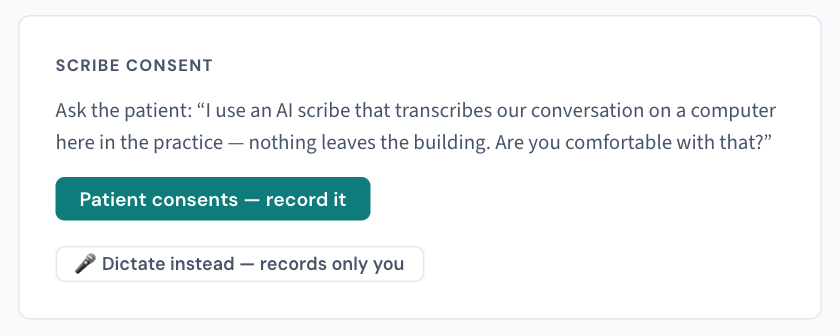
A wording that works
"We use a digital scribe that listens during the consult and drafts my notes, so I can pay attention to you instead of the keyboard. I review everything before it goes in your record, and the audio never leaves this building. Comfortable with that?"
Every clause in that sentence is true, which is why it works.
What patients (and staff) most often ask
"Is it recording me? Where does it go?" The audio is processed on the appliance inside your practice — this is the point of Curaeon's design. It is held in your practice's own storage on your own network, it is not sent to any cloud service, and it is not used to train anyone else's models. If consent is withdrawn it is deleted immediately; otherwise it is destroyed with the rest of the record at the end of its retention period (KB-066 — Keep, hold or destroy patient records past retention). How long it is kept between those two points is a practice setting — check with support if a patient asks for the number.
"Will a computer be writing my medical record?" No — it drafts, the doctor reviews and decides. Nothing is applied to the note until the clinician accepts it, and the scribe never writes the Assessment (KB-014 — AI scribe — getting the best transcription quality, KB-056 — Why the scribe never writes the Assessment or suggests item numbers).
"What if I say no?" Nothing changes about the care. Truly nothing — worth saying to patients exactly that plainly.
"Does my consent expire?" It's asked fresh at each visit, so the answer is always current — and saying no this time changes nothing about last time's notes.
If the consent prompt isn't appearing
The card not showing when it should, or the scribe starting without it, is a fault — raise a ticket with the approximate time and the consult room, starting the one-line summary with "Scribe consent". Given what the prompt protects, we triage these seriously. (Being asked at every visit is not a fault — that is the design. Nor is a missing scribe option when consent hasn't been recorded yet.)

Related articles
- KB-014 — AI scribe — getting the best transcription quality — AI scribe — getting the best transcription quality
- KB-007 — Why we never need patient details in a support ticket — Why we never need patient details in a support ticket