Read a patient's results over time — the cumulative view
Answer "is this coming down?" by reading one row left to right on the patient's Results tab, instead of opening five reports one at a time.
Before you start
The cumulative view is on the patient's record, not in the results Inbox. The Inbox is the review queue for what has just arrived (KB-046 — Work the results Inbox: Practitioner vs Assigned to, routing, COPY and corrected results, Follow-up); the cumulative view is the history. Opening a record may ask you why first, unless you have a consult open with the patient or they are booked in today (KB-062 — Why Curaeon asks your reason for opening a record). The Results tab holds pathology, imaging and other diagnostic reports, with reference ranges and abnormal flags.
Steps
- Open the patient's record.
- Open the Results tab.
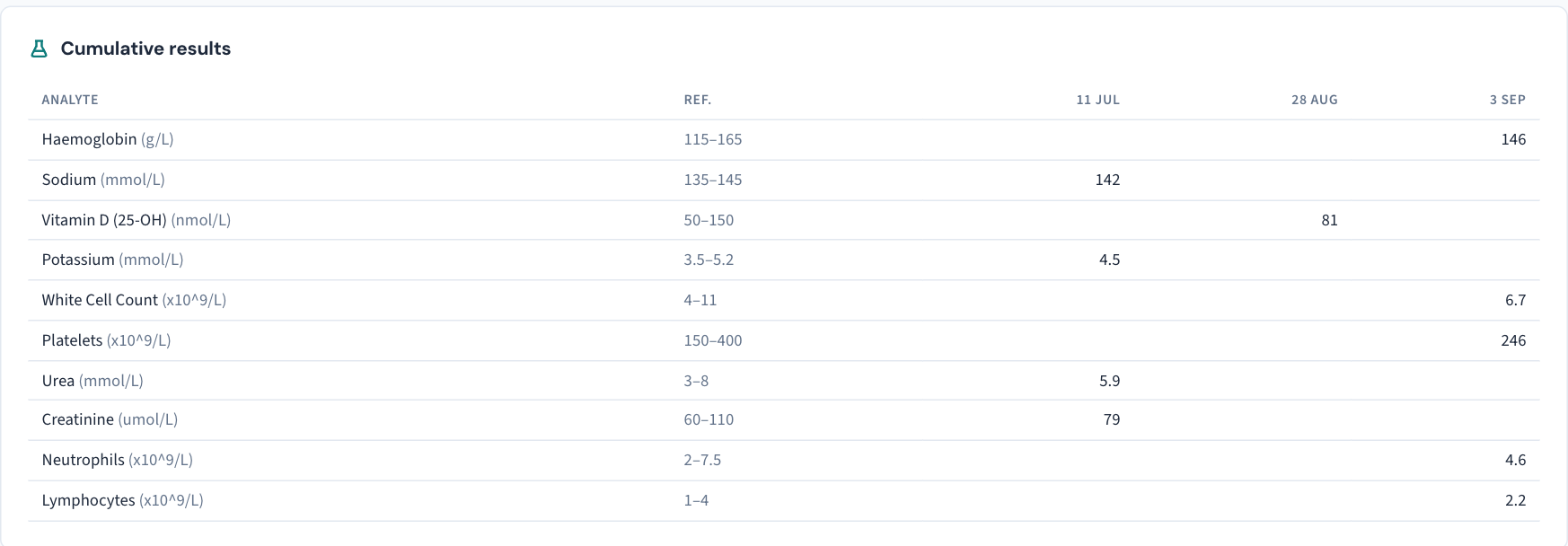
- Switch to the cumulative view. It lays results out as one row per analyte and one column per collection.
- Find the analyte you care about and read its row left to right — that is the trend. The manual's own example: whether the HbA1c is coming down is a row read left to right rather than five reports opened one at a time.
- Look for flags. Abnormal values are flagged in the grid.
- Check the units before comparing. A value reported in a different unit shows its unit beside it, so two collections that look different may be the same value written two ways.
What you will not see, and why
Superseded reports do not appear. When a laboratory issues a correction, the corrected result supersedes the one it corrects. The cumulative view shows only the amended result — the manual's phrase is "the amended result is the result".
The withdrawn result is not gone. It is kept and marked, because it is what was on file at the time, and the correction goes back to whoever reviewed the original (KB-046 — Work the results Inbox: Practitioner vs Assigned to, routing, COPY and corrected results, Follow-up). To see what a decision was made on, look for the withdrawn result on the report, not in the grid.
Important: A result marked COPY was addressed to somebody else and copied to your practice. It appears on the patient's record for information; the addressee is responsible for actioning it.
When a result is missing from the row
A gap in a row usually means one of three things:
- The test was never returned. The Requests screen lists what is outstanding.
- The result could not be matched to the patient. Matching is deliberately cautious; an unmatched message waits in the Lab feed until someone assigns it (KB-019 — Pathology results not filing — what to check).
- The record is restricted. Its results are refused to anyone not named on it (KB-061 — Restrict a patient's record, and open one in an emergency).
Tip: Reviewing a result from the Inbox is what records who read it and when. Reading the cumulative view is a look at the record, not a review — an unreviewed result stays on the Inbox and Follow-up until somebody actions it there.
Where the manual is silent
The manual does not say whether the cumulative view can be filtered by date or analyte, graphed or printed, or how imaging reports sit alongside numeric pathology. If you need any of those, raise a ticket under Clinical software.
Still stuck? Raise a ticket at support.curaeon.com.au or call 1300 XXX XXX. If your clinic can't see patients right now, call and choose option 1. Support is staffed Monday to Friday, 8:00–18:00 Sydney time; outside those hours a call or text to the same number is answered on a best-effort basis.
Related articles
- KB-046 — Work the results Inbox: Practitioner vs Assigned to, routing, COPY and corrected results, Follow-up — Work the results Inbox: Practitioner vs Assigned to, routing, COPY and corrected results, Follow-up
- KB-019 — Pathology results not filing — what to check — Pathology results not filing — what to check
- KB-062 — Why Curaeon asks your reason for opening a record — Why Curaeon asks your reason for opening a record
- KB-098 — Read a child's or teenager's growth chart on the Observations tab — Read a child's or teenager's growth chart on the Observations tab