Read a child's or teenager's growth chart on the Observations tab
Find the growth charts Curaeon draws for every patient under 20, open one full size to read each measurement's exact centile, and know why a chart is sometimes not drawn at all.
Before you start
Growth charts live on the patient record, on the Observations tab, and only for patients under 20. They are drawn from the observations already recorded — weight, height or length, head circumference and BMI — so a chart is only as complete as the measurements behind it. Recording an observation is the same as for any patient; nurses and reception can record them, and clinicians too.
Opening a record may ask you why first, unless you have a consult open with the patient or they are booked in today (KB-062 — Why Curaeon asks your reason for opening a record).
Steps
- Open the patient's record and choose the Observations tab. The usual observation trends are at the top.
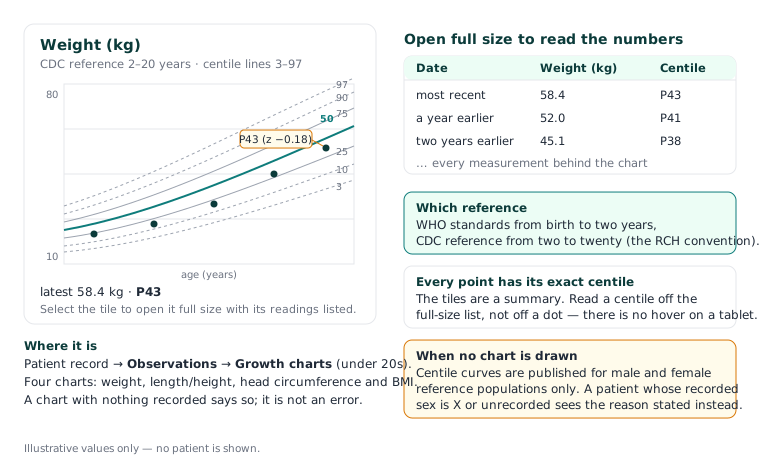
- Scroll to Growth charts. There are four: weight, length/height, head circumference and BMI. Each is a small tile plotting the patient's measurements against centile curves — lines from the 3rd to the 97th centile, with the median (50th) drawn solid.
- Read the tile's caption for the latest value and its centile. The tiles are deliberately small: they are a summary, not something to read a centile off.
- Select a chart to open it full size. The large view lists every measurement behind it as dates, values and centiles, most recent first — so on a tablet at the bedside, where there is no hovering over a point, the numbers are stated in words.
- Compare against the reference the chart names. Curaeon follows the RCH convention: WHO standards from birth to age two, and CDC centiles from two to twenty. A child crossing their second birthday moves from one reference to the other, which is expected.
When a chart is not drawn
The patient's recorded sex is X or unrecorded. Centile curves are published for male and female reference populations only. Rather than plotting the patient against a guessed reference, Curaeon shows the stated reason instead of a chart. That is a deliberate choice, not a fault. If the patient's sex is simply missing from their details, recording it on the record brings the charts back.
No measurements of that kind. A chart with nothing behind it says so. Record the observation and the point appears.
The patient is 20 or over. The Growth charts section is not shown at all; the ordinary observation trends remain.
The record is restricted. A restricted record's clinical pages, the Observations tab among them, are refused to anyone not named on it (KB-061 — Restrict a patient's record, and open one in an emergency).
Good to know
- Each measurement's centile is exact — it is computed for that value at that age, not read off the nearest curve.
- A measurement entered with the wrong date plots at the wrong age. If a point sits far off the child's line, check the date it was taken before you worry about the child.
- Growth charts are for looking at trends over time; they do not raise a recall or a task by themselves. If a trend needs following up, raise a recall from the record (KB-051 — Run recalls: book from a recall, and why a recall stays open or comes back).
Where the manual is silent
The manual does not say whether a growth chart can be printed for a parent, or whether corrected-age charts for premature infants are offered. If you need either, raise a ticket under Clinical software — describe what you need, never the patient.
Still stuck? Raise a ticket at support.curaeon.com.au or call 1300 XXX XXX. If your clinic can't see patients right now, call and choose option 1. Support is staffed Monday to Friday, 8:00–18:00 Sydney time; outside those hours a call or text to the same number is answered on a best-effort basis.
Related articles
- KB-077 — Read a patient's results over time — the cumulative view — Read a patient's results over time — the cumulative view
- KB-062 — Why Curaeon asks your reason for opening a record — Why Curaeon asks your reason for opening a record
- KB-094 — Start here: I'm a GP or nurse — Start here: I'm a GP or nurse