Documents and scanning FAQ
Quick answers for the person with the day's paper in front of them — where the tray is, what the appliance has already done to the page, and how to undo a slip without deleting anything.
Where is the scanning tray, and what does filing do?
Scanning is a section of the Utilities drawer, where the rest of the front desk's tools live; anyone who can file correspondence can open it. Filing a page does three things at once: it lands in the patient's documents, it is dated by the date on the letter, and it appears in the clinical Inbox for a doctor to review (KB-047 — Scan and file paper letters, including the appliance's pre-filled suggestions).
The filing form was already filled in when I opened the page. Who did that?
The practice's AI appliance pre-reads every waiting page — PDFs and images included — and the form arrives with its best reading: the patient, the kind of document, a title and the date on the page. It matches a patient only when the page's Medicare number, or full name and date of birth, match exactly one record, and the row says why it matched. Every field stays editable, and nothing is ever filed by a machine.
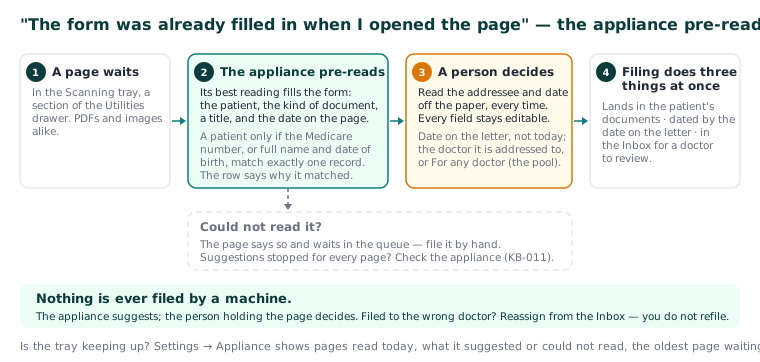
Important: The appliance suggests; the person holding the page decides. Read the addressee and the date off the paper, every time.
A page has no suggestions, or the suggestions have stopped.
A page the appliance could not read simply says so and waits in the queue — file it by hand. If suggestions stop for every page, check the appliance (KB-011 — Appliance appears offline — five checks before you call); filing by hand keeps working in the meantime.
Which date do I file a letter under?
The date on the letter, not today. A referral dated last week files as last week. Correct the appliance's reading if the page says otherwise.
Which doctor do I choose, and what does "For any doctor" mean?
The picker is pre-filled with the patient's usual GP when that doctor is still at the practice; if the page is addressed to somebody else, change it. For any doctor leaves it in the practice pool. Only clinicians who can action Inbox items can be chosen.
I filed a page to the wrong doctor.
Reassign it from the Inbox — you do not refile. Every routing change is recorded with the previous and the new addressee.
I uploaded a page by mistake. Can I delete it?
No, and you do not need to. A page uploaded in error is never deleted — it is simply never filed, and stays in the queue's history with its name and who uploaded it.
Filing is refused and says the record is restricted.
The patient's record is restricted to named staff and you are not one of them. Hand the page to someone who is (KB-061 — Restrict a patient's record, and open one in an emergency).
A document will not upload, or opens as a blank page.
Will not upload: the type is unsupported or the file is too large. PDF, PNG, JPEG, TIFF, plain text and RTF are accepted; the manual does not publish the size limit. Opens blank: the stored file is missing or unreadable. The record entry is kept — report it with the document title and the date filed, not the patient's name.
How do I know the tray is keeping up?
Settings → AI Appliance shows how the mail is going: pages read today, what the appliance suggested, what it could not read, the oldest page still waiting, and the typical time from scan to filed (KB-057 — Check appliance health and link security in Settings → AI Appliance, and revoke a certificate). Utilities → Data clean-up lists scans unfiled for a fortnight.
Still stuck? Raise a ticket at support.curaeon.com.au or call 1300 XXX XXX. If your clinic can't see patients right now, call and choose option 1. Support is staffed Monday to Friday, 8:00–18:00 Sydney time; outside those hours a call or text to the same number is answered on a best-effort basis.
Related articles
- KB-047 — Scan and file paper letters, including the appliance's pre-filled suggestions — Scan and file paper letters, including the appliance's pre-filled suggestions
- KB-057 — Check appliance health and link security in Settings → AI Appliance, and revoke a certificate — Check appliance health and link security in Settings → AI Appliance, and revoke a certificate
- KB-011 — Appliance appears offline — five checks before you call — Appliance appears offline — five checks before you call