Start here: I'm a GP or nurse
Ten articles in the order a clinician needs them — sign in, get the scribe working for you, then the parts of the record that differ from the system you came from.
One page to pin beside the monitor: the quick-reference guide for this role is KB-111 — Quick reference: GP or nurse. The Help Centre's print view drops the navigation, so it prints as one sheet.
How to use this page
Read the scribe articles (2–5) before your first scribed consult; the rest can wait until the situation arises. A nurse's role covers observations, immunisations and assessment tools rather than notes and prescribing, so 6 and 9 are for GPs.
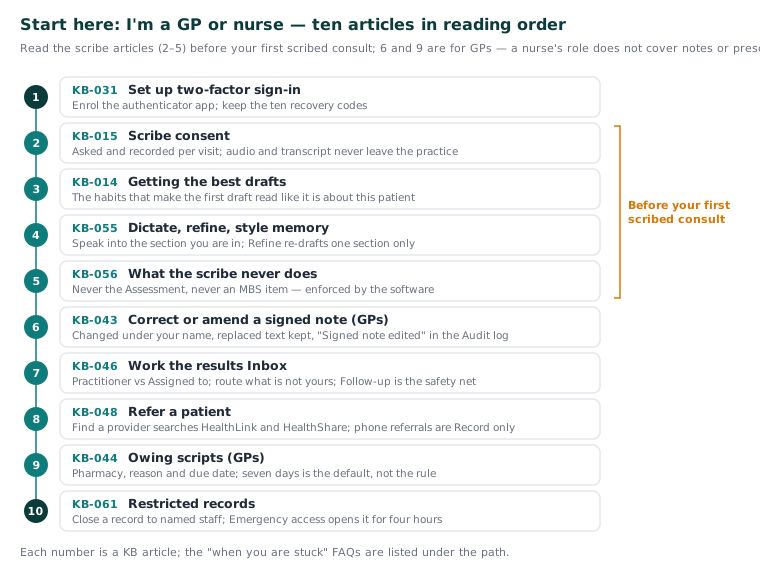
The path
-
KB-031 — Set up two-factor sign-in for Curaeon, and fix a code that is rejected, already used or timed out — Set up two-factor sign-in. First sign-in enrols an authenticator app and gives you ten recovery codes. Afterwards: you sign in every day with a code and know what each rejection message means.
-
KB-015 — AI scribe consent workflow explained — Scribe consent. Consent is asked and recorded per visit, never assumed from last time, and nothing leaves the practice — audio and transcript are processed on the appliance on your LAN. Afterwards: you can ask for consent in plain words and answer what patients actually ask.
-
KB-014 — AI scribe — getting the best transcription quality — Getting the best drafts. The scribe is very good and not magic; a few habits separate practices that love it from practices that fight it. Afterwards: your first draft reads like it is about this patient.
-
KB-055 — Dictate into a section, refine a draft, and manage style memory and suggested follow-ups — Dictate, refine, style memory. Dictation puts what you say into the section you are in; Refine a section re-drafts one section and leaves the rest alone; style memory learns your phrasing and can be cleared. Afterwards: you can speak a paragraph straight into a note and turn a Plan into offered follow-ups and a draft letter.
-
KB-056 — Why the scribe never writes the Assessment or suggests item numbers — What the scribe never does. It never writes the Assessment and never suggests an MBS item — enforced by the software, not by convention. Afterwards: a blank Assessment stops looking like a fault.
-
KB-043 — Correct or amend a note after it's signed — Correct or amend a signed note. A signed note can be changed, never silently: the edit is saved under your name, the replaced text is kept, and the Audit log shows "Signed note edited". Afterwards: you can fix a mistake or add an amendment knowing what the record will show.
-
KB-046 — Work the results Inbox: Practitioner vs Assigned to, routing, COPY and corrected results, Follow-up — Work the results Inbox. Practitioner shows your usual patients' items; Assigned to shows what is routed to you. Afterwards: you can clear your queue, route what is not yours, read COPY and corrected results, and use Follow-up as the safety net.
-
KB-048 — Refer a patient: find a provider in HealthLink/HealthShare, or record a referral without a letter — Refer a patient. Find a provider searches HealthLink and HealthShare with a badge saying whose each row is, and a referral made by phone is still recorded with Record only — no letter. Afterwards: you can address a referral first time and read each delivery badge.
-
KB-044 — Record and settle an owing script — Owing scripts. A script phoned to a pharmacy or given after hours is marked owing with the pharmacy, the reason and its due date; seven days is the default, not the rule. Afterwards: the Owing scripts screen stays honest and each one is settled the right way.
-
KB-061 — Restrict a patient's record, and open one in an emergency — Restricted records. A clinician can close a record to named staff; anyone else sees who it is open to, not why, and Emergency access opens it for four hours with your reason and your password. Afterwards: you can restrict a record when warranted and know what the practice sees when someone opens one.
When you are stuck
The clinical FAQs are KB-087 — AI scribe FAQ (the scribe), KB-088 — Letters and referrals FAQ (letters and referrals) and KB-090 — Results and incoming letters FAQ (results and incoming letters). If the scribe stops mid-clinic, the consultation does not: type the note as you would anywhere else and report the fault when convenient. One more to know early: interactions are checked only where a medicines dataset is configured, and the screen says so when it is not (KB-045 — "Interactions not checked": what the prescribing screen is telling you, and why there is nothing to load yet).
Related articles
- KB-093 — Start here: I work at reception — Start here: I work at reception
- KB-095 — Start here: I'm the practice manager — Start here: I'm the practice manager
- KB-096 — Start here: I look after the computers — Start here: I look after the computers
- KB-085 — Glossary: the words Curaeon uses — Glossary: the words Curaeon uses
- KB-098 — Read a child's or teenager's growth chart on the Observations tab — Read a child's or teenager's growth chart on the Observations tab
- KB-102 — Start a care plan from a template, share templates between sites, and keep Plan reviews and INR clear — Start a care plan from a template, share templates between sites, and keep Plan reviews and INR clear
- KB-104 — Add or lift a DNR, interaction or red-flag alert above a patient's chart — Add or lift a DNR, interaction or red-flag alert above a patient's chart
- KB-131 — Set up Preferences: your start screen, calendar view, colours, notifications and privacy — Set up Preferences: your start screen, calendar view, colours, notifications and privacy
- KB-132 — Set up your clinical defaults and pathology favourites once, so every consult starts your way — Set up your clinical defaults and pathology favourites once, so every consult starts your way