Check Directory sources when Find a provider says "extract", looks stale, or cannot reach a directory
Read the badge on a provider search result, find out on one page where each directory's answers are coming from and how fresh they are, and know which problems are yours to fix and which are ours.
Before you start
Find a provider searches two directories, HealthLink and HealthShare, and every result carries a badge saying whose it is and how fresh (KB-048 — Refer a patient: find a provider in HealthLink/HealthShare, or record a referral without a letter). Directory sources, at the foot of Settings → Address book, is the administrator's view behind those badges. Reception can read the badges; only an administrator sees Directory sources.
What the badge means
| Badge | Meaning |
|---|---|
| HealthLink · live | The service's answer just now. |
| HealthShare · extract 2026-08-14 | A file loaded on that date. The provider may have moved since. |
| Results say one directory could not be reached | The other's results are still listed; the missing one is named. |
A provider both directories list, under the same provider number, appears once with both rows beneath a line saying so — each exactly as its directory publishes it, because the two can disagree. Choose the row to use; Curaeon never mixes the two.
Read Directory sources
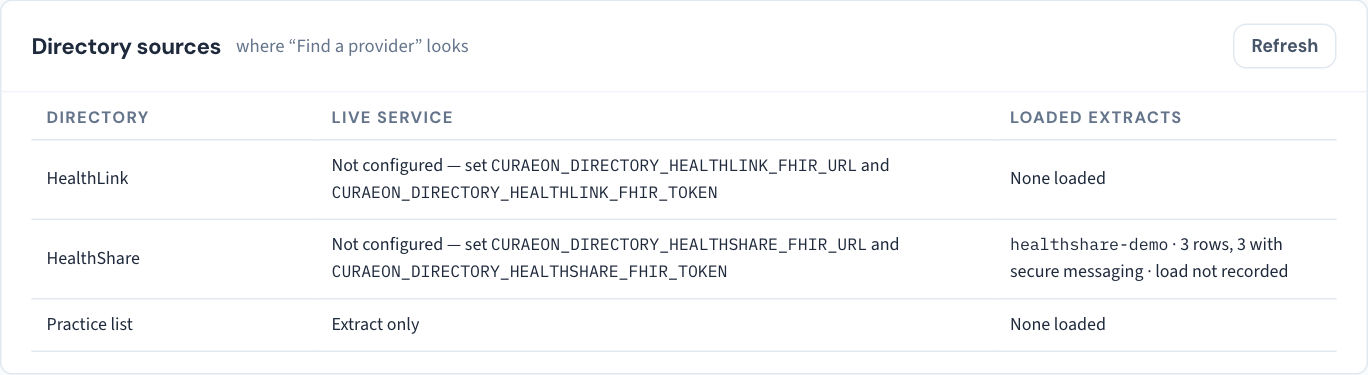
- Open Settings → Address book and scroll to Directory sources.
- For each directory, read three things: whether its live service is configured, when it last answered and its last error, and every extract loaded from it with its row count and load date.
- Refresh re-reads the page.
What each state means, and what to do
Live service not configured. Searches against that directory answer from loaded extracts only, and will badge as extract. Configuring a live service is done on the server by whoever runs it, with the credentials the directory issues to the practice — raise a ticket if you are not sure who that is.
Last answered long ago, or a last error is shown. The live service was configured and has stopped answering. Results will say the directory could not be reached; the other directory's results still list. Raise a ticket and copy the error text as shown — it names no patient.
Extract dated months ago. Everything from that directory is as old as the file. A specialist who has moved practice, or changed secure-messaging address, will still be listed at the old one, and a letter to that address comes back Not delivered (KB-059 — Secure-messaging referral "Not delivered" or stuck on "Sent — awaiting confirmation"). Ask us to load a fresh extract; loading is a server task, not a button on this page.
"None loaded" and no live service. That directory contributes nothing to searches. The address book still works for everyone the practice has written to before.
When a contact is wrong
A contact added from a directory says which one it came from — "From HealthShare, extract loaded 2026-08-14", "From HealthLink". If the entry is wrong today, correct it in Settings → Address book; a correction there does not change the directory, so a fresh extract or a live answer may list the published details again as a separate row.
What we cannot do
The directories are HealthLink's and HealthShare's, not ours. We cannot correct a provider's entry in either; the provider does that with the directory. What we can do is check that your extract is current and your live service is answering.
Still stuck? Raise a ticket at support.curaeon.com.au or call 1300 XXX XXX. If your clinic can't see patients right now, call and choose option 1. Support is staffed Monday to Friday, 8:00–18:00 Sydney time; outside those hours a call or text to the same number is answered on a best-effort basis.
Related articles
- KB-048 — Refer a patient: find a provider in HealthLink/HealthShare, or record a referral without a letter — Refer a patient: find a provider in HealthLink/HealthShare, or record a referral without a letter
- KB-059 — Secure-messaging referral "Not delivered" or stuck on "Sent — awaiting confirmation" — Secure-messaging referral "Not delivered" or stuck on "Sent — awaiting confirmation"
- KB-088 — Letters and referrals FAQ — Letters and referrals FAQ
- KB-124 — Keep the practice address book in Settings → Address book: add, edit and retire a contact — Keep the practice address book in Settings → Address book: add, edit and retire a contact