Refer a patient: find a provider in HealthLink/HealthShare, or record a referral without a letter
Address a referral to the right specialist first time — even one your practice has never written to — and make sure a referral made by phone is still on the record.
Before you start
Referrals are written from the consult (or the chart's New from template) and are filed to the patient's record whether or not they are sent electronically. Who it is to comes first, on two tabs: Address book is everyone this practice has written to before; Find a provider searches the published provider directory for everybody else. Adding someone from the directory needs no administrator; one can correct the entry later in Settings → Address book.
A referral needs a clinical reason; it won't send without one.
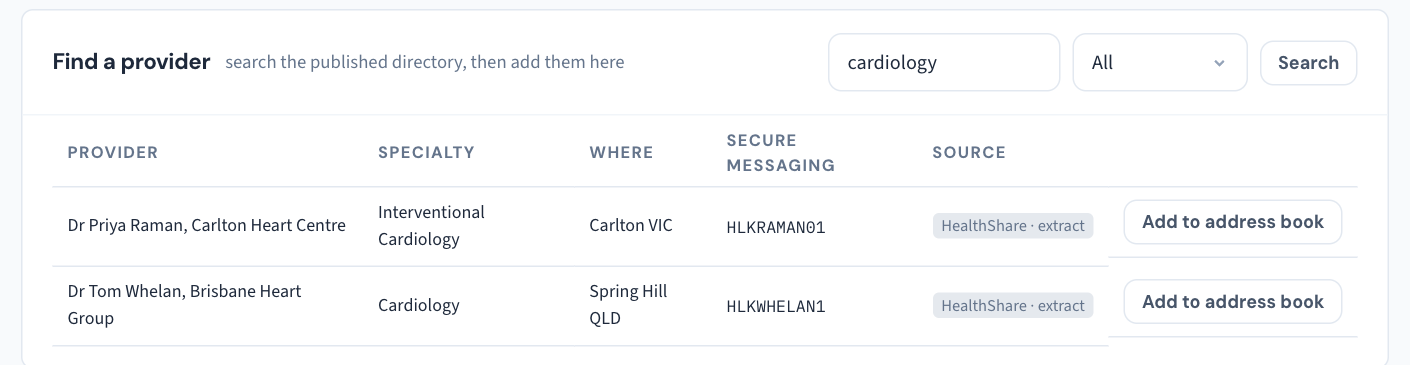
Find a provider
- On the recipient step, choose Find a provider.
- Type it the way you'd say it — "cardiologist Carlton" — or a name, a practice, a postcode or a special interest.
- Read the badge on each result. The directory is really two, HealthLink and HealthShare, and every row says whose it is and how fresh: live is the service's answer just now; extract with a date is a file loaded on that date. The list beside the search box narrows results to one directory.
- If the same provider is in both directories under the same provider number, you'll see them once, with both rows beneath a line saying so — each exactly as its directory publishes it, because the two can disagree (a different secure-messaging address; a practice they've since left). Choose the row to use. Curaeon never mixes the two.
- Select the provider to see what the directory holds — specialty, provider number, address, whether they have a secure-messaging address — then add them.
If one directory can't be reached, the results say which, and the other's are still listed.
Record a referral without a letter
A referral by phone, or one whose letter you'll write tomorrow, still needs recording: where a patient was sent and for how long the referral is valid is what the practice tracks and what Medicare cares about.
- Tick Record only — no letter on the recipient step, or use Record without a letter on the Referrals list under "Issued this visit".
- The referral appears in that list. From there, Print produces a paper referral on your letterhead, Write letter opens the composer for it later, and Mark sent records that it has gone.
You won't create a duplicate: a letter written this visit for a recipient already referred to attaches to that referral instead of starting a second one.
Good to know
- Curaeon connects to one messaging network at a time. A recipient on a different network is refused at the point of sending, naming both networks — never marked sent and quietly lost. Post it, or ask them for an address on your network. Send-status badges and "Not delivered" are covered in KB-059 — Secure-messaging referral "Not delivered" or stuck on "Sent — awaiting confirmation".
If that didn't work
If a provider you know exists isn't in either directory, add them to the address book by hand and let us know. The directories are HealthLink's and HealthShare's, not ours — we can't correct their entries, but we can check your extract is current.
Still stuck? Raise a ticket at support.curaeon.com.au or call 1300 XXX XXX. If your clinic can't see patients right now, call and choose option 1. Support is staffed Monday to Friday, 8:00–18:00 Sydney time; outside those hours a call or text to the same number is answered on a best-effort basis.
Related articles
- KB-059 — Secure-messaging referral "Not delivered" or stuck on "Sent — awaiting confirmation" — Secure-messaging referral "Not delivered" or stuck on "Sent — awaiting confirmation"
- KB-049 — Build and import letter templates: Word upload, merge fields, pronoun fields, snippets — Build and import letter templates: Word upload, merge fields, pronoun fields, snippets
- KB-007 — Why we never need patient details in a support ticket — Why we never need patient details in a support ticket
- KB-103 — Check Directory sources when Find a provider says "extract", looks stale, or cannot reach a directory — Check Directory sources when Find a provider says "extract", looks stale, or cannot reach a directory
- KB-124 — Keep the practice address book in Settings → Address book: add, edit and retire a contact — Keep the practice address book in Settings → Address book: add, edit and retire a contact