Secure-messaging referral "Not delivered" or stuck on "Sent — awaiting confirmation"
Read the badge beside the referral correctly, fix the one state that needs fixing, and clear the practice-wide list so nobody's referral is quietly lost.
Before you start
You need the patient's record or Settings → Referrals sent. Correcting a messaging address needs Settings → Address book. Nothing here needs a call to us — the last section says when it does.
What the badge means
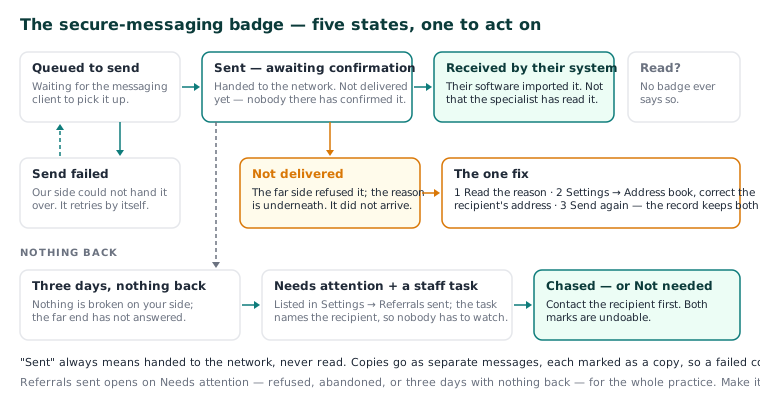
| Badge | What it means |
|---|---|
| Queued to send | Waiting for the messaging client to pick it up. |
| Sent — awaiting confirmation | Handed to the messaging network. Not delivered yet — nobody at the other end has confirmed it. |
| Received by their system | Their software imported it. It does not mean the specialist has read it. |
| Not delivered | The far side refused it, with the reason underneath. The letter did not arrive. |
| Send failed | Our side could not hand it over. It retries by itself. |
"Sent" always means handed to the network, never read. Copies go as separate messages, each marked as a copy, so a failed copy shows on its own.
Fix a "Not delivered" referral
This is the one state to act on.
- Read the reason under the badge — it is what the receiving side said.
- Open Settings → Address book and correct the recipient's secure messaging address.
- Back on the referral, press Send again. The refused letter goes as a fresh attempt, and the record keeps both.
A referral stuck on "Sent — awaiting confirmation"
Nothing is broken on your side; the far end has not answered. After three days with nothing back, the referral appears under Needs attention in Settings → Referrals sent, and Curaeon raises a staff task naming the recipient, so nobody has to be watching the screen.
- Contact the recipient and confirm they have it.
- Mark the row Chased — or Not needed if the referral turned out not to be required. Both are undoable.
Neither mark changes what happened: a letter you chased is still a letter that was refused. Referrals sent opens on Needs attention (refused, abandoned, or three days with nothing back) for the whole practice, so make it part of someone's day.
Refusals at the point of sending
These stop the letter before it leaves; none marks it sent and loses it.
| What you see | What to do |
|---|---|
| "This recipient has no secure messaging address" | Add one in Settings → Address book (KB-048 — Refer a patient: find a provider in HealthLink/HealthShare, or record a referral without a letter), or print and post. |
| "This practice sends through HealthLink, and that address is on Argus…" | Curaeon connects to one network at a time. Post or fax it, or ask for an address on your network. |
| It mentions a missing reason | A referral needs a clinical reason. Add it. |
| "Neither PDF nor plain text" | Save the attachment as PDF and attach that. |
If that didn't work
A Send failed that never clears, or letters that never reach Received by their system for anyone, is worth a ticket. Tell us the badge, the reason text and the recipient's network — never the patient's name or details (KB-007 — Why we never need patient details in a support ticket).
Still stuck? Raise a ticket at support.curaeon.com.au or call 1300 XXX XXX. If your clinic can't see patients right now, call and choose option 1. Support is staffed Monday to Friday, 8:00–18:00 Sydney time; outside those hours a call or text to the same number is answered on a best-effort basis.
Related articles
- KB-007 — Why we never need patient details in a support ticket — Why we never need patient details in a support ticket
- KB-020 — NASH certificates — why they matter and how renewal works — NASH certificates — why they matter and how renewal works
- KB-063 — Answer "who has seen my record?": print a patient access report — Answer "who has seen my record?": print a patient access report
- KB-103 — Check Directory sources when Find a provider says "extract", looks stale, or cannot reach a directory — Check Directory sources when Find a provider says "extract", looks stale, or cannot reach a directory