Letters and referrals FAQ
Every message the letter composer and the secure-messaging badge can show you, and what to do about each, answered in place.
"This recipient has no secure messaging address"
The address book entry has no messaging address. Add one in Settings → Address book, or print and post the letter (KB-048 — Refer a patient: find a provider in HealthLink/HealthShare, or record a referral without a letter).
"This practice sends through HealthLink, and that address is on Argus…"
Curaeon connects to one messaging network at a time, and this recipient is on another. The letter is refused at the point of sending, naming both networks — it is never marked sent and quietly lost. Send by post or fax, or ask the recipient for an address on your network.
It mentions a missing reason, or refuses a letter as "neither PDF nor plain text"
A referral needs a clinical reason — add it; it is the first thing the specialist reads. An attachment that is neither PDF nor plain text is a type the network will not carry: save it as PDF and attach that.
It says "Sent — awaiting confirmation". Has it arrived?
Not yet. "Sent" means handed to the messaging network, not read by the specialist. Received by their system means their software imported it — still not that anyone has read it. Not delivered means the far side refused it, with the reason underneath. Send failed means our side could not hand it over, and it retries by itself (KB-059 — Secure-messaging referral "Not delivered" or stuck on "Sent — awaiting confirmation").
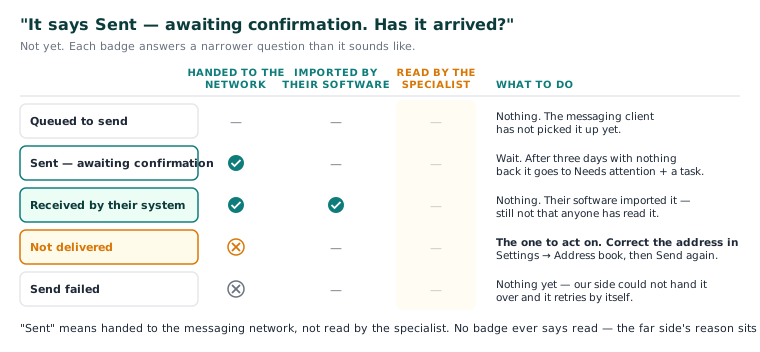
The badge says "Not delivered"
This is the one state to act on. Correct the messaging address in Settings → Address book, then press Send again on the referral. The refused letter goes as a fresh attempt, and the record keeps both.
It has been days and nothing has come back
After three days with nothing back, the referral appears under Needs attention in Settings → Referrals sent, and Curaeon raises a staff task naming the recipient with what to do next. Contact them, then mark the row Chased — or Not needed if the referral turned out not to be required. Neither mark changes what happened to the message.
I cannot find the specialist in the address book
Use the Find a provider tab, which searches the HealthLink and HealthShare directories — type it the way you would say it, or a name, practice, postcode or special interest. Every result carries a badge saying which directory it came from and how fresh it is; a provider in both appears once with both rows beneath, and you choose the row to use. If one directory cannot be reached, the results say which (KB-048 — Refer a patient: find a provider in HealthLink/HealthShare, or record a referral without a letter).
I referred by phone. Do I still record it?
Yes — where a patient was sent, and for how long the referral is valid, is what the practice tracks and what Medicare cares about. Tick Record only — no letter on the recipient step, or Record without a letter on the Referrals list. Writing the letter later attaches to that referral rather than starting a second one.
Why only two typefaces, three sizes and two colours?
Because those survive every way a letter leaves the practice — printed, downloaded as RTF or emailed as a PDF. Nothing below 12 point is offered; that is the floor for anything printed. Red and blue are there to flag, not decorate.
Can I put diagnoses or medications into a template as merge fields?
No, deliberately. Merge fields cover administrative details only. Clinical content goes in with Insert from the record, by an explicit click, so the clinician sees exactly what enters the letter. Confidential diagnoses are never inserted. A Word template refused on upload holds a picture, header, tracked changes or merged cells (KB-049 — Build and import letter templates: Word upload, merge fields, pronoun fields, snippets).
Is the letter kept if I never send it?
Yes. A letter is filed to the patient record whether or not it is sent electronically, and if Curaeon signs you out mid-letter it becomes a draft in the patient's documents (KB-033 — Change how long Curaeon waits before signing you out, and end a session left open). Printed drafts are watermarked as drafts.
A printed letter runs to two pages
The patient-naming header that an emailed letter carries on every page after the first is not on the printed version — a browser would repeat it on page one over the letterhead. Until that is solved, staple a printed letter of more than one page.
Tip: Emailing a letter to a patient has its own messages — consent, address, the DDMMYYYY password, a character the PDF "cannot show" — covered in KB-089 — Emailing patients FAQ and KB-050 — Email a letter to a patient: password, refused characters, "I can't open it".
Still stuck? Raise a ticket at support.curaeon.com.au or call 1300 XXX XXX. If your clinic can't see patients right now, call and choose option 1. Support is staffed Monday to Friday, 8:00–18:00 Sydney time; outside those hours a call or text to the same number is answered on a best-effort basis.
Related articles
- KB-059 — Secure-messaging referral "Not delivered" or stuck on "Sent — awaiting confirmation" — Secure-messaging referral "Not delivered" or stuck on "Sent — awaiting confirmation"
- KB-048 — Refer a patient: find a provider in HealthLink/HealthShare, or record a referral without a letter — Refer a patient: find a provider in HealthLink/HealthShare, or record a referral without a letter
- KB-049 — Build and import letter templates: Word upload, merge fields, pronoun fields, snippets — Build and import letter templates: Word upload, merge fields, pronoun fields, snippets
- KB-106 — Write a letter in the editor: Insert from the record, { } Field, and the formatting that survives print and email — Write a letter in the editor: Insert from the record, { } Field, and the formatting that survives print and email