Payment plans: let a patient pay an invoice in instalments, and remind them
Agree with a patient that they will pay what they owe on an invoice in parts — so much a week, a fortnight or a month, from a date — see at a glance whether they are keeping to it, and remind them when an instalment is due or the plan has fallen behind.
Before you start
- A payment plan is an agreement about when, not a payment. Nothing about the invoice changes when you start one, and no money moves. Each instalment is recorded the way any payment is, with Record payment (KB-148 — Take a payment, give a receipt, void or correct an invoice), and the plan reads those payments.
- A plan goes on one issued private or WorkCover invoice with something owing. A bulk-billed or DVA invoice is owed by Medicare or DVA, not the patient, so it cannot carry one.
- Starting or ending a plan needs the same permission as a credit note (
billing.adjust). Recording the instalments does not. - One plan at a time per invoice. A plan is never edited: if the terms change, end it and start another.
- One plan can cover several of the same patient's invoices (below). Payments are still recorded on whichever invoice they are for.
Start a plan
- Open the invoice from Billing and choose Payment plan….
- Type the Instalment — how much the patient will pay each time.
- Choose How often: weekly, fortnightly or monthly.
- Set First instalment due — today or a later day.
- Add a Note if it helps: who agreed it, and how.
- Read the schedule the window shows. It is worked out by the server from what is owing now, split into instalments of the amount you typed, the last one taking what is left. Choose Start plan.
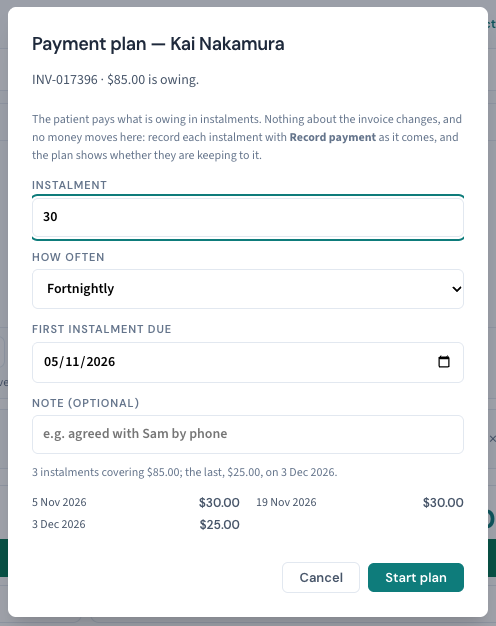
The schedule has to be at least two instalments and at most 52. An instalment that covers everything owing in one go is refused as not a plan; one so small it would take more than 52 is refused as a typo. A first day already past is refused.
One plan for several invoices
A patient who owes on several invoices agrees to one amount each fortnight, not one per invoice. Start the plan from any one of them:
- In the Payment plan… window, under Also cover the patient's other invoices, tick the others. Only invoices that can join are listed: issued, private or WorkCover, with something owing, and not already under a plan.
- The schedule under it is for what they owe together. Choose Start plan.
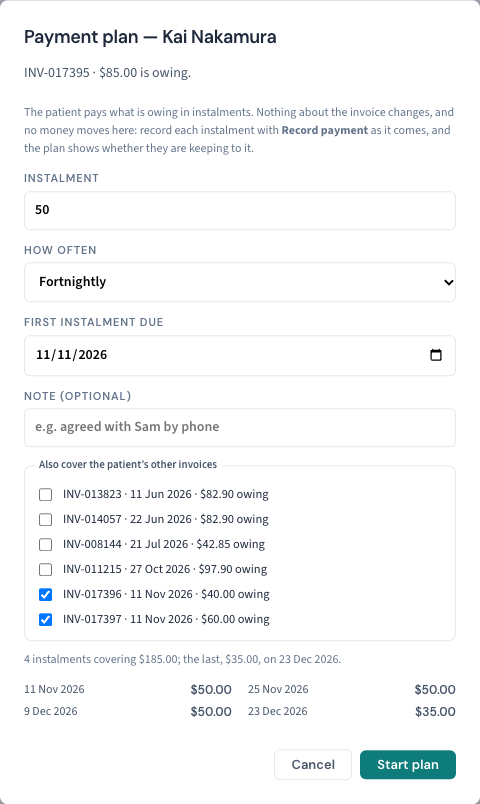
Every invoice the plan covers then shows the same Payment plan block, with a line naming the invoices and what each still owes — "One plan for 3 invoices: INV-017395 · $85.00 owing · INV-017396 · paid · INV-017397 · $60.00 owing" — and the figures are for all of them together. Record each payment on whichever invoice it is for; the plan reads the payments on all of them and does not say which invoice an instalment was for. Send reminder and End plan… work from any of the invoices, and ending the plan frees them all. If one invoice is voided, the plan goes on for the rest.
See where the plan stands
The invoice shows a Payment plan block with the standing, the rule and the schedule:
- On track — what has been paid since the plan began covers every instalment whose day has come.
- Behind by $… — the instalments due so far add up to more than has been paid since the plan began. The figure is the shortfall.
- Complete — nothing is owing on the invoice, whether by payment or by a credit note.
- Ended — someone ended the plan, with a reason.
- Invoice voided — the invoice was voided under the plan.
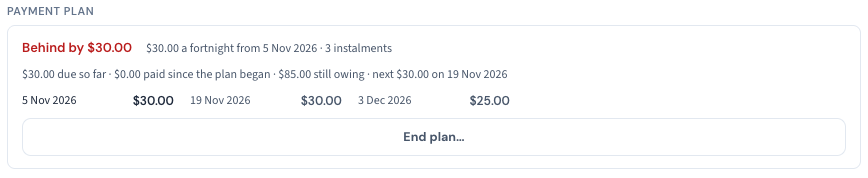
Payments are not matched to particular instalments. The plan compares what the schedule asked for by today with what has come in since it started, so a patient who pays two instalments early is on track, and one who pays half of one is behind by the other half.
Record an instalment
Record it as any payment: open the invoice and choose Record payment, or take it on the terminal (KB-160 — Take a card payment on the Tyro terminal). The plan updates itself. A refund of a payment made under the plan counts against it, as a refund counts against any invoice.
Remind the patient
There are two ways, and a practice can use both.
Send reminder, from the invoice. On a plan that is on track or behind, choose Send reminder in the Payment plan block. Curaeon writes the message itself:
- if the plan is behind, it says by how much — "your payment plan is $30.00 behind";
- if it is on track, it says what is still to pay by the next instalment, and when — "your payment plan instalment of $30.00 is due on Sun 22 Nov".
It goes on the channel ticked for Payment plan reminders in Settings › Patient messaging (KB-122 — Set up Settings → Patient messaging: email, SMS and WhatsApp channels, DKIM, the bounce mailbox and message wording), or by text if none is ticked, with the practice's next messages. The block then says what became of it: waiting to be sent, sent, or could not be sent.
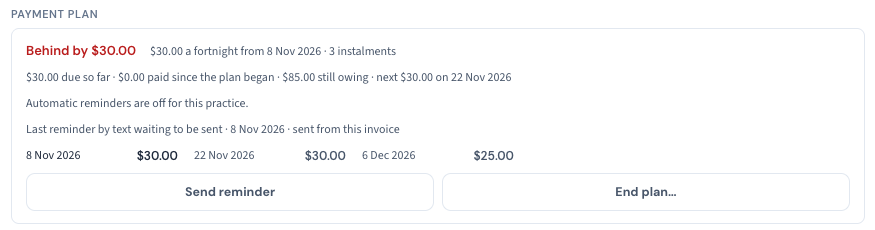
Anyone who can record a payment on the invoice can send a reminder; it does not need billing.adjust.
Automatically, before each instalment. An administrator ticks Remind patients on a payment plan before each instalment is due in Settings › Patient messaging and chooses Send the reminder: on the day it is due, or one to seven days before. Then each patient on a running plan is sent one message per instalment, saying how much is due and when.

An automatic reminder is never sent:
- twice for the same instalment, whatever became of the first;
- for an instalment the patient has already paid (one partly paid is reminded for what is left);
- for an instalment whose reminder day came before the plan was agreed — a plan made at the desk today for an instalment due tomorrow was agreed with the patient standing there;
- before 9am or after 8pm — it waits for the morning.
The Payment plan block says whether automatic reminders are on, and how far ahead. A reminder sent from the invoice does not use up the automatic one.
Your own wording. Under the tick box in Settings › Patient messaging are two messages you can write for yourselves (KB-122 — Set up Settings → Patient messaging: email, SMS and WhatsApp channels, DKIM, the bounce mailbox and message wording): the payment plan instalment message (the automatic reminder, and Send reminder on a plan that is on track) and the payment plan behind message. The instalment wording must include the amount due and the day; the behind wording the amount behind. The window offers the details you can insert and shows a preview.
Neither kind says what the account was for: a text is not a private channel, and what was billed is part of the patient's record.
End a plan
- On the invoice, choose End plan… in the Payment plan block.
- Type the reason — it stays on the ended plan.
- Choose End plan.
What is owing does not change. The plan and its schedule stay on the invoice marked Ended, with who ended it, when and why, and Payment plan… is offered again so another can be started on new terms.

Payment plans on the patient's statement
The printed statement (KB-053 — Month-end and end of day: aged debtors, statement runs and bank reconciliation) still asks for the whole balance — it is all owed — but an invoice on a running plan has a line under it saying what was agreed and where the patient stands: the instalment and how often, how many are left and the last date, On track or Behind by $…, and the next instalment with what is still to pay on it. After the table, the statement says how much of the balance is on a payment plan, and how much of that was due by today and has not been paid. A patient reading it knows to pay by the instalments, and whether they have missed one.
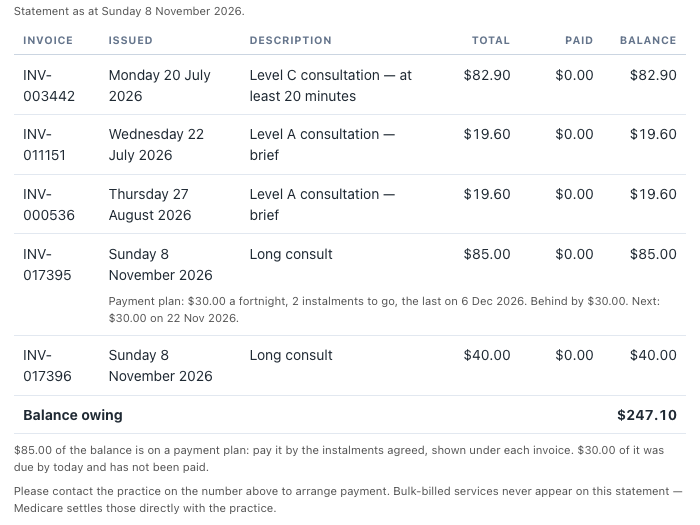
A plan that covers several of the invoices listed is described under the first, and the others say Paid under the same payment plan as that one. The same lines are on every statement in a statement run. An ended plan is not mentioned: the invoice is asked for as before.
Payment plans on Aged debtors
Aged debtors (KB-053 — Month-end and end of day: aged debtors, statement runs and bank reconciliation) still ages a balance under a plan like any other debt — it is owed, and from the invoice's date. What it adds is a third figure at the head of the page, On payment plans, with how much of that is behind, and a line under each patient who has one: On a payment plan, on track, or behind by $…. A patient paying as agreed is not one to chase; a patient behind their plan is.

What each message means
| Message | What it means | What to do |
|---|---|---|
| This invoice already has a payment plan. End it first, then start another. | One plan at a time | End the running plan with a reason, then start the new one |
| That instalment covers everything owing in one payment, which is not a plan. | The amount is at least what is owing | Choose a smaller instalment, or just record the payment when it comes |
| That instalment is too small: it would take more than 52 instalments… | The amount is too small for the balance | Choose a larger instalment or a shorter gap |
| The first instalment's date has already passed. | The first day is before today | Choose today or later |
| This invoice is billed to Medicare or DVA… | A funder's invoice | Nothing — the funder pays the claim |
| Nothing is owing on this invoice, so there is nothing to plan. | The invoice is paid or credited in full | Nothing to do |
| INV-… cannot join this plan — … | One of the other invoices ticked cannot be under this plan: it is another patient's, billed to Medicare or DVA, has nothing owing, or is already under a plan | Untick it, or deal with what the message names, and start again. Nothing was started |
| A reminder about this plan is already waiting to be sent. | You (or the automatic reminder) already queued one, and it has not gone yet | Nothing — it goes with the practice's next messages |
| The patient has already paid what this plan asks for by its next instalment… | They are ahead of the plan | Nothing to remind them about |
| This patient has no mobile number or email address the practice sends payment plan reminders to. | No channel reaches them | Add a mobile or email on the patient's details, or check which channels are ticked for Payment plan reminders in Settings › Patient messaging |
| This patient is recorded as deceased or no longer at the practice… | They are not sent reminders | Nothing to send |
What a plan does not do
- Its reminders are not sent by WhatsApp.
- It does not move money between invoices or decide which invoice a payment is for: each payment is recorded on an invoice, and a plan over several reads them all.
Related articles
- KB-148 — Take a payment, give a receipt, void or correct an invoice — Take a payment, give a receipt, void or correct an invoice
- KB-053 — Month-end and end of day: aged debtors, statement runs and bank reconciliation — Month-end and end of day: aged debtors, statement runs and bank reconciliation
- KB-168 — Hold credit on a patient's account: deposits, using credit and paying it back — Hold credit on a patient's account: deposits, using credit and paying it back
- KB-160 — Take a card payment on the Tyro terminal — Take a card payment on the Tyro terminal
- KB-122 — Set up Settings → Patient messaging: email, SMS and WhatsApp channels, DKIM, the bounce mailbox and message wording — Set up Settings → Patient messaging: channels and message wording