Hold credit on a patient's account: deposits, using credit and paying it back
Record money a patient has given the practice that is not for an invoice yet, use it against a later invoice, and pay back what is not used.
What account credit is
Account credit is money the practice holds for a patient. It belongs to the patient until it is used against one of their invoices or paid back to them.
Credit gets onto an account in two ways:
- A deposit. The patient pays ahead, for example before a procedure, and there is no invoice yet.
- A refund kept on the account. A payment on an invoice is refunded, and the patient would rather leave the money with the practice than take it back.
Credit is never used on its own. A person chooses when to put it against an invoice, and how much.
Note: Paying more than an invoice is owed is still refused. If a patient hands over more than the invoice, record the invoice's amount as the payment and the rest as a deposit.
Before you start
- Recording a deposit, and using credit against an invoice: any signed-in role.
- Paying credit back, and correcting an entry: these need the
billing.adjustpermission. The Admin and Clinician roles hold it by default. Reception does not, unless an administrator has ticked it for the role in Settings → Permissions (KB-121 — Change what each role may do in Settings → Permissions). - Credit can be used only against an Issued private or WorkCover invoice for the same patient.
See what a patient has on account
- Open the patient's record.
- Choose the Billing tab.
- Look at Account credit, above Invoices.
The figure beside the heading is what is held. Under it is every movement on the account, newest first:
| It reads | What it means |
|---|---|
| DEPOSIT | Money the patient paid ahead, with how it was paid |
| KEPT | A refund that was left on the account, with the invoice it came from |
| USED | Credit put against an invoice, with the invoice's number |
| PAID BACK | Credit returned to the patient, with how it went back |

See every patient who holds credit
- Open Billing.
- Choose Account credit in the toolbar, beside Aged debtors.
The list shows every patient the practice holds credit for, largest first, and the total held. It is the other side of Aged debtors: money the practice owes its patients.
| Column | What it shows |
|---|---|
| Patient | The patient's name, which opens their record. A badge reads Deceased, Inactive or Transferred when that applies |
| On account | What is held for them |
| Owes on invoices | What they owe on issued private and WorkCover invoices, or a dash |
| Last movement | What last happened on the account, and when |
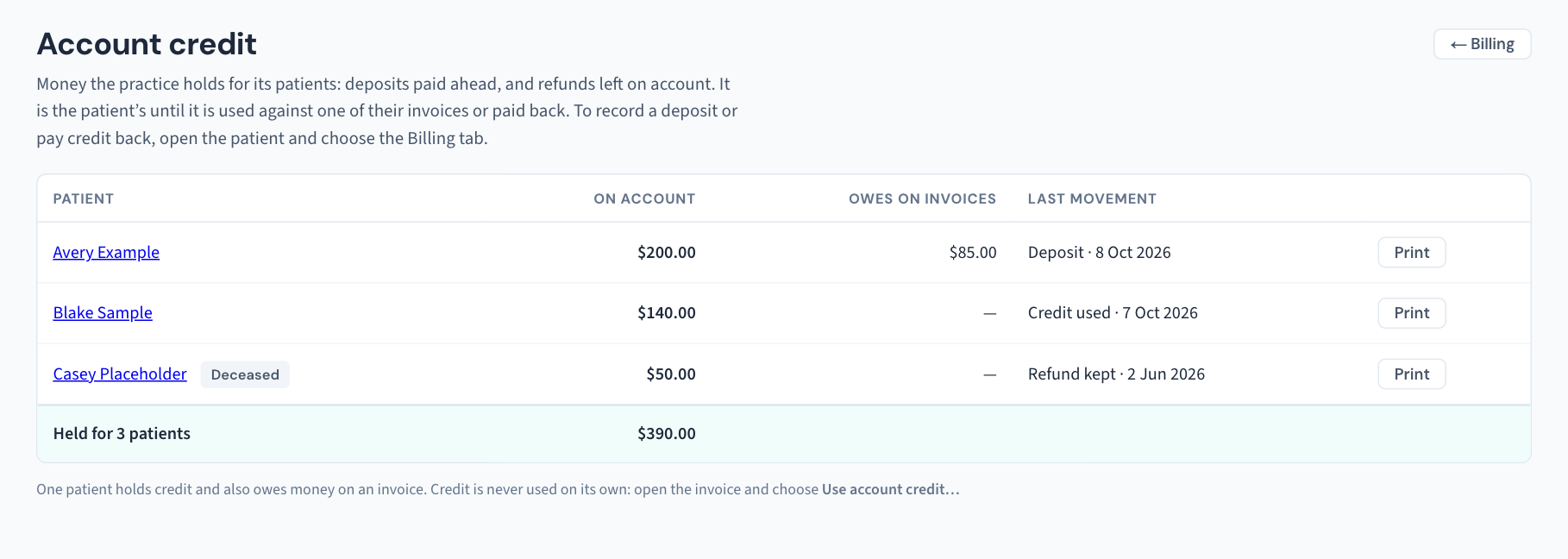
A patient with an amount under both On account and Owes on invoices has credit that nobody has used. A line under the table says how many there are. Open their invoice and choose Use account credit….
Credit held for a patient who has died or left the practice is still theirs, or their estate's. Pay it back when you can.
Print opens that patient's account credit page. To record a deposit or pay credit back, open the patient.
Record a deposit
Take the money first. Then:
- On the patient's Billing tab, under Account credit, choose Record a deposit….
- Type the Amount received.
- Under How it was paid, choose the method.
- Under What it is for, say what the deposit is for. This is optional, and it is printed for the patient.
- Choose Record deposit.
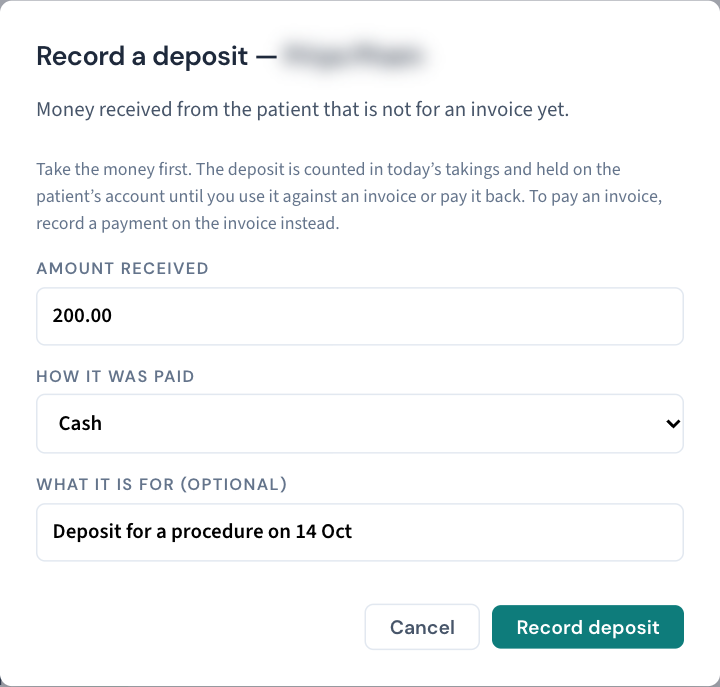
The deposit is counted in that day's takings, by its method (KB-053 — Month-end and end of day: aged debtors, statement runs and bank reconciliation). To take a card deposit, use the terminal by itself and then record the deposit here with EFTPOS (Tyro). Take payment on the terminal is for an invoice (KB-160 — Take a card payment on the Tyro terminal).
Important: Do not record a deposit to pay an invoice the patient already has. Record a payment on the invoice (KB-148 — Take a payment, give a receipt, void or correct an invoice).
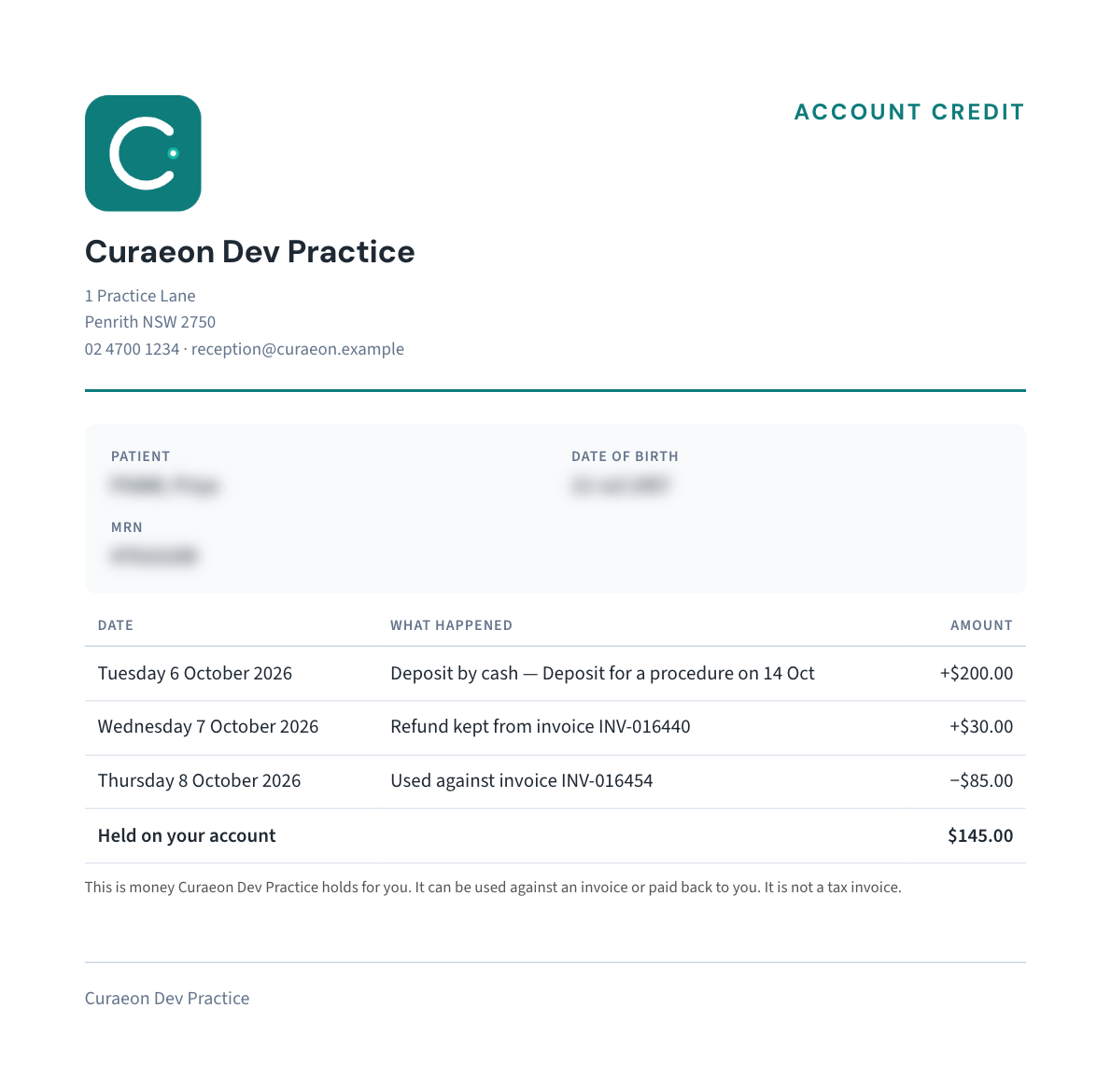
Give the patient a receipt for a deposit
Choose Print in the Account credit panel. The page shows your practice, the patient, every movement on the account and what is held. Each print is recorded in the Audit log.
Use credit against an invoice
- Open the invoice's full page from Billing.
- If the patient has credit that can go on this invoice, a line under the buttons reads This patient has $… on account, and Use account credit… is offered.
- Choose Use account credit….
- Check the Amount to use. It starts at what is owing, or at what is held if that is less. Lower it to use part.
- Choose Use credit.
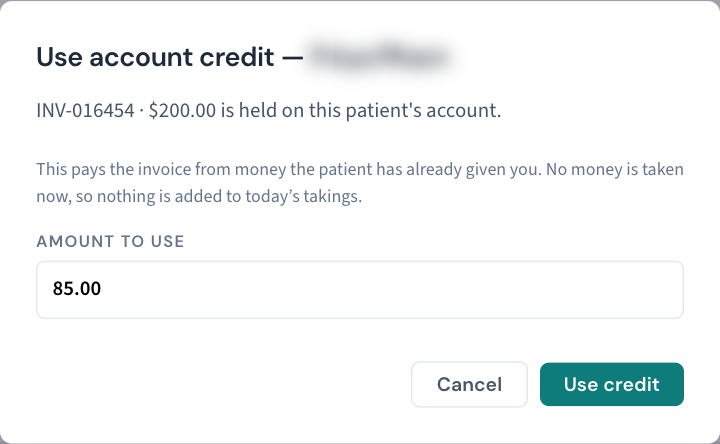
The invoice now shows a payment marked account credit under Payments. If it covers what was owing, the invoice becomes Paid.
No money is taken when you use credit, so nothing is added to that day's takings. The money was counted on the day the deposit was taken.
Use account credit… is not offered on:
- A bulk-bill or DVA invoice. The patient owes nothing on it.
- An invoice that is not issued, or has nothing owing.
- An invoice for a patient with nothing on account.
Keep a refund on the patient's account
When you refund a payment on an invoice (KB-148 — Take a payment, give a receipt, void or correct an invoice), you can leave the money with the practice instead of handing it back:
- Under Payments on the invoice, choose Refund… beside the payment.
- Under How the money went back, choose Keep it on the patient's account — no money goes back.
- Type the Reason and choose Record refund.
The invoice is refunded as usual: the amount is owing again, and a Paid invoice goes back to Issued. The amount appears on the patient's account as KEPT. Because nothing was handed back, End of day lists no refund for it.
If a refund was kept on the account by mistake, undo the refund on the invoice with Undo refund… (KB-148 — Take a payment, give a receipt, void or correct an invoice). The amount comes back off the patient's account and is held on the invoice again. This is refused if that credit has since been used or paid back.
Undo credit that was used
A payment made from account credit has Refund… beside it, like any payment. The refund starts on Keep it on the patient's account, so the credit goes back where it came from. Choose another method only if money really was handed to the patient.
Correct… is not offered on a payment made from account credit. There is no amount or method that was typed in wrongly. Refund it instead.
Pay unused credit back to the patient
You need the billing.adjust permission.
Important: Curaeon records the money going back. It does not move the money. Give it back first: a card on the terminal, cash from the till, a transfer from your bank.
- On the patient's Billing tab, under Account credit, choose Pay credit back….
- Check the Amount paid back. It starts at everything that is held.
- Under How the money went back, choose the method.
- Type the Reason. It is required.
- Choose Record it paid back.
The amount comes off the account and is listed with that day's refunds in End of day.
Correct a deposit, or credit paid back, entered wrongly
Use Correct… when a deposit, or credit paid back, was typed in wrongly and no money needs to move: $200 recorded for a $20 deposit, or cash recorded as EFTPOS.
You need the billing.adjust permission.
- On the patient's Billing tab, under Account credit, choose Correct… beside the entry.
- The window opens on the entry as it was recorded. Change what is wrong: the Amount it should have been, the method, or both.
- Type the Reason. It is required and stays on the correction.
- Choose Correct entry.
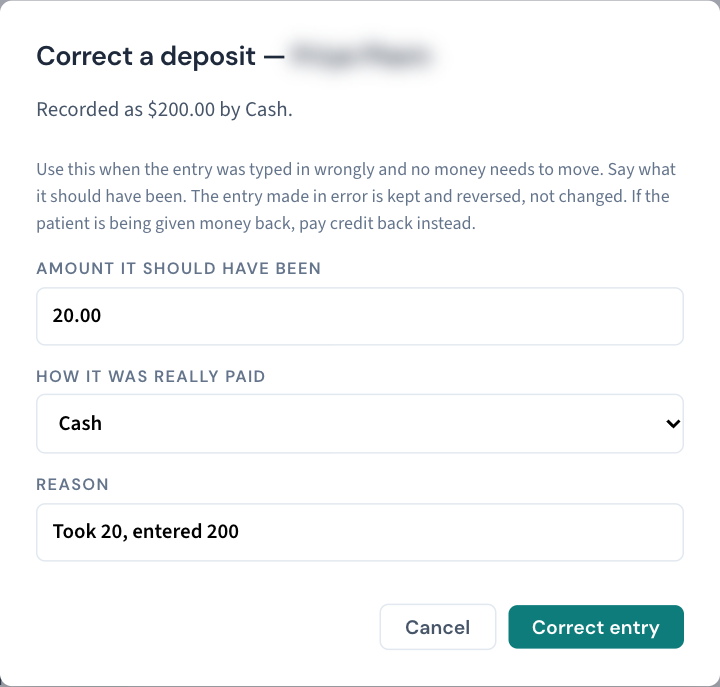
Curaeon does not change the entry you made. It keeps it, and adds two more beside it:
- The entry as you first recorded it, now reading entered in error, corrected.
- An entry marked REVERSED, which takes it out, with your reason.
- The entry as it should have been, reading replaces the entry made in error, with your reason.

The amount held follows the corrected figure. End of day lists the correction under Corrections on the day you made it (KB-053 — Month-end and end of day: aged debtors, statement runs and bank reconciliation). The printed account page shows only what stands, so the patient's copy does not list the mistake.
Correct… is not offered on:
- Credit used against an invoice, or a refund kept on the account. Undo those on the invoice, with Refund….
- An entry that has already been corrected, or a REVERSED entry. Correct the entry that replaced it.
Note: A deposit cannot be corrected to less than the credit already used or paid back from it, and an entry matched to a line in bank reconciliation must be unmatched first. The message says which.
Undo a correction
If the correction itself was the mistake, undo it:
- Under Account credit, find the entry that reads replaces the entry made in error and choose Undo correction… beside it.
- The window shows the figure now and the figure before the correction. Check that the one it will restore is right.
- Type the Reason. It is required.
- Choose Undo correction.
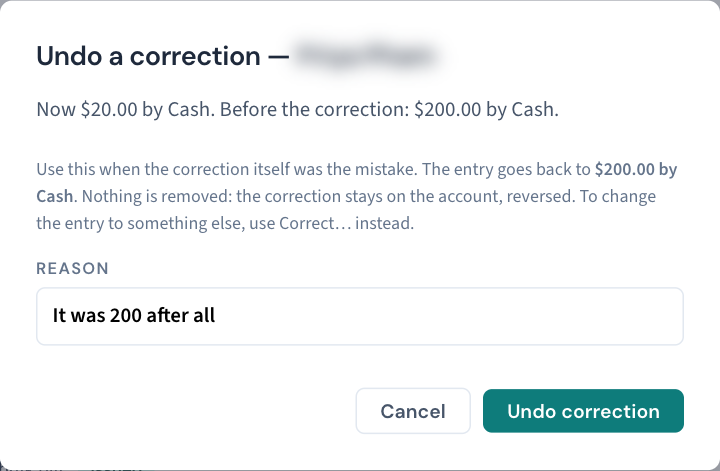
The entry goes back to the amount and method it had before the correction. You do not type them again. Nothing is removed: the correction stays on the account, reversed, and two more entries are added. End of day lists the undo as another correction.
Undo correction… is offered only on the entry a correction left, while that entry still stands. To change an entry to something other than what it was before, use Correct….
Where else account credit shows
- End of day. A deposit is in Payments received. Credit paid back is in Refunds given. A third block, Patient account credit, says how much of the day's takings was deposits, how much credit was used against invoices, and how much was kept on accounts from refunds. The last two are not money that day and change nothing you count (KB-053 — Month-end and end of day: aged debtors, statement runs and bank reconciliation).
- Statements. A patient's statement says how much credit the practice holds. It is not taken off the balance owing, because credit pays nothing until someone uses it against an invoice.
- Aged debtors. A patient with an unpaid invoice and credit on account still shows as owing. Use the credit against the invoice to clear it.
- Bank reconciliation. A deposit paid by EFTPOS or by transfer is matched like a payment. An EFTPOS deposit is part of its day's settlement, and a transfer is matched by its amount and date. Where you match by hand, a deposit reads deposit on account in place of an invoice number. Credit paid back on the terminal comes off that day's settlement and reads account credit paid back. Credit used against an invoice, and a refund kept on an account, are never offered, because no money moved (KB-108 — Bank lines that won't match, statement reprints and brought-forward balances: the ledger FAQ).
- The Audit log. A deposit and credit paid back are each recorded with your name, the amount, the method and the reason. Credit used against an invoice is recorded as a payment, marked as coming from the patient's account (KB-101 — Find who did what in the Audit log: kinds, Sign-ins, Exactly, Who and a bookmarkable view).
- Keeping records. A record with credit still held is not destroyed at the end of its retention period. Pay the credit back or use it first.
What Curaeon does not do
- It does not use credit on its own when an invoice is issued.
- It does not turn an overpayment into credit. Record the extra as a deposit.
What each message means
| Message | What it means | What to do |
|---|---|---|
| That is more than this patient has on account. They have $…. | The amount is more than is held | Enter that amount or less |
| payment exceeds the outstanding balance | The credit you are using is more than the invoice is owed | Enter what is owing or less |
| This invoice is billed to Medicare or DVA, so the patient owes nothing on it and their account credit cannot be used against it. | Credit cannot be used on a bulk-bill or DVA invoice | Nothing. Leave the credit on the account |
| This payment came from the patient's account credit, so there is no amount or method to correct. … | Correct… was tried on a payment made from credit | Refund it, and keep the refund on the patient's account |
| That would leave the account below nothing, by $…. … | A deposit is being corrected, or a correction undone, to less than has already been used or paid back from the account, or credit paid back to more than was held | Enter an amount that leaves the account at nothing or more. A correction cannot be undone once that much credit has been used |
| This entry has already been corrected, or is itself the reversal of one. … | A colleague corrected it a moment ago | Reload, and correct the entry that replaced it |
| This entry is matched to a bank line. … | It was matched in bank reconciliation | Unmatch it there, then correct it or undo the correction |
| That entry is not the result of a correction, so there is no correction to undo. … | Undo correction… was tried on an entry that was never corrected | Use Correct… |
| Only a deposit, or credit paid back, can be corrected here. … | Correct… was tried on credit used or a refund kept | Undo it on the invoice with Refund… |
| amount must be a positive amount like 200.00 | The amount is blank, zero, negative or not a number | Type dollars and cents, no dollar sign |
| A warning that a reason is required | The Reason box is empty | Type why the credit is going back |
| this record was merged into another. … | The deposit was recorded on a record that has been merged away | Open the record it was merged into and record it there |
| your role does not permit this action | Your role lacks billing.adjust |
Ask someone who holds it |
If that didn't work
If Use account credit… is missing on an invoice, check the patient's Billing tab: there may be nothing held, or the invoice may be bulk-billed, DVA, a draft or already paid. If Pay credit back… or Correct… is missing, your role may not hold billing.adjust; Pay credit back… also needs something to be held. If the Account credit panel on a patient's Billing tab shows an error instead of figures, choose Try again beside the message (KB-170 — When part of a screen says it could not be loaded: Try again, and what Loading… means). If the Account credit list in Billing shows an error, reload the page. An error does not mean nobody holds credit.
Still stuck? Raise a ticket at support.curaeon.com.au or call 1300 XXX XXX. If your clinic can't see patients right now, call and choose option 1. Support is staffed Monday to Friday, 8:00–18:00 Sydney time; outside those hours a call or text to the same number is answered on a best-effort basis.
Related articles
- KB-148 — Take a payment, give a receipt, void or correct an invoice — Take a payment, give a receipt, void or correct an invoice
- KB-053 — Month-end and end of day: aged debtors, statement runs and bank reconciliation — Month-end and end of day: aged debtors, statement runs and bank reconciliation
- KB-160 — Take a card payment on the Tyro terminal — Take a card payment on the Tyro terminal
- KB-108 — Bank lines that won't match, statement reprints and brought-forward balances: the ledger FAQ — Bank lines that won't match, statement reprints and brought-forward balances: the ledger FAQ
- KB-121 — Change what each role may do in Settings → Permissions — Change what each role may do in Settings → Permissions