Find who did what in the Audit log: kinds, Sign-ins, Exactly, Who and a bookmarkable view
Answer "who cancelled that appointment", "who changed the fee" or "did someone sign in from home" in a few clicks, by knowing which Audit log filter answers which question.
Before you start
Only administrators read Settings → Audit log, and each look at it is recorded. Rows are newest first, in the practice's clock with its zone (AEST or AEDT). Two articles cover the reports built from it — a patient's access report (KB-063 — Answer "who has seen my record?": print a patient access report) and a staff member's activity report (KB-099 — Print a staff member's activity report for an investigation or a handover); this one is about finding a row.
The tabs
- All — everything.
- Viewed — looks: records and documents opened, patient searches, each page of the patient list, worklists, reports that list patients, pages printed, exports, and views of the Audit log itself.
- Sent — every document that left the practice: letters and referrals to patients and providers, and scripts sent to eRx.
- Changes — changes only, with the field-level before and after where there is one.
- Sign-ins — signing in and out, refused passwords and codes, sessions ended, and anyone turned away by their role. Because these have their own tab, Changes stays clean.
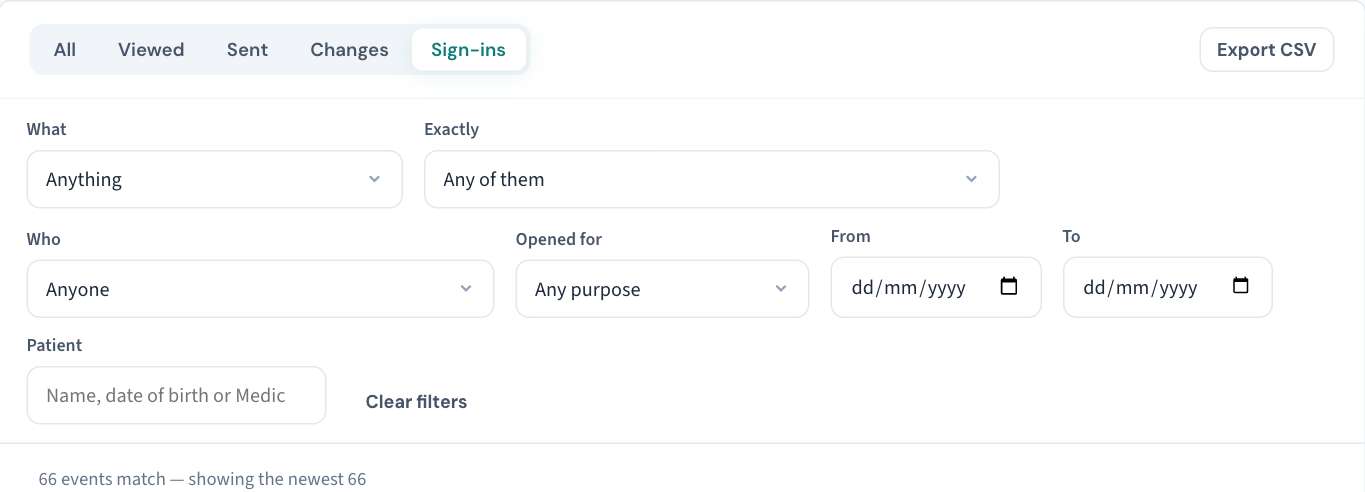
The filters, and the question each answers
| You want to know | Use |
|---|---|
| Everything of one sort — sign-in, staff and permissions, the patient record, prescribing, appointments, billing, settings, exports | What |
| One exact thing that happened — every voided invoice, every record restricted, every signed note edited | Exactly |
| What one person did, including a departed account or an API key | Who |
| What Curaeon did by itself, and what came from the public booking page | Who → Nobody signed in |
| Openings for one stated purpose | Opened for (KB-062 — Why Curaeon asks your reason for opening a record) |
| A period | From and To — the practice's days |
| Everything about one patient, without opening their record | Patient — a name, date of birth or Medicare number; former and deceased patients are found and marked |
On any row, three more narrowings: the address it came from, Only this record (a staff account, an API key), and the sign-in — select it to see everything done from that session. Only this patient on a row does the same for a patient.
Worked examples
"Who cancelled Mrs X's appointment on Tuesday?" Patient → search her; What → appointments; From/To → Tuesday. The row shows who, from which address, and the appointment's history says so too.
"Who changed the after-hours fee?" Changes tab; What → settings; the row shows the fee, the old value and the new one. Fees, opening hours, appointment types, rosters, recall types, templates and the backup schedule are all recorded this way.
"Did someone try to sign in as me?" Sign-ins tab; Who → you. Refused passwords are listed with the reason. A Password accepted, second step pending with no Signed in after it is a password used without the phone — tell your administrator (KB-031 — Set up two-factor sign-in for Curaeon, and fix a code that is rejected, already used or timed out).
"What did the booking page do overnight?" Who → Nobody signed in; From/To → last night.
Keep the view
Filters stay in the address. A filtered view can be bookmarked, or the address sent to a colleague who is also an administrator, and it opens on the same rows.
Export CSV downloads every event the filters match — the time, the action in the same words as the screen, the changes, the staff account or API key by name, and the row's place and hash on the chain once sealed. The export itself is recorded with its filters and row count; one cut short is not saved.
What a count means
The same person opening the same chart again from the same sign-in within 15 minutes is listed once. A look that the server could not record at that moment went unrecorded — so treat a missing look as possible. A missing change is not: a change is written in the same step as the change itself.
Still stuck? Raise a ticket at support.curaeon.com.au or call 1300 XXX XXX. If your clinic can't see patients right now, call and choose option 1. Support is staffed Monday to Friday, 8:00–18:00 Sydney time; outside those hours a call or text to the same number is answered on a best-effort basis.
Related articles
- KB-063 — Answer "who has seen my record?": print a patient access report — Answer "who has seen my record?": print a patient access report
- KB-099 — Print a staff member's activity report for an investigation or a handover — Print a staff member's activity report for an investigation or a handover
- KB-064 — Sign off the weekly Security review, and act on alerts and audit-log check warnings — Sign off the weekly Security review, and act on alerts and audit-log check warnings
- KB-127 — Connect an outside system: create, scope, rotate and revoke API keys and webhooks in Settings → API access — Connect an outside system: create, scope, rotate and revoke API keys and webhooks in Settings → API access