Follow a Medicare or DVA claim: its status, Check now and the claims list
Read what is happening to a claim on its invoice, ask Tyro for the latest answer, and work the list of every claim that is not finished.
Note: This applies once your practice's Tyro connection is switched on. Until then, Send to Medicare… shows what would be sent and files nothing.
Before you start
- Any signed-in member of staff can queue a claim, open the claims list, use Check now and send a rejected claim again.
- Void invoice and Void & correct need the
billing.adjustpermission. Clinicians and administrators have it unless your practice has changed that (KB-121 — Change what each role may do in Settings → Permissions). - Each doctor's provider number must be recorded in Curaeon and registered with Tyro (KB-162 — Register each provider with Tyro before the first claim). Curaeon does not queue a claim for a doctor with no provider number recorded (KB-052 — Raise, correct and claim an invoice, including when "Send to Medicare…" is blocked).
What happens after you queue a claim
You queue a claim with Queue Medicare claim on an issued invoice, or Queue DVA claim on a DVA invoice (KB-052 — Raise, correct and claim an invoice, including when "Send to Medicare…" is blocked). From there Curaeon does the work:
- Curaeon sends the claim to Tyro Health Online in the background. You do not press anything.
- For a bulk bill or other Medicare claim, Curaeon first checks the patient's card with Medicare, unless it was verified in the last 24 hours (KB-157 — Verify a patient's Medicare card with Medicare).
- Curaeon then asks Tyro for the answer on its own: every minute for the first 15 minutes, every five minutes for two hours, every half hour for three days, then every four hours.
- The claim's line on the invoice changes when the answer arrives.
While it waits, the claim's line reads Queued — ready to send · Curaeon sends it on its own, usually within moments. There is nothing you need to press. Change… on a queued claim lets you correct what you said when you queued it: the signed-on-paper tick for a bulk bill (KB-158 — Assignment of benefit for a bulk bill: Tyro's text to the patient, or signed on paper), or where the service was given and the accepted disability for a DVA claim (KB-159 — Claim for a DVA patient, and lodge a private patient's Medicare claim for them).
Read the status on the invoice
Open the invoice from Billing. Its Medicare claims block has one row per claim: the claim type, a line saying what is happening, and a badge. On an invoice whose only claims are DVA claims the block is headed DVA claims.

| Badge | The line says | What it means |
|---|---|---|
| queued | Queued — ready to send, with assignment signed on paper if that was ticked, then Curaeon sends it on its own, usually within moments | Not yet with Tyro. |
| submitted | Sent to Tyro … awaiting the patient's agreement to assign the benefit — Tyro has texted them a link, valid 48 hours | A bulk bill waiting for the patient. Nothing has gone to Medicare yet (KB-158 — Assignment of benefit for a bulk bill: Tyro's text to the patient, or signed on paper). |
| submitted | Sent to Medicare … patient agreed to assign the benefit (recorded …) … awaiting Medicare | The patient agreed, and the claim is with Medicare. |
| submitted | Sent to Medicare … awaiting Medicare | With Medicare. |
| accepted | Approved by Medicare … payment to follow | Approved, not yet paid. |
| paid | Paid by Medicare, the date, and what Medicare paid | Medicare has paid. See "What a paid claim says about the money" below. |
| rejected | The reason, in words, with Send again… beside it | Needs a person. See below. |
| cancelled | Cancelled | The invoice was voided or corrected while the claim was still queued. Nothing was sent. |
A DVA claim's line names DVA in place of Medicare: Sent to DVA … awaiting DVA, Approved by DVA, Paid by DVA (KB-159 — Claim for a DVA patient, and lodge a private patient's Medicare claim for them).
A sent claim's line also shows last checked and a time: when Tyro was last asked, by Curaeon or by you.
The invoice keeps itself up to date. While a claim on it can still move (queued where Curaeon files claims itself, sent, or approved and not yet paid), the invoice's full page reads the invoice again every 15 seconds, as long as it is the tab in view. A claim Tyro answers within seconds of being sent changes on screen without you reloading. A patient claim Medicare has assessed is not read again, because no further answer comes to the practice.
A claim that has been sent also has Statement and Summary on its row, on the invoice's full page. Statement opens the form Tyro Health produces for the claim, to print for the patient. Summary opens Curaeon's one-page summary for the file: what was claimed, the provider number it went under, and where the claim stands (KB-169 — Print the form for a patient, or a summary, for a Medicare or DVA claim).
Note: Paid by Medicare does not close the invoice. When the money reaches your account, use Record payment on the invoice. For a bulk bill or DVA invoice the method starts on Direct deposit.
What a paid claim says about the money
A paid claim's line says what the funder paid for the items on the claim. The amount comes from Tyro Health.
| The line says | What it means |
|---|---|
| Medicare paid the $… claimed | The payment is the amount the claim asked for. |
| Medicare paid $… for the $… claimed, $… less | Medicare paid less than the claim asked for. |
| Medicare paid $… for the $… claimed, $… more | Medicare paid more than the claim asked for. |
| Paid by Medicare and the date, with no amount | Curaeon has no amount for this claim. It was paid before amounts were kept, or Tyro Health reported none. Check the payment advice. |
The amount claimed is the fees on the claim's items, as they were when the claim was queued. A DVA claim's line names DVA. What DVA paid for travel is not in this amount and has its own sentence (KB-159 — Claim for a DVA patient, and lodge a private patient's Medicare claim for them).
When the payment is not the amount claimed
For a bulk bill and a DVA claim, what the funder pays is the whole payment: nobody else can be asked for the rest. So when one of these claims is paid for an amount that is not what it asked for, Curaeon brings the invoice to what was paid. It does this by itself, as it marks the claim paid. There is nothing to press.
| The claim was paid | What Curaeon does | The claim's line ends |
|---|---|---|
| Less than was claimed | Raises a credit note for the difference. Its reason reads Medicare paid $… of the $… claimed. Raised by Curaeon when the claim was paid. | which has been taken off this invoice by a credit note |
| More than was claimed | Adds a line to the invoice for the difference, Paid by Medicare above the $… claimed. Under it the invoice says Added by Curaeon when the claim was paid. | which is on this invoice as a line of its own |
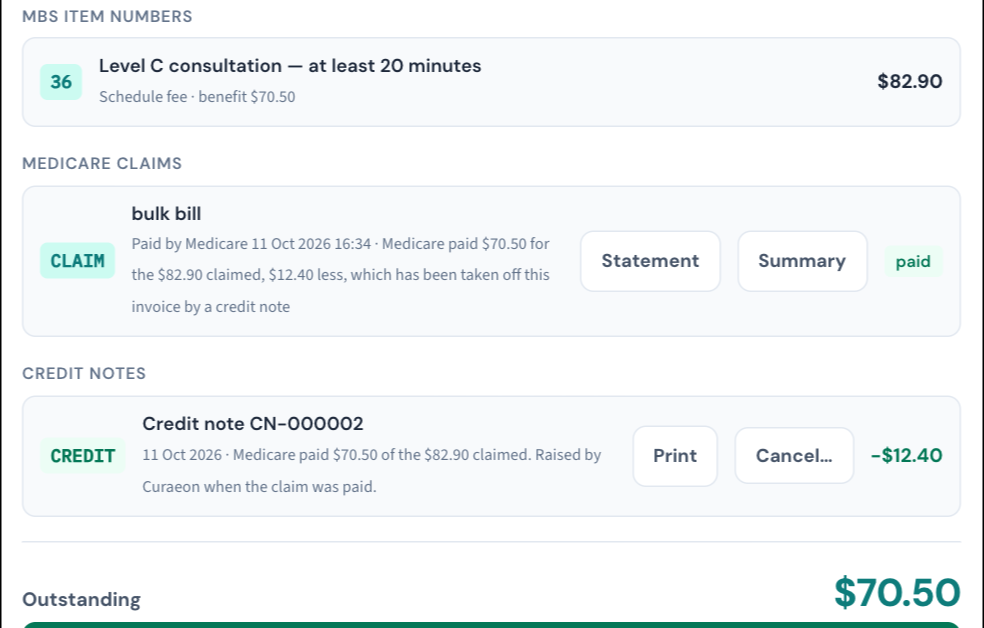
Outstanding on the invoice is then what the funder paid. When the money reaches your account, choose Record payment: the amount starts at what is outstanding, and recording it marks the invoice paid.
Things to know:
- A credit note is never for more than is still owing. If the full amount had been recorded as paid before the claim was paid, Curaeon raises nothing, and the claim's line says what was paid without saying the difference was taken off. Correct the payment that was recorded (KB-148 — Take a payment, give a receipt, void or correct an invoice).
- An invoice recorded as paid that is then owed more goes back to Issued. This happens when the funder paid more than was claimed after the invoice had been marked paid. Choose Record payment for the rest.
- A claim paid nothing has its whole invoice credited, and the invoice shows as paid with no money on it.
- A claim paid for only some of its items has the rest taken off with it. That claim cannot be sent again. If the refused item should be claimed, bill it on a new invoice.
- Nothing is changed on a patient claim, on a private invoice, where Tyro Health reported no amount, or for a claim paid before this was added.
- The credit note can be cancelled like any other, by someone who holds
billing.adjust(KB-148 — Take a payment, give a receipt, void or correct an invoice). The amount is then owing on the invoice again.
Ask now with Check now
Check now appears on a submitted or accepted claim, on the invoice and on the claims list. It asks Tyro at once and shows the answer.
| The answer | What it means |
|---|---|
| Waiting on the patient: Tyro has texted them a link… | The patient has not agreed yet. The claim goes to Medicare once they do. |
| The patient has agreed to assign the benefit, and the claim has gone to Medicare. Medicare has not decided yet… | This check is what learned that the patient agreed. The claim's line now says so. |
| Medicare has not decided yet… | Tyro has the claim and is waiting on Medicare. The message says bulk-bill claims are usually assessed by the next business morning. |
| Medicare has approved this claim; payment follows. | Approved. |
| Medicare has paid this claim. | Paid. |
| Medicare declined this claim: the reason and a code | Rejected. The line on the invoice now shows the reason. |
| Nothing has changed since the last check. | No news. |
| Tyro reads this claim as … which does not fit a claim that is already … | Tyro's answer conflicts with the claim's status. Nothing was changed. Raise a ticket with the invoice number. |
| Tyro Health could not be reached to check the claim. Try again shortly. | Tyro or your internet connection is down. Curaeon keeps asking on its own. |
| nothing to check with Tyro: the claim is already paid (or rejected) | The claim had already moved on before you asked. Nothing is wrong: the invoice, or the claims list, is read again after the answer, so the claim's line now shows where it is. |
For a DVA claim the same answers name DVA, and the waiting answer says DVA can take up to two business days.
Curaeon records the patient's agreement on its own, the next time it asks Tyro about the claim, or sooner if Tyro reports it first. The line then reads patient agreed to assign the benefit (recorded …), with a date and time. That time is when Curaeon learned of the agreement, which can be some minutes after the patient tapped the link. Check now asks at once, so use it when the patient tells you they have agreed and the line still says it is waiting for them.
Work the claims list
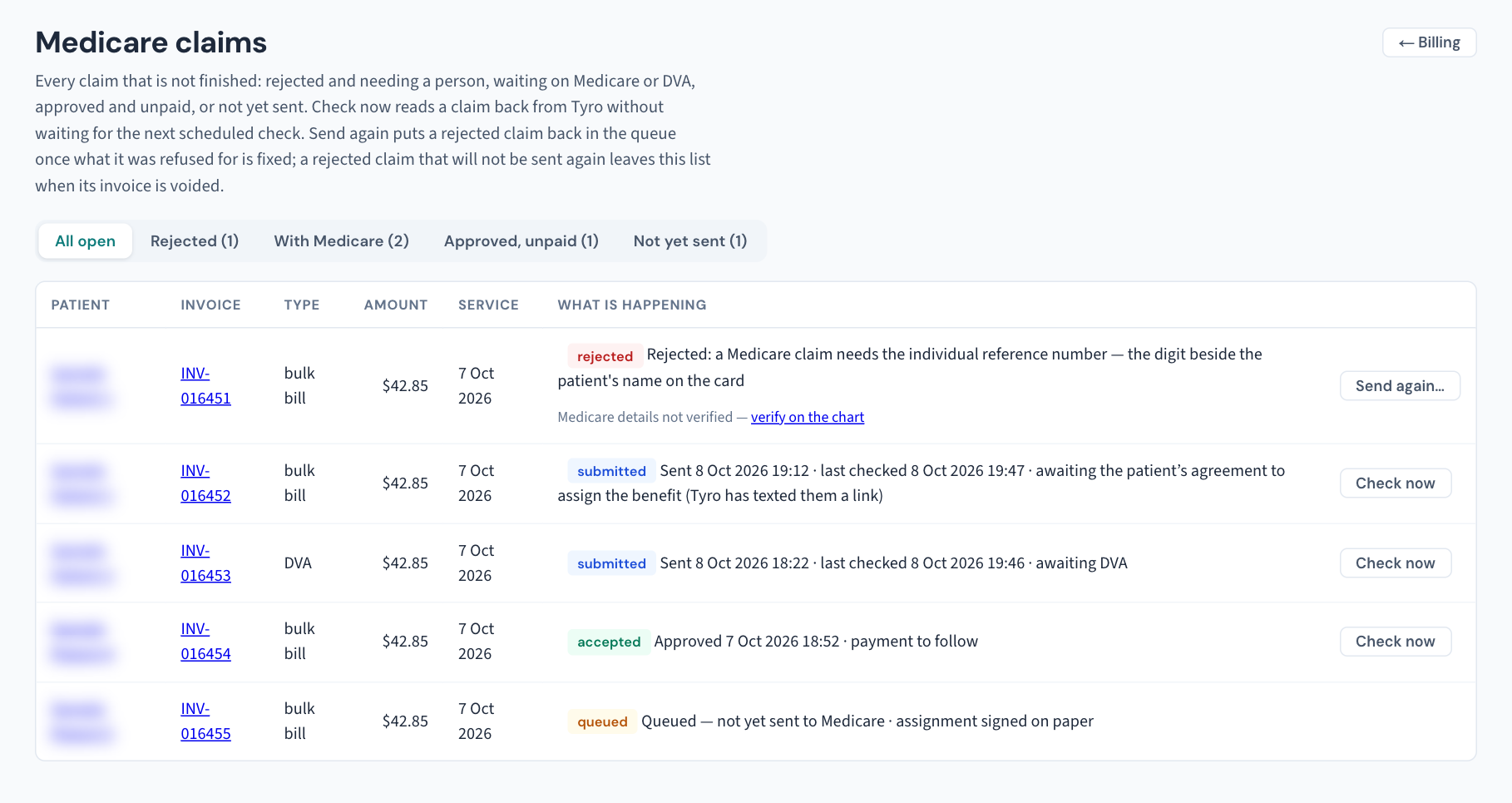
Open Billing, then Medicare claims in the toolbar. The list holds every claim that is not finished. Paid and cancelled claims are not on it, and nor is any claim whose invoice has been voided.
| Group | What is in it |
|---|---|
| All open | Everything below, rejected first. |
| Rejected | Needs a person. |
| With Medicare | Sent. This includes DVA claims, and bulk bills still waiting for the patient to agree. |
| Approved, unpaid | Approved, payment to come. |
| Not yet sent | Queued. |
Each row links to the patient and the invoice and shows the type, amount, service date and what is happening. The list words the same states a little more briefly than the invoice does: Sent for sent to Tyro, to Medicare or to DVA, Approved, and Queued — not yet sent to Medicare (or to DVA). A sent claim's row has Check now, and a rejected claim's row has Send again…. A queued or rejected Medicare claim whose patient has never been confirmed by Medicare shows Medicare details not verified with a link to the chart.
The list shows at most 500 rows. Past that it says Showing the first 500 open claims, in the order they need attention; the counts above are complete. Work the top of the list and the rest follows.
When a claim is rejected
Read the reason first, on the invoice or in the Rejected group. It is in Medicare's, DVA's or Tyro's own words. KB-017 — Medicare claim rejections — common causes and fixes lists the reasons Curaeon gives itself. What was wrong decides what you do next:
- A reason about one item starts with that item's number, for example Item 104: 611 Referral/request details not supplied - no benefit payable. Where more than one item was refused, each is listed.
- A claim can be sent one day and rejected the next. Medicare assesses some claims the morning after they are sent, so check the Rejected group each morning.
| What was wrong | What to do |
|---|---|
| The patient's details: card, IRN, name, date of birth or mobile number | Fix them on the patient's record, then Send again… (below). |
| The doctor's provider number is right, but was not registered or active with Tyro | Register it with Tyro (KB-162 — Register each provider with Tyro before the first claim), then Send again…. |
| The accepted disability on a White Card holder's DVA claim | Send again… asks for it again. Correct it in the window (KB-159 — Claim for a DVA patient, and lodge a private patient's Medicare claim for them). |
| The claimant on a patient claim | Send again… asks who is claiming again. Fix the claimant's own record, or choose someone else (KB-159 — Claim for a DVA patient, and lodge a private patient's Medicare claim for them). |
| A referral the item needed was not stated, or the one stated was wrong | Void & correct the invoice. When you queue the claim on the corrected one, open Referral and state it (KB-052 — Raise, correct and claim an invoice, including when "Send to Medicare…" is blocked). Send again… does not ask about a referral. |
| An item or a fee on the invoice, or the provider number recorded for the doctor in Curaeon | Void & correct the invoice and claim on the corrected one. See "When the invoice itself is wrong". |
| The invoice is for the wrong patient or the wrong provider | Void invoice, then raise a new invoice. See "If the claim should not be sent again". |
A claim keeps the items, fees and provider number it was queued with. Sending it again sends those again, so a rejection about any of them is not fixed by Send again. The patient's details are read afresh each time a claim is sent.
Send the claim again
- Fix the cause on the patient's record.
- Choose Send again… on the rejected claim. It is on the claim's row on the invoice and in the Rejected group of the claims list.
- Read the window. It repeats why the claim was not accepted. Choose Send again, or Cancel to leave the claim as it is.
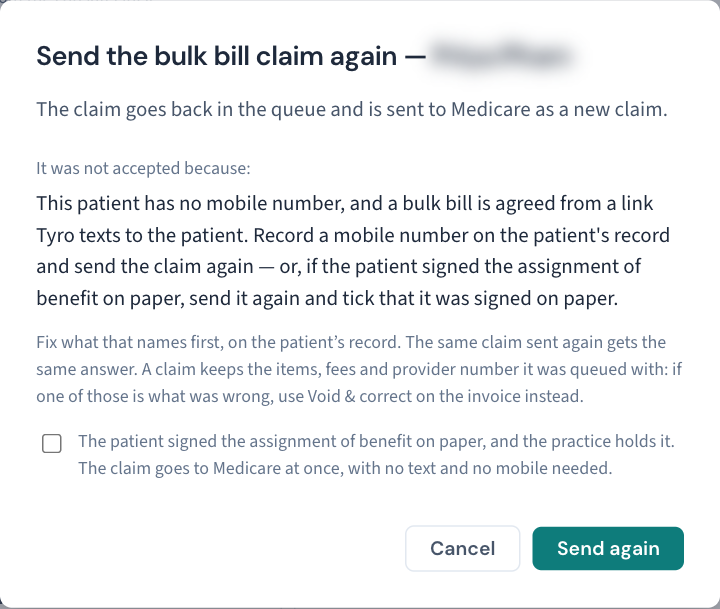
The claim goes back to Queued — ready to send, and Curaeon sends it as a new claim, the same way it sent the first. The rejection reason is cleared from the claim's line. It stays in the Audit log (KB-101 — Find who did what in the Audit log: kinds, Sign-ins, Exactly, Who and a bookmarkable view).
Important: Fix the cause before you send again. Send again changes nothing about the claim except, for a bulk bill, the paper tick below. The same claim sent again gets the same answer.
For a bulk bill, at a practice that uses Tyro's text, the window also has the tick box The patient signed the assignment of benefit on paper, and the practice holds it. It starts as the claim was first queued. Tick it only if you hold the signed form (KB-158 — Assignment of benefit for a bulk bill: Tyro's text to the patient, or signed on paper). Leave it empty and the new claim waits for the patient's agreement again, even if they agreed to the one that was rejected.
Send again… is offered only on a rejected claim, and not once the claim's invoice has been voided.
If the claim should not be sent again
A claim billed to the wrong patient, or for a visit you have since billed on another invoice, should not go again. Choose Void invoice on its invoice (KB-148 — Take a payment, give a receipt, void or correct an invoice). The rejected claim then leaves the claims list. It stays on the voided invoice as the record of what was refused, and it can no longer be sent again.
When the invoice itself is wrong
Void & correct voids the invoice and opens an editable copy with the same patient, provider and items (KB-148 — Take a payment, give a receipt, void or correct an invoice). Use it when a claim was rejected for an item, a fee or the provider number recorded for the doctor:
- Correct the provider number first, if that was the cause (KB-162 — Register each provider with Tyro before the first claim).
- On the invoice, choose Void & correct, type the reason, and choose Void & correct again.
- On the copy, fix the items or fees, then choose Issue invoice.
- Open the issued invoice from Billing and queue its claim.
The rejected claim stays on the voided invoice as the record of what was refused, and leaves the claims list. The corrected invoice has a claim of its own.
Under a rejected claim, the invoice says which way to go: Void & correct if an item, a fee or the provider's number was wrong, Send again… if only the patient's details were.
Both buttons depend on where the claim is. Neither is offered while money is still recorded on the invoice: refund the payment first (KB-148 — Take a payment, give a receipt, void or correct an invoice).
| The claim is | Void & correct | Void invoice |
|---|---|---|
| queued | Offered. The claim is cancelled, and it is not sent. | Offered. The claim is cancelled, and it is not sent. |
| submitted or accepted | Not offered. | Not offered. A line under the buttons says the invoice has a claim that has not been answered yet. Use Check now, and wait for the answer. |
| rejected | Offered. The claim stays on the voided invoice and leaves the claims list. | Offered. The claim stays on the voided invoice and leaves the claims list. |
| paid | Not offered. | Not offered. A claim on the invoice has been paid. Record the benefit as a payment instead. |
If that didn't work
- A claim stays queued. A claim is normally sent within moments. If Curaeon cannot reach Tyro it tries again on its own for about three hours, then stops. The screen does not say so. If a claim still reads Queued — ready to send after that, raise a ticket with the invoice number.
- The Tyro Health line above the Billing screens. Under the menu bar on every Billing screen, a line headed Tyro Health says what your server does with a queued claim: Filing automatically, Claims held in outbox or Not connected. If claims stay queued and the line reads either of the last two, your server is not sending claims. Raise a ticket. Status unavailable means it could not find out. Reload the page. New Medicare claim does not show the line. The box at the top of its right-hand column says the same, and a badge beside its heading reads Filed automatically, Held in outbox, Tyro not connected or Filing status unavailable.
- The line says "Test environment". On a server that is connected to Tyro but not to Tyro's live system, the line adds Test environment: this server is not pointed at Tyro's live system., and New Medicare claim has a second badge, Test environment. A claim sent from that server is a test, not a real claim. If you see this on the server your practice bills from, raise a ticket before you queue another claim.
- Send again answers "Only a rejected claim can be sent again, and this one is …". Someone else has already sent it again, or its answer has changed. Reload the page and read the claim's line.
- Administrators see a banner at the top of Billing, headed These claims can't be submitted yet., when queued claims cannot be sent. It names a doctor with no provider number (on claims queued before 26 October 2026, when Curaeon still queued them), a missing Medicare Minor ID, or says This server is not filing claims with Tyro. In the last case the claims stay queued and none is sent. Filing is switched on in the server's configuration, not on a screen, so raise a ticket.
- If Billing cannot check this, it says Billing could not check, with what it could not check and Try again. A warning that belongs here may be missing, so choose Try again rather than taking its absence to mean nothing is wrong.
Still stuck? Raise a ticket at support.curaeon.com.au or call 1300 XXX XXX. If your clinic can't see patients right now, call and choose option 1. Support is staffed Monday to Friday, 8:00–18:00 Sydney time; outside those hours a call or text to the same number is answered on a best-effort basis.
Related articles
- KB-052 — Raise, correct and claim an invoice, including when "Send to Medicare…" is blocked — Raise, correct and claim an invoice, including when "Send to Medicare…" is blocked
- KB-017 — Medicare claim rejections — common causes and fixes — Medicare claim rejections — common causes and fixes
- KB-157 — Verify a patient's Medicare card with Medicare — Verify a patient's Medicare card with Medicare
- KB-158 — Assignment of benefit for a bulk bill: Tyro's text to the patient, or signed on paper — Assignment of benefit for a bulk bill: Tyro's text to the patient, or signed on paper
- KB-159 — Claim for a DVA patient, and lodge a private patient's Medicare claim for them — Claim for a DVA patient, and lodge a private patient's Medicare claim for them
- KB-162 — Register each provider with Tyro before the first claim — Register each provider with Tyro before the first claim
- KB-169 — Print the form for a patient, or a summary, for a Medicare or DVA claim — Print the form for a patient, or a summary, for a Medicare or DVA claim