Print the form for a patient, or a summary, for a Medicare or DVA claim
Print the form Tyro Health produces for a claim, to give to the patient. Or print Curaeon's own one-page summary of the claim for the practice's file.
Note: This applies once your practice's Tyro connection is switched on. Until then, Send to Medicare… shows what would be sent and files nothing.
Two pages for one claim
A claim that has been sent through Tyro Health has two links on its row: Statement and Summary.
| Link | What it opens | Who it is for |
|---|---|---|
| Statement | The form Tyro Health produces for the claim. For a bulk bill it is a bulk bill assignment advice. For a patient claim it is a lodgement advice. For a DVA claim it is a DVA treatment service voucher. | The patient. |
| Summary | Curaeon's own page: what was claimed, under which provider number, and where the claim stands. | The practice's file. |
Tyro sends the patient nothing for a claim that Curaeon files, so the form behind Statement is the copy to give them. Curaeon's summary is not that form.
Neither page is a tax invoice or a receipt. For those, use View receipt on the invoice (KB-148 — Take a payment, give a receipt, void or correct an invoice).
Note: This article does not say what your practice must give a patient for a claim it has lodged. Check your own obligations with Services Australia or your practice's adviser.
Before you start
- Any signed-in member of staff can open and print either page.
- A claim has both once it has been sent. One that is still queued, was cancelled before it was sent, or was stopped before it was lodged has neither.
- The links are on the invoice's full page. They are not in the quick view on the Billing list, and they are not on the claims list.
Print the form for the patient
- Open Billing and choose the invoice's row.
- In the small window, choose Open full page ↗.
- Find the claim under Medicare claims. On an invoice whose only claims are DVA claims the block is headed DVA claims.
- Choose Statement on the claim's row. A new tab opens and reads Fetching the form from Tyro Health… while Curaeon asks Tyro for it.
- The form appears under a line that reads This is Tyro Health's form for the claim: the one to give the patient. Check it, then choose Print.

From the claims list (KB-156 — Follow a Medicare or DVA claim: its status, Check now and the claims list), choose the invoice number on the claim's row to reach the same page.
Curaeon fetches the form from Tyro each time you open it and shows it as it comes. Nothing on the form is Curaeon's wording, and Curaeon keeps no copy.
When the form cannot be shown
The page says so in one sentence that begins Tyro Health's form for this claim cannot be shown:. Under it is Open Curaeon's summary of this claim, which is not the form itself.
| The sentence ends | What it means | What to do |
|---|---|---|
| The form could not be fetched from Tyro Health. Try again shortly. | Tyro did not answer, or did not answer with the form. | Choose Try again beside the sentence. If it repeats, raise a ticket with the invoice number. |
| The server could not be reached. | Your browser could not reach your practice's Curaeon server. | Choose Try again (KB-170 — When part of a screen says it could not be loaded: Try again, and what Loading… means). |
| Tyro Health is not connected for this practice yet, so its form for this claim cannot be fetched. | This server has no Tyro connection. | Print the summary for the file. Raise a ticket if your practice claims through Tyro. |
| Tyro Health holds this claim and has produced no form for it. | Tyro has the claim and returned no form. | Raise a ticket with the invoice number. |
| Tyro Health holds no transaction under this claim's reference, so it has no form for it. | The reference on the claim does not match anything Tyro holds for your practice. | Raise a ticket with the invoice number. |
| This claim was not sent through Tyro Health, so Tyro has no form for it. | The claim was marked as sent without going through Tyro. | Use the summary. |
| This claim has not been sent yet, so there is no form for it. | The claim is queued. You reached the page from a saved link, or the claim was sent again after you opened it. | Wait until the claim has been sent. |
| the print could not be recorded, so the form was not given out | Curaeon could not write the Audit log entry, so it did not show the form. | Choose Try again. If it repeats, raise a ticket. |
Print the summary
Follow steps 1 to 3 above, then choose Summary on the claim's row. The summary opens in a new tab. Check the page, then choose Print.
Above the page, a line reads This is Curaeon's summary. The form to give the patient is Tyro Health's form for this claim. The link in it opens the form.
A claim that was not sent through Tyro Health has Summary alone. Tyro has no form for that claim, so there is no Statement link.
When the links are offered
| The claim is | The links |
|---|---|
| queued | Not offered. Nothing has been sent, so there is nothing to state. |
| submitted | Offered. This includes a bulk bill that is still waiting for the patient to agree. |
| accepted | Offered. |
| paid | Offered. |
| rejected, after it was sent | Offered. The summary gives the funder's reason. |
| rejected, before it was sent | Not offered. See "A claim stopped before it was lodged" below. |
| cancelled | Not offered. The claim was never sent. |
The links follow the claim, not the invoice. A claim that was sent and declined still has them after its invoice has been voided.
Tip: If you want a copy of a declined claim's summary, print it before you choose Send again…. Sending again puts the claim back to queued, and the reason it was declined is cleared from it (KB-156 — Follow a Medicare or DVA claim: its status, Check now and the claims list). It has both pages again once it has been sent, and they are for the new claim.
What the summary prints
The rest of this article is about Curaeon's summary.
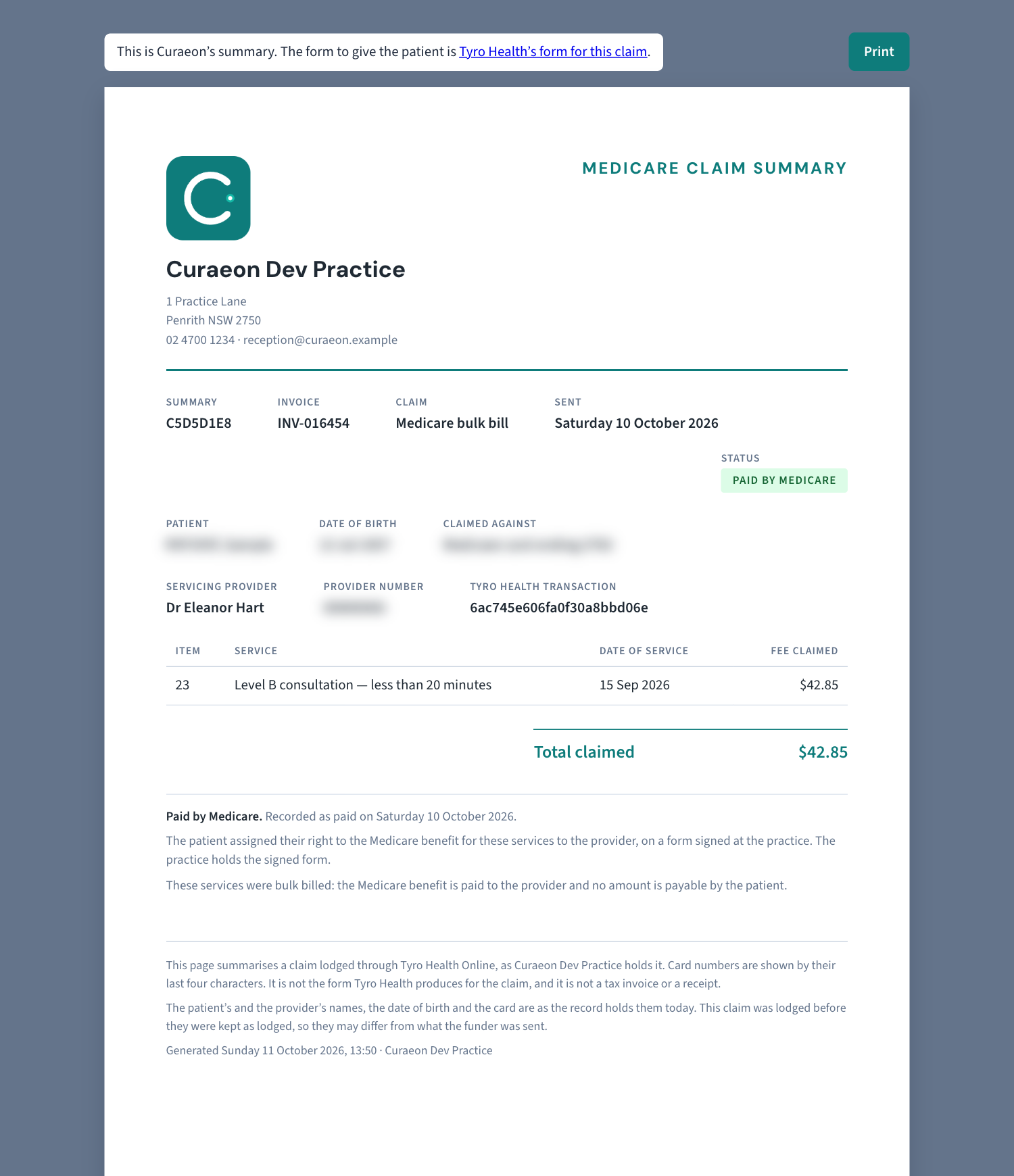
The page is headed with your practice's letterhead and titled Medicare Claim Summary or DVA Claim Summary.
| On the page | What it is |
|---|---|
| Summary | A short number for this claim's summary, eight letters and digits. It is the same each time the summary is printed. |
| Invoice | The invoice number. |
| Claim | Medicare bulk bill, Medicare patient claim or DVA claim. |
| Sent | The date the claim was sent. |
| Status | Where the claim stands. See the next section. |
| Patient, Date of birth | The patient the claim is for. |
| Claimed against | The card, by its last four characters only: Medicare card ending … with the reference number, or DVA file number ending …. |
| Servicing provider, Provider number | The doctor, and the provider number the claim went under. |
| Benefit paid to provider | The provider number the benefit is paid to. Shown only when the claim named a provider other than the servicing provider. |
| Referral | What the claim told the funder about a referral: Referred by the practitioner, their number and the date, or No referral and the reason (KB-052 — Raise, correct and claim an invoice, including when "Send to Medicare…" is blocked). Shown only when the claim said something about a referral. |
| Tyro Health transaction | Tyro's reference for the claim. |
| Item, Service, Date of service, Fee claimed | One row for each service on the claim. |
| Total claimed | The fees claimed, added up. |
Under the total, the page says in sentences:
- where the claim stands, and the date of the answer if there is one;
- for a declined claim, Medicare's reason: or DVA's reason: in the funder's own words;
- for a bulk bill, how the patient assigned their benefit: by the link Tyro texted them, with the date that was recorded, or on a form signed at the practice (KB-158 — Assignment of benefit for a bulk bill: Tyro's text to the patient, or signed on paper);
- for a DVA claim given outside the rooms, Service given on a visit. or Service given in hospital with the facility number (KB-159 — Claim for a DVA patient, and lodge a private patient's Medicare claim for them);
- who the benefit goes to. A bulk bill reads These services were bulk billed: the Medicare benefit is paid to the provider and no amount is payable by the patient. A DVA claim reads These services were billed to the Department of Veterans' Affairs. No amount is payable by the patient. A declined claim says instead that no benefit or payment has been made.
The foot of the page reads This page summarises a claim lodged through Tyro Health Online, as your practice holds it, says card numbers are shown by their last four characters, and says It is not the form Tyro Health produces for the claim, and it is not a tax invoice or a receipt. The last line gives the date and time the page was made, your practice's name and, when one is set, its ABN.
It prints what was lodged
The services, the fees and the provider number are the ones the claim was queued with. That is what Medicare or DVA was sent. If the doctor's provider number has been corrected in Settings → Users since, the summary still shows the number the claim went under.
The patient's name, date of birth and card ending, and the doctor's name, are also as lodged. Curaeon keeps them when the claim is sent, so a patient who has since changed their name, or whose date of birth or card has since been corrected, is printed as they were claimed for.
A claim that was sent before Curaeon began keeping those details has none kept. Its summary prints the names as the record holds them today, and its last line says so: "The patient's and the provider's names, the date of birth and the card are as the record holds them today." If the record has changed since that claim, the names may differ from what the funder was sent.
It shows no benefit amount
The summary shows the fee claimed for each service. It does not show the benefit Medicare or DVA assessed or paid. Curaeon holds the answer to a claim: approved, paid or declined. It does not hold the amount the funder worked out, so it does not print one.
The card is never printed whole
The page shows the last four characters of the Medicare card or DVA file number. That is enough for the patient to recognise their card. The full number is not sent to the page at all.
What each status means
| The summary says | What it means |
|---|---|
| Waiting for the patient's agreement | A bulk bill sent with Tyro's text. The patient has not tapped the link yet, and nothing has gone to Medicare. The page says the claim goes to Medicare once they agree. |
| Lodged with Medicare, not yet assessed, then Medicare has not given its decision yet. | Medicare has the claim and has not answered. |
| Approved by Medicare, then Approved on the date, payment follows. | Approved, not yet paid. |
| Paid by Medicare, then Recorded as paid on the date | Medicare has paid the claim. The date is when Curaeon recorded it. Where Tyro Health reported the amount, the page also says Medicare paid $… for the items above, and which were claimed at $… when the two differ (KB-156 — Follow a Medicare or DVA claim: its status, Check now and the claims list). |
| Declined by Medicare, then Declined on the date and Medicare's reason: | The claim was rejected. The reason and its code are printed as Medicare or Tyro gave them (KB-017 — Medicare claim rejections — common causes and fixes). |
A DVA claim's summary names DVA in each of these in place of Medicare.
A patient claim's summary reads Assessed by Medicare, then Assessed on the date, in place of the approved and paid rows: Medicare pays a patient claim's benefit to the claimant, so nothing is paid to the practice. It says This is a patient claim: Medicare pays the benefit to the claimant, not to the practice. When the claimant was not the patient, it names them: Claimant: their name and the ending of their Medicare card (KB-159 — Claim for a DVA patient, and lodge a private patient's Medicare claim for them).
A claim stopped before it was lodged
A claim can be rejected without reaching Medicare or DVA. Curaeon stops a Medicare claim when the patient's card does not verify (KB-157 — Verify a patient's Medicare card with Medicare), and Tyro refuses a claim it cannot accept (KB-017 — Medicare claim rejections — common causes and fixes). The claim's badge reads rejected and the reason is on the invoice, but no claim was lodged, so the funder has decided nothing.
That claim has no Statement or Summary link. Fix the cause and choose Send again… (KB-156 — Follow a Medicare or DVA claim: its status, Check now and the claims list). The claim has both pages once it has been sent.
The status on the page is the status when you opened it. If the claim may have moved on, use Check now on the invoice first (KB-156 — Follow a Medicare or DVA claim: its status, Check now and the claims list), then open the summary again.
When the summary will not print
The summary is printed whole or not at all. If any part of it cannot be read, the page shows one sentence in place of the summary and has no Print button.
| The page says | What it means | What to do |
|---|---|---|
| This claim has not been sent to Medicare yet, so there is nothing to state. Its summary can be printed once the claim has been sent. | The claim is queued. You reached the page from a saved link, or the claim was sent again after you opened it. | Wait until the claim has been sent, then choose Summary on the invoice. |
| This claim was cancelled before it was sent to Medicare. No claim was lodged, so it has no summary. | The invoice was voided or corrected while the claim was still queued. | Nothing. There is no claim to state. |
| This claim was stopped before it was lodged with Medicare, so Medicare has made no decision on it and there is nothing to state. The reason it was stopped is on the invoice. | The claim was rejected before it was sent: the card did not verify, or Tyro would not take the claim. | Read the reason on the invoice, fix the cause and choose Send again… (KB-156 — Follow a Medicare or DVA claim: its status, Check now and the claims list). |
| This claim summary cannot be printed: the practice's details could not be loaded … | The letterhead could not be read. | Choose Try again beside the sentence (KB-170 — When part of a screen says it could not be loaded: Try again, and what Loading… means). |
| This claim summary cannot be printed: What this claim was queued with cannot be read, so its summary cannot be made. Raise it with support, quoting the invoice number. | The record of what was sent cannot be read. | Raise a ticket with the invoice number. Do not include the patient's name. |
| This claim summary cannot be printed: and another reason | The claim could not be read. | Choose Try again beside the sentence. If it repeats, raise a ticket with the invoice number. |
For a DVA claim the first three sentences name DVA.
While the page is being put together it reads Loading the claim summary….
What is recorded
- Opening Tyro's form is recorded in the Audit log against the patient as Printed, naming it Claim form from Tyro Health, with your name and the invoice number. It is recorded when the form is fetched, each time, whether or not you go on to print it. A print from a PDF viewer is one Curaeon cannot see, so the fetch is what is logged.
- Opening the summary is recorded against the patient as Claim summary opened, with your name and the invoice number.
- Each print of the summary is recorded as Printed, naming the page as Claim summary. Printing from the browser's own menu is recorded the same way as the Print button.
Both are found in the Audit log (KB-101 — Find who did what in the Audit log: kinds, Sign-ins, Exactly, Who and a bookmarkable view).
What Curaeon does not do
- It does not email or text either page. Each has a Print button and nothing else.
- It does not change, fill in or keep Tyro's form.
- It does not print for several claims at once. Each claim has its own pages.
If that didn't work
If the links are missing on a claim, read the claim's badge. A queued or cancelled claim has neither page, and nor has a rejected claim that was stopped before it was sent. Check you are on the invoice's full page and not the quick view. If a sent claim on the full page has Summary and no Statement, it was not sent through Tyro Health. If it has neither, raise a ticket with the invoice number.
Still stuck? Raise a ticket at support.curaeon.com.au or call 1300 XXX XXX. If your clinic can't see patients right now, call and choose option 1. Support is staffed Monday to Friday, 8:00–18:00 Sydney time; outside those hours a call or text to the same number is answered on a best-effort basis.
Related articles
- KB-156 — Follow a Medicare or DVA claim: its status, Check now and the claims list — Follow a Medicare or DVA claim: its status, Check now and the claims list
- KB-157 — Verify a patient's Medicare card with Medicare — Verify a patient's Medicare card with Medicare
- KB-052 — Raise, correct and claim an invoice, including when "Send to Medicare…" is blocked — Raise, correct and claim an invoice, including when "Send to Medicare…" is blocked
- KB-158 — Assignment of benefit for a bulk bill: Tyro's text to the patient, or signed on paper — Assignment of benefit for a bulk bill: Tyro's text to the patient, or signed on paper
- KB-159 — Claim for a DVA patient, and lodge a private patient's Medicare claim for them — Claim for a DVA patient, and lodge a private patient's Medicare claim for them
- KB-148 — Take a payment, give a receipt, void or correct an invoice — Take a payment, give a receipt, void or correct an invoice
- KB-017 — Medicare claim rejections — common causes and fixes — Medicare claim rejections — common causes and fixes
- KB-101 — Find who did what in the Audit log: kinds, Sign-ins, Exactly, Who and a bookmarkable view — Find who did what in the Audit log: kinds, Sign-ins, Exactly, Who and a bookmarkable view