Email a letter to a patient: password, refused characters, "I can't open it"
Every message Curaeon shows when an email to a patient will not go, or the patient cannot open it — what each one means and what fixes it at the desk.
How emailing a patient works
A document can be emailed to a patient who has consented to email and has an address on file. The attachment is a password-protected PDF; the default password is the patient's date of birth as DDMMYYYY (the convention Australian pathology and radiology already use), and it can be changed per message. Everything sent is filed to the patient's record as outgoing correspondence.
The Send to patient box opens with a message already written, with the patient's first name in it. It is your practice's own wording if the practice manager has written one (KB-122 — Set up Settings → Patient messaging: email, SMS and WhatsApp channels, DKIM, the bounce mailbox and message wording), and Curaeon's built-in sentence if not. Read it and change it for this patient if you need to before you choose Send.
The PDF is set from the letter rather than approximating it — headings, typeface, colours, working links and tables all carry across. A letter that runs to more than one page names the patient at the top of every page after the first, with "Page 2 of 3" at the foot, so a separated sheet can still be filed to the right person.
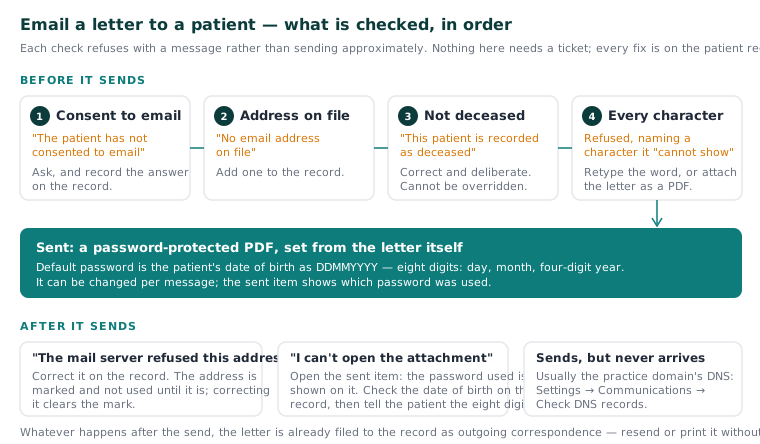
Before it sends
| What you see | What it means | What to do |
|---|---|---|
| "The patient has not consented to email" | No email consent is recorded | Ask the patient and record their answer on the record. |
| "No email address on file" | The record has no address | Add one. |
| "This patient is recorded as deceased" | Correct, and deliberate | Nothing to fix. This cannot be overridden. |
| Refused, naming a character it "cannot show" | The letter contains a character the PDF's fonts have no glyph for — most often a name with marks outside the Western European set | Retype that word, or compose the letter as a PDF and attach it. |
The character refusal is a design choice, not a fault: a letter is refused rather than sent approximately, because a name silently dropped from a letter addressed to that person is worse than a refusal.
After it sends
| What you see | What it means | What to do |
|---|---|---|
| "The mail server refused this address (…)" | The address is wrong, and the receiving server said so | Correct it on the patient record. The address is marked and stops being used until it is corrected; correcting it clears the mark automatically. |
| The patient says they cannot open the attachment | Attachments are password-protected | Open the sent item — the password used is shown on it. Confirm which password was set, and that the date of birth on the record is right, then tell the patient: eight digits, day, month, four-digit year. |
| Emails send but patients say they never arrive | Usually the practice domain's DNS | Settings → Patient messaging → Check DNS records. See KB-060 — Patient emails or SMS reminders not arriving: check Settings → Patient messaging. |
Worth remembering: the letter is filed to the record whether or not the email arrives, so a replacement can be sent or printed without rewriting it.
Sending by WhatsApp instead
If your practice has arranged WhatsApp with Meta (KB-140 — Arrange WhatsApp with Meta: the account, the number and the message templates Curaeon needs before it can send) and ticked it for letters, Send to patient uses WhatsApp for a patient who has WhatsApp consent on their record and whose preferred route it is in your practice's order. Three things differ from email:
- The patient reads your practice's approved message, not what you type. WhatsApp delivers only wording Meta approved in advance, so the Subject and Message boxes are kept with the record and are not sent. The dialog says so before you type.
- The letter travels as the same password-protected PDF when your practice has named a letter-with-document template; the approved message tells the patient the password is their date of birth unless the practice gave them another. Otherwise the patient gets a message that a letter is ready, with the number to call.
- It passes through Meta, outside Australia. That is why it needs the patient's WhatsApp consent, which is separate from their consent to texts or email.
If that didn't work
If the sent item shows the right password and the right date of birth and the patient still cannot open it, raise a ticket and say which letter and when — never paste the patient's details or the letter into the ticket (KB-007 — Why we never need patient details in a support ticket).
Still stuck? Raise a ticket at support.curaeon.com.au or call 1300 XXX XXX. If your clinic can't see patients right now, call and choose option 1. Support is staffed Monday to Friday, 8:00–18:00 Sydney time; outside those hours a call or text to the same number is answered on a best-effort basis.
Related articles
- KB-060 — Patient emails or SMS reminders not arriving: check Settings → Patient messaging — Patient emails or SMS reminders not arriving: check Settings → Patient messaging
- KB-049 — Build and import letter templates: Word upload, merge fields, pronoun fields, snippets — Build and import letter templates: Word upload, merge fields, pronoun fields, snippets
- KB-007 — Why we never need patient details in a support ticket — Why we never need patient details in a support ticket
- KB-106 — Write a letter in the editor: Insert from the record, { } Field, and the formatting that survives print and email — Write a letter in the editor: Insert from the record, { } Field, and the formatting that survives print and email
- KB-140 — Arrange WhatsApp with Meta: the account, the number and the message templates Curaeon needs before it can send — Arrange WhatsApp with Meta: the account, the number and the message templates Curaeon needs before it can send