Write a letter in the editor: Insert from the record, { } Field, and the formatting that survives print and email
Bring the patient's diagnoses, medications and results into a letter with one deliberate click, fill the administrative fields without retyping them, and use the few formatting choices that look the same on paper and in the emailed PDF.
Before you start
The editor is the same whether the letter is written from the consult or from the chart's New from template. Who the letter is to comes first (KB-048 — Refer a patient: find a provider in HealthLink/HealthShare, or record a referral without a letter); templates and the pronoun fields are an administrator's topic (KB-049 — Build and import letter templates: Word upload, merge fields, pronoun fields, snippets). What prints, downloads as .rtf or goes out as a PDF is what is on screen — there is no separate print layout to check.
A letter can also be drafted from the consult: it opens in the same editor, from what the consult already contains, as a draft to edit and sign — never correspondence that leaves on its own.
Put the record into the letter
- Place the cursor where the content should go.
- Choose Insert from the record and pick what to insert: active diagnoses, past history, current medications (as a list or a table), allergies, recent observations, immunisations, family history, social history or recent results.
- Read what arrived and edit it like anything you typed.
This is an explicit click on purpose: the clinician sees exactly what enters the letter. Clinical content is never a merge field for that reason. Confidential diagnoses are never inserted, and the letter carries no mention that anything was withheld — the count of withheld items is shown to you alone.
Fill the administrative fields
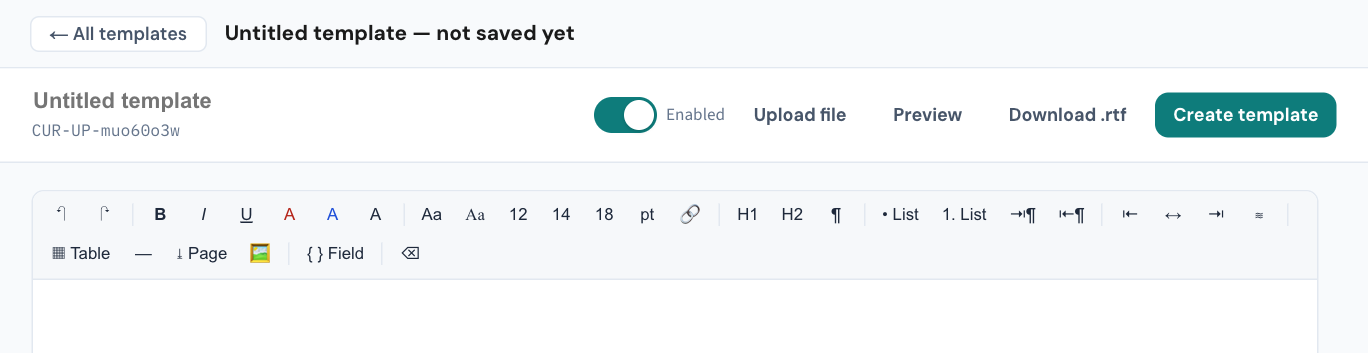
{ } Field on the toolbar opens the merge-field picker — every administrative field in the record, grouped (patient, pronouns, contact, identifiers and funding, the signing doctor, the practice, the recipient, the referral, dates) and searchable. In a letter it inserts the value, and shows the current value beside each field so a blank is seen before it goes in. Snippet… on the same bar inserts one of the practice's quick-text snippets with its fields already filled.
Format with what survives
- Typeface and size — two typefaces, sans serif and serif, and three sizes: 12, 14 and 18 point, where 12 is the body. Nothing below 12 is offered: it is the floor for anything printed, and these choices survive every way a letter leaves the practice.
- Colour — red and blue, to flag rather than decorate.
- Links — they survive to the emailed PDF as working links.
- Tables — emailed as ruled grids with the text wrapped inside each cell.
- Headings, lists, indent, alignment, a rule and a page break — as in the toolbar, with undo and redo.
What happens on the way out
- Printed: at 12 point on the letterhead; drafts are watermarked, so an unsigned letter cannot be handed over as final. A printed letter of more than one page carries no per-page patient header, so staple it.
- Emailed: a password-protected PDF set from the letter, with the patient's name and date of birth on every page after the first (KB-050 — Email a letter to a patient: password, refused characters, "I can't open it"). A character the PDF's fonts cannot show stops the send and names the character.
- Sent securely: with a status badge you can act on (KB-059 — Secure-messaging referral "Not delivered" or stuck on "Sent — awaiting confirmation").
- Filed: to the patient's record as outgoing correspondence whether or not it is sent electronically.
If that didn't work
Insert from the record brought nothing. The record holds nothing of that kind, or the items are confidential — the withheld count tells you which.
A field printed blank. The picker showed the value beside the field before you inserted it; a blank there means the record is blank. Fix the record, not the letter.
Still stuck? Raise a ticket at support.curaeon.com.au or call 1300 XXX XXX. If your clinic can't see patients right now, call and choose option 1. Support is staffed Monday to Friday, 8:00–18:00 Sydney time; outside those hours a call or text to the same number is answered on a best-effort basis.
Related articles
- KB-049 — Build and import letter templates: Word upload, merge fields, pronoun fields, snippets — Build and import letter templates: Word upload, merge fields, pronoun fields, snippets
- KB-050 — Email a letter to a patient: password, refused characters, "I can't open it" — Email a letter to a patient: password, refused characters, "I can't open it"
- KB-088 — Letters and referrals FAQ — Letters and referrals FAQ