Start a care plan from a template, share templates between sites, and keep Plan reviews and INR clear
Set up the practice's own care-plan starting points, write a plan that files as a plan, and work the two chronic-disease worklists — Plan reviews and INR — before a plan quietly stops working.
Before you start
Two things are both called "template", and they live in different places:
- Settings → Templates → Care plans holds the MBS-structured plan documents the letter composer offers on its Care plans tab. These are what you write and issue to the patient.
- Settings → Care plan templates holds the practice's own starting points: the conditions, goals, actions and services a new plan of that kind opens with. Curaeon ships none; the practice writes them or saves them from a plan.
Care plan templates are an administrator's page; writing a plan is a clinician's work.
Write a plan that files as a plan
- From the consult, open the letter composer and choose the Care plans tab.
- Pick the MBS-structured plan. It is filed as a care plan, not a generic document, so it can be found as one later — and it is issued to the patient the way a certificate is.
- An allied-health referral written alongside it stays a referral, because it is one; filing it as a plan would misfile it (KB-048 — Refer a patient: find a provider in HealthLink/HealthShare, or record a referral without a letter).
Give the practice its own starting points
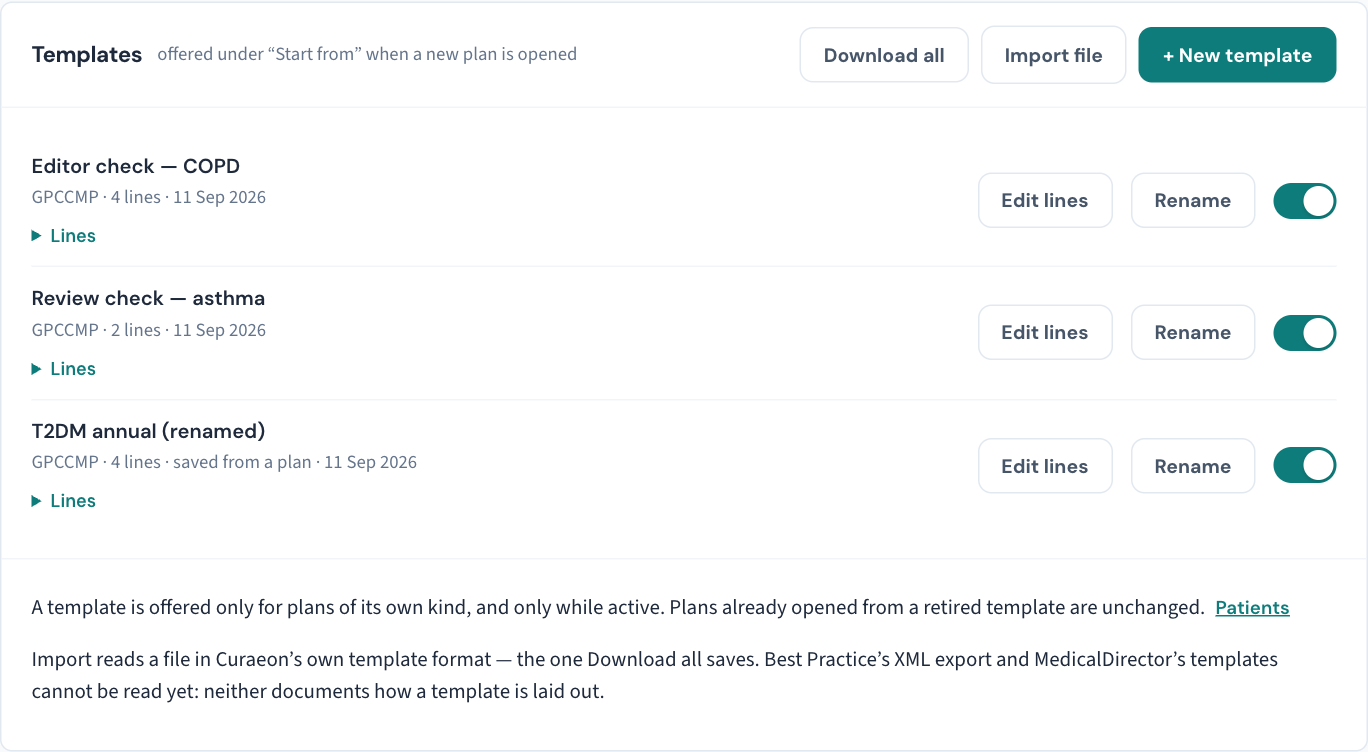
- Open Settings → Care plan templates and choose + New template, or save one from a plan you have already written with Save as template on the plan page.
- Give it a name, and fill in the lines — conditions, goals, actions and services.
- Leave it active. A template is offered under Start from only for plans of its own kind and only while active; plans already opened from a retired template are unchanged.
Move templates to another Curaeon site
Download all saves every template in Curaeon's own template format; Import file on the other site reads that file. This is for a second practice, or a group standardising its plans.
What cannot be imported yet: Best Practice's and MedicalDirector's care plan templates. Neither system documents how a template is laid out, so Curaeon does not guess at one. Bring those across by writing them here once, or by writing one plan and saving it as a template.
Work Plan reviews
Plan reviews (in the sidebar) lists active plans due for review, most overdue first, with counts of how many are overdue and how many fall due within the period you are looking ahead. Filter by clinician, by plan type, and by how far ahead to look. A plan nobody reviews is a plan that has stopped working, which is what the screen exists to prevent.
Work INR
INR is the warfarin monitoring worklist: every patient on anticoagulation whose INR is due or past due, most overdue first, with the last INR, the target range, the indication and when they were last reminded. Recording an INR result is bookkeeping; what this screen answers is who should have been tested and has not been. Remind a patient from the row, or open their anticoagulation record.
What the lists leave out
Both worklists leave a restricted record's rows out for anyone not named on it, and say how many they left out, so a list never looks finished when it is not. The counts at the top still include them (KB-061 — Restrict a patient's record, and open one in an emergency).
If that didn't work
A template that is not offered under Start from is usually inactive or of a different kind from the plan being opened. An import that is refused is usually a file from another system rather than Curaeon's own format.
Still stuck? Raise a ticket at support.curaeon.com.au or call 1300 XXX XXX. If your clinic can't see patients right now, call and choose option 1. Support is staffed Monday to Friday, 8:00–18:00 Sydney time; outside those hours a call or text to the same number is answered on a best-effort basis.
Related articles
- KB-049 — Build and import letter templates: Word upload, merge fields, pronoun fields, snippets — Build and import letter templates: Word upload, merge fields, pronoun fields, snippets
- KB-051 — Run recalls: book from a recall, and why a recall stays open or comes back — Run recalls: book from a recall, and why a recall stays open or comes back
- KB-061 — Restrict a patient's record, and open one in an emergency — Restrict a patient's record, and open one in an emergency
- KB-078 — Print a medication summary chart, or a whole aged-care round — Print a medication summary chart, or a whole aged-care round