Patient emails or SMS reminders not arriving: check Settings → Patient messaging
Find out in one screen whether each channel can actually deliver, then work the two front-desk lists that catch the messages that did not land.
Before you start
Settings → Patient messaging is the first of the two checks the manual asks you to make before calling us (the other is the version banner at the top of every screen). You need to be an administrator to open it. Reception can work the Failed reminders worklist.
Step 1: read Settings → Patient messaging
- Open Settings → Patient messaging.
- Look at each channel — SMS, email and WhatsApp. Every channel shows whether it can actually deliver, and names what is missing if it cannot.
- Check What goes out on what. Each kind of message has a row. Reminders, recalls and INR messages go by text when nothing is ticked on their row, and by email where Email is ticked and the patient has consented; letters and referrals go only where a channel is ticked. WhatsApp is used only where the WhatsApp card reads Can send and the patient has WhatsApp consent (KB-140 — Arrange WhatsApp with Meta: the account, the number and the message templates Curaeon needs before it can send). To see what has actually left, open Settings → Messages (KB-123 — Read the reminder queue in Settings → Messages, and know which messages screen you need).
- For email, check DKIM signing and the bounce mailbox, then run Check DNS records.
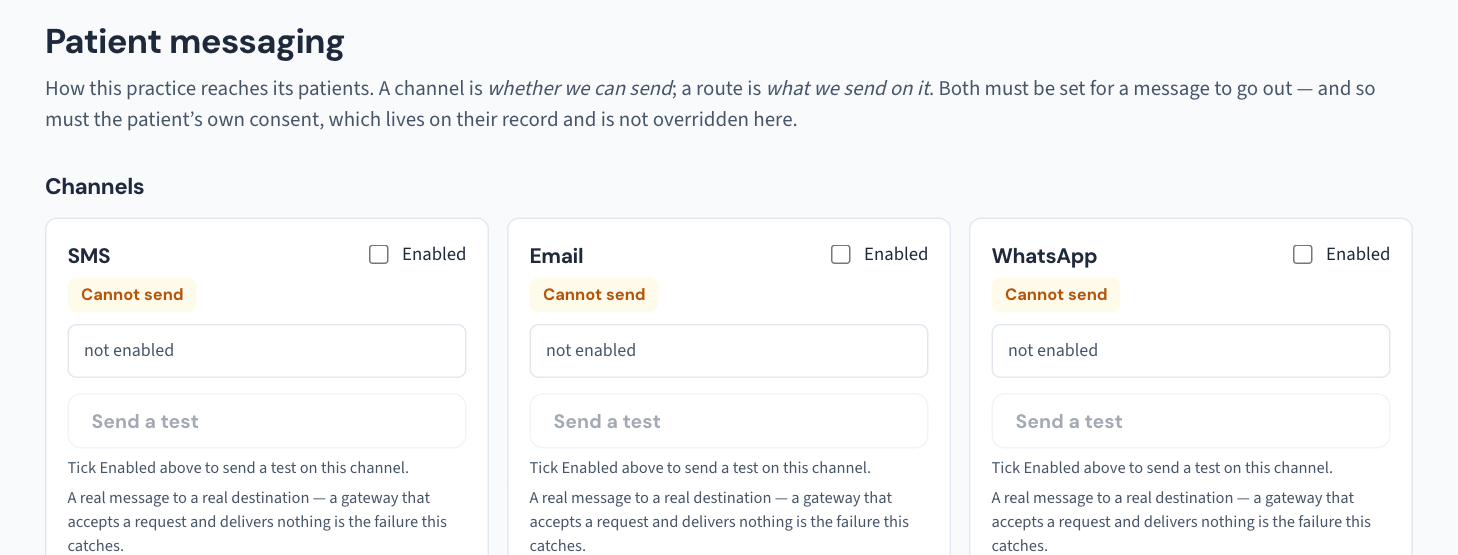
If a channel says it cannot deliver, what it names is the thing to fix. Changes to messaging channels are recorded in the Audit log with old and new values, so you can see who changed what.
Emails send but patients say they never arrive
The manual's answer is short: this is usually the practice domain's DNS. Run Settings → Patient messaging → Check DNS records and act on what it reports (the manual's email-deliverability.md guide has the detail). If the check names something you cannot change yourself, put the result on a ticket.
A single patient's email is refused
Curaeon tells you why before it gives up:
| What you see | What to do |
|---|---|
| "The patient has not consented to email" | Ask the patient and record it. |
| "No email address on file" | Add one. |
| "This patient is recorded as deceased" | Correct, and deliberate. It cannot be overridden. |
| "The mail server refused this address (…)" | The receiving server said the address is wrong. Correct it on the patient record — that clears the refusal automatically. |
A patient who receives the email but cannot open the attachment has a password problem, not a delivery one (KB-050 — Email a letter to a patient: password, refused characters, "I can't open it"): the default is their date of birth as DDMMYYYY, shown on the sent item.
SMS reminders that did not reach the patient
A recall reminder is sent by text, or by email where the practice has ticked email for recalls; a phone call or letter is made by a person and logged with Log contact. If texts are not leaving at all, check that the SMS card in Settings → Patient messaging reads Can send: that card is where the SMS gateway is connected (KB-122 — Set up Settings → Patient messaging: email, SMS and WhatsApp channels, DKIM, the bounce mailbox and message wording).
- Open the Failed reminders worklist. It lists every patient a reminder never reached.
- Correct the mobile number and retry — or ring the patient and mark it handled with a note.
- On a recall, Reminder history lists every SMS sent for it with its send state.
A patient's preferred contact, and their consent to SMS and email, are on their record; the recall panel shows the channel and whether consent is recorded.
If that didn't work
If Patient messaging says a channel can deliver, the DNS check is clean, and messages still vanish, raise a ticket with the channel and the time of a message that did not arrive — no patient names or numbers (KB-007 — Why we never need patient details in a support ticket).
Still stuck? Raise a ticket at support.curaeon.com.au or call 1300 XXX XXX. If your clinic can't see patients right now, call and choose option 1. Support is staffed Monday to Friday, 8:00–18:00 Sydney time; outside those hours a call or text to the same number is answered on a best-effort basis.
Related articles
- KB-007 — Why we never need patient details in a support ticket — Why we never need patient details in a support ticket
- KB-059 — Secure-messaging referral "Not delivered" or stuck on "Sent — awaiting confirmation" — Secure-messaging referral "Not delivered" or stuck on "Sent — awaiting confirmation"
- KB-022 — Booking system sync issues — first steps — Booking system sync issues — first steps
- KB-122 — Set up Settings → Patient messaging: email, SMS and WhatsApp channels, DKIM, the bounce mailbox and message wording — Set up Settings → Patient messaging: email, SMS and WhatsApp channels, DKIM, the bounce mailbox and message wording
- KB-123 — Read the reminder queue in Settings → Messages, and know which messages screen you need — Read the reminder queue in Settings → Messages, and know which messages screen you need
- KB-140 — Arrange WhatsApp with Meta: the account, the number and the message templates Curaeon needs before it can send — Arrange WhatsApp with Meta: the account, the number and the message templates Curaeon needs before it can send