AI scribe FAQ
The questions clinicians ask about the scribe in their first month, answered in place — and the one fact to hold on to: the consultation is never blocked by it.
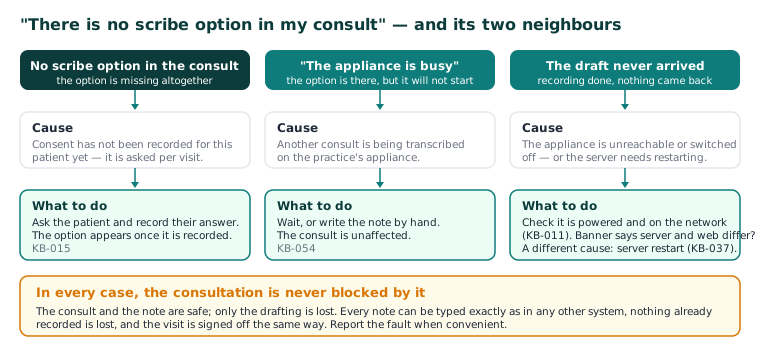
There is no scribe option in my consult
Consent has not been recorded for this patient yet. Ask the patient and record their answer; the option appears once it is recorded (KB-015 — AI scribe consent workflow explained).
Does the patient really have to consent every visit?
Yes. Consent is asked and recorded per visit and is never assumed from last time. Each answer goes to the Audit log with how it was asked and the consent wording. Being asked every visit is the design, not a fault.
Where does the audio go?
Nowhere outside the building. Audio and transcript are processed on the appliance on your practice's network, and the object store that holds patient documents and scribe audio is on the same network. Nothing is sent to any cloud service. The same is true of dictation.
It says "The appliance is busy"
Another consult is being transcribed. Wait, or write the note by hand — the consult is unaffected (KB-054 — Scribe option missing, "appliance is busy", or the draft never arrives).
The draft never arrived
The appliance is unreachable or switched off. Check it is powered and on the network (KB-011 — Appliance appears offline — five checks before you call). The consult and the note are safe; only the drafting is lost. If the banner at the top of the screen says the server and web are different versions, that is a different cause: the server needs restarting (KB-037 — Screens blank or behaving oddly after an update: the version-mismatch banner).
The scribe says the microphone is not available
This computer does not yet trust the practice's certificate, or the certificate has lapsed — browsers only allow the microphone on a page they trust. Do not click past the warning. On a new computer see KB-035 — Make a new PC, Mac or locum laptop trust Curaeon ("Your connection is not private"); if every computer warns at once, an administrator checks Settings → Certificates (KB-036 — A certificate is red in Settings → Certificates: what it means and who to tell).
The Assessment is empty. Is it broken?
No. The scribe drafts History, Examination and Plan. It never writes the Assessment — a boundary enforced by the software, not by convention — and nothing in Curaeon suggests an MBS item number or an attendance level. Type the Assessment as you would in any other system (KB-056 — Why the scribe never writes the Assessment or suggests item numbers).
Can it redo one section, or take dictation instead?
Both. Refine a section re-drafts one section — shorter, or in more detail — and leaves the others alone; nothing is applied until you accept it. Dictation puts what you say into the section you are working in, on the same appliance (KB-055 — Dictate into a section, refine a draft, and manage style memory and suggested follow-ups).
The drafts are starting to sound like me. Can I reset that?
That is style memory: it learns the headings and turns of phrase you keep and drafts in that shape. It is per clinician and can be cleared (KB-055 — Dictate into a section, refine a draft, and manage style memory and suggested follow-ups).
The Plan says "review in six weeks". Will it book that?
No. A follow-up the Plan mentions is offered as a follow-up to create, with the date filled in — offered, never created. The note is a record; making a commitment on the practice's behalf is a decision, not a transcription.
The draft says something that was not said
Review is not optional: the draft is a draft until you accept it, and the clinician's review is how the product is designed to be used (KB-014 — AI scribe — getting the best transcription quality). Anything the scribe asserted that was not said is exactly what we want to hear about — report it without quoting the record (KB-016 — Reporting an AI scribe quality concern).
The scribe stopped working mid-clinic. Is that an emergency?
Only if you decide it is. Every note can be typed exactly as it would be in any other system, nothing already recorded is lost, and the visit is signed off the same way. Report the fault when convenient. If the fault is on every computer at once, check Settings → AI Appliance for the appliance's health and link certificate (KB-057 — Check appliance health and link security in Settings → AI Appliance, and revoke a certificate).
Important: A scribe recording does not keep you signed in. Fifteen seconds before an idle sign-out the recording is stopped and written up from what it heard (KB-033 — Change how long Curaeon waits before signing you out, and end a session left open).
Still stuck? Raise a ticket at support.curaeon.com.au or call 1300 XXX XXX. If your clinic can't see patients right now, call and choose option 1. Support is staffed Monday to Friday, 8:00–18:00 Sydney time; outside those hours a call or text to the same number is answered on a best-effort basis.
Related articles
- KB-054 — Scribe option missing, "appliance is busy", or the draft never arrives — Scribe option missing, "appliance is busy", or the draft never arrives
- KB-055 — Dictate into a section, refine a draft, and manage style memory and suggested follow-ups — Dictate into a section, refine a draft, and manage style memory and suggested follow-ups
- KB-056 — Why the scribe never writes the Assessment or suggests item numbers — Why the scribe never writes the Assessment or suggests item numbers