Draft. This article is awaiting technical review and may change — if anything here conflicts with advice from our team, follow the team.
Quick reference: reception
The page to pin beside the front-desk monitor: each task, where it lives, what to press, and the day in order.
Print this page: the Help Centre's print view drops the navigation.
I want to…
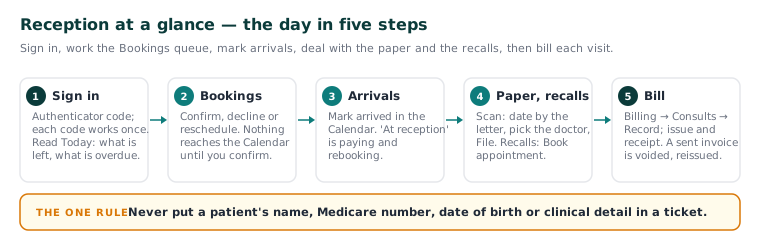
The day in order
| Do | More | |
|---|---|---|
| 1 | Sign in with your code; read Today | KB-031 — Set up two-factor sign-in for Curaeon, and fix a code that is rejected, already used or timed out |
| 2 | Work Bookings — nothing reaches the Calendar until you confirm | KB-022 — Booking system sync issues — first steps |
| 3 | Mark arrivals; at reception means paying and rebooking | KB-076 — Appointment statuses from pending to completed, and what "At reception" means |
| 4 | Scan the post; work Recalls and Failed reminders | KB-047 — Scan and file paper letters, including the appliance's pre-filled suggestions |
| 5 | Bill and receipt each visit | KB-052 — Raise, correct and claim an invoice, including when "Send to Medicare…" is blocked |
Before you call support
| Check | More |
|---|---|
| Version banner? The server needs a restart | KB-037 — Screens blank or behaving oddly after an update: the version-mismatch banner |
| One computer or everyone? Try the next computer | KB-068 — Use the standalone admin console when the main app won't load |
| Message not sent? An administrator reads Settings → Patient messaging | KB-060 — Patient emails or SMS reminders not arriving: check Settings → Patient messaging |
| Asked why you are opening a record? Normal — answer it | KB-062 — Why Curaeon asks your reason for opening a record |
| Note the screen, the time and the exact message | KB-082 — What to have ready before you contact support |
Clinic cannot see patients? Call 1300 XXX XXX, option 1 (KB-006 — How to report a clinic-down emergency (and what happens next)).
The one rule
Never put a patient's name, Medicare number, date of birth or clinical detail in a ticket, email or text. The screen, the time and the message find the fault (KB-007 — Why we never need patient details in a support ticket).
Start here: KB-093 — Start here: I work at reception.