Draft. This article is awaiting technical review and may change — if anything here conflicts with advice from our team, follow the team.
Quick reference: GP or nurse
The page to pin in the consulting room: each task, where it lives, what to press, and the session in order.
Print this page: the Help Centre's print view drops the navigation.
I want to…
| I want to… | Where | What to press | More |
|---|---|---|---|
| Use the scribe | The consult | Ask, record the answer — per visit | KB-015 — AI scribe consent workflow explained |
| Speak a paragraph | The section you are in | Dictation | KB-055 — Dictate into a section, refine a draft, and manage style memory and suggested follow-ups |
| Redraft one section | The draft | Refine a section; nothing applies until accepted | KB-055 — Dictate into a section, refine a draft, and manage style memory and suggested follow-ups |
| Write the Assessment | The note | You do — the scribe never does | KB-056 — Why the scribe never writes the Assessment or suggests item numbers |
| Fix a signed note | The note | Edit (history kept) or an amendment | KB-043 — Correct or amend a note after it's signed |
| Clear results | Inbox | Practitioner = your usual patients; Assigned to = routed to you | KB-046 — Work the results Inbox: Practitioner vs Assigned to, routing, COPY and corrected results, Follow-up |
| Refer | The letter | Find a provider; Record only — no letter for a phone referral | KB-048 — Refer a patient: find a provider in HealthLink/HealthShare, or record a referral without a letter |
| Chase a script owed | The consult | Mark it owing; later Settle… | KB-044 — Record and settle an owing script |
| Restrict a record | The chart | Restrict…; Emergency access opens it for four hours | KB-061 — Restrict a patient's record, and open one in an emergency |
| Record a vaccine (nurse) | The patient's record | Vaccine, batch, site, route; then the AIR backlog | KB-079 — Record an immunisation and work the AIR backlog |
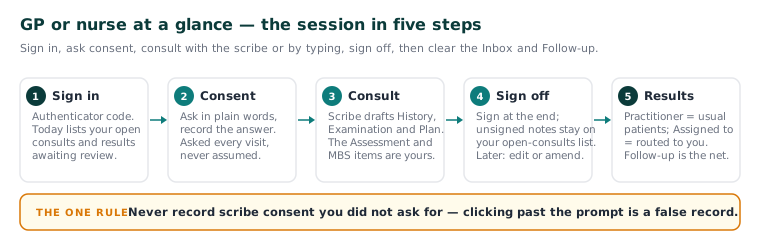
The session in order
| Do | More | |
|---|---|---|
| 1 | Sign in with your code; Today lists open consults and results | KB-031 — Set up two-factor sign-in for Curaeon, and fix a code that is rejected, already used or timed out |
| 2 | Each consult: consent, then scribe or type; the Assessment is yours | KB-056 — Why the scribe never writes the Assessment or suggests item numbers |
| 3 | Sign at the end — unsigned notes stay on your open-consults list | KB-043 — Correct or amend a note after it's signed |
| 4 | Inbox, then Follow-up — the safety net | KB-046 — Work the results Inbox: Practitioner vs Assigned to, routing, COPY and corrected results, Follow-up |
| 5 | Owing scripts, just yours, before you leave | KB-044 — Record and settle an owing script |
Before you call support
| Check | More |
|---|---|
| Scribe stopped? Type the note — the consult is never blocked | KB-054 — Scribe option missing, "appliance is busy", or the draft never arrives |
| No scribe option = consent not recorded. "Appliance is busy" = wait or type | KB-054 — Scribe option missing, "appliance is busy", or the draft never arrives |
| Browser warns or no microphone? Never click past; tell IT | KB-035 — Make a new PC, Mac or locum laptop trust Curaeon ("Your connection is not private") |
| Version banner? The server needs a restart | KB-037 — Screens blank or behaving oddly after an update: the version-mismatch banner |
| Interactions "not checked" = screening is not connected yet; check them yourself | KB-045 — "Interactions not checked": what the prescribing screen is telling you, and why there is nothing to load yet |
Report a fault with the room, the time and the message — never the patient (KB-007 — Why we never need patient details in a support ticket).
The one rule
Never record scribe consent you did not ask for. Clicking past the prompt is a false record, not a shortcut (KB-015 — AI scribe consent workflow explained).
Start here: KB-094 — Start here: I'm a GP or nurse.