Glossary: the words Curaeon uses
The terms you will meet on Curaeon's screens and in these articles, each in a sentence or two, with the article that explains it properly.
Bold words are what the screen says. Where two words are easily confused — recall and reminder, Practitioner and Assigned to — both are under one entry.
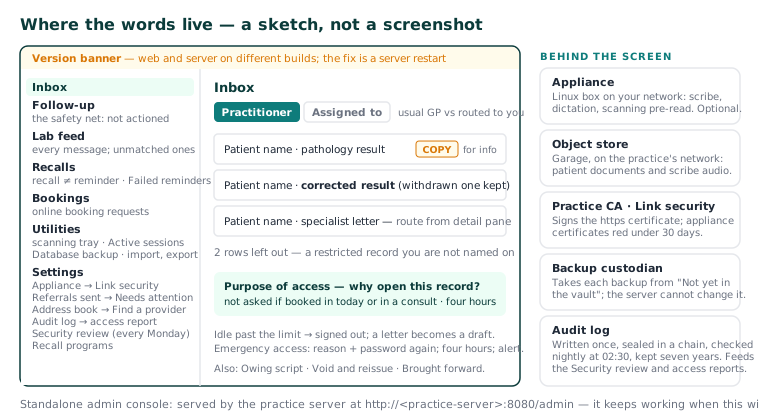
Access report — A printout from the Audit log, on the letterhead, for a patient who asks who has seen their record: who opened it and how often, why, what was sent out of the practice, and every change. The staff-member equivalent is the activity report. KB-063 — Answer "who has seen my record?": print a patient access report
Appliance — The separate Linux box on your practice's network that runs speech-to-text and the drafting model for the AI scribe, and pre-reads the scanning tray. Optional: without it, everything except the scribe works normally. KB-057 — Check appliance health and link security in Settings → AI Appliance, and revoke a certificate
Assigned to / Practitioner — The two Inbox filters. Practitioner shows items for patients whose usual GP you are; Assigned to shows items routed to you, whoever the patient usually sees. KB-046 — Work the results Inbox: Practitioner vs Assigned to, routing, COPY and corrected results, Follow-up
At reception — The appointment status between the clinician finishing and the patient paying and rebooking, so the front desk can see who is in front of them. KB-076 — Appointment statuses from pending to completed, and what "At reception" means
Audit log — Who did what, and when. Written once and never changed, sealed into a chain of fingerprints, checked nightly at 02:30, and kept for at least seven years. Only administrators read it, and that reading is recorded too. KB-064 — Sign off the weekly Security review, and act on alerts and audit-log check warnings
Brought forward — What patients owed the practice you converted from. Reported beside the aged debtor buckets and never inside them; settling one records that the practice has stopped chasing it, not that the patient paid. KB-070 — Import patients, documents, appointments and balances from your previous system, and read the reconciliation report
COPY — A result addressed to somebody else and copied to this practice. For information; the addressee actions it. A corrected result supersedes the one it corrects, which is kept and marked as withdrawn. KB-046 — Work the results Inbox: Practitioner vs Assigned to, routing, COPY and corrected results, Follow-up
Cumulative view — The patient's Results tab as one row per analyte and one column per collection, so a trend is a row read left to right. KB-077 — Read a patient's results over time — the cumulative view
Emergency access — How anyone opens a restricted record in an emergency: a reason in a sentence and their own password again. The record stays open to them alone for four hours, and an alert is raised at once. KB-061 — Restrict a patient's record, and open one in an emergency
Failed reminders — The front-desk worklist of patients a reminder never reached: correct the number and retry, or ring them and mark it handled. KB-060 — Patient emails or SMS reminders not arriving: check Settings → Patient messaging
Find a provider — The search for anyone not yet in your address book. It is really two directories, HealthLink and HealthShare, and every result carries a badge saying whose it is and how fresh. KB-048 — Refer a patient: find a provider in HealthLink/HealthShare, or record a referral without a letter
Follow-up — The safety net: results and correspondence nobody has actioned. A result that arrives, is filed and is never looked at is the commonest serious failure in general practice. KB-046 — Work the results Inbox: Practitioner vs Assigned to, routing, COPY and corrected results, Follow-up
Lab feed — Every electronic message received, including any that could not be matched to a patient confidently. Unmatched messages are assigned by hand from here. KB-019 — Pathology results not filing — what to check
Legal hold — Keeps a record past its retention date whatever its age, for one likely to be involved in proceedings or an open complaint. Placed and released with a reason. KB-066 — Keep, hold or destroy patient records past retention
Link security — The certificates between the appliance and the server, in Settings → AI Appliance. Red under 30 days; an expired one stops the scribe. KB-057 — Check appliance health and link security in Settings → AI Appliance, and revoke a certificate
Not yet in the vault — What a new backup reads for the few minutes before the backup custodian — a separate program that keeps backups where the server cannot change them — takes it. Normal. If the screen ever says the server can delete its backups, contact support. KB-067 — Set up nightly backups, a second copy and a monthly restore drill
Object store — Garage, an S3-compatible store on the practice's network, holding patient documents and scribe audio. An incoming letter "with nothing to open" could not be stored there; the message is kept. KB-090 — Results and incoming letters FAQ
Online booking request — A request from the public booking portal, if your practice runs one. It sits in Bookings until someone confirms, declines or reschedules it. KB-040 — Set up rosters, leave and online-bookable appointment types, and handle online booking requests
Owing script — A medication authorised in the moment — phoned to the pharmacy, an emergency supply — whose signed script does not yet exist, recorded with the pharmacy, the reason and a due date. Seven days by default; each state's poisons regulation sets the window. Printing the script settles it. KB-044 — Record and settle an owing script
Practice CA — The practice's own certificate authority, which signs the https:// certificate your browser sees. Every computer trusts it once; renewal is automatic from 60 days out; after a Revoke…, an appliance works again only with a new certificate from it. KB-035 — Make a new PC, Mac or locum laptop trust Curaeon ("Your connection is not private")
Purpose of access — The reason Curaeon asks when you open a patient's record. Not asked when the patient is booked in today or in a consult with you; an answer stands for four hours. KB-062 — Why Curaeon asks your reason for opening a record
Recall / reminder — A recall tracks a patient due follow-up on the Recalls worklist, and closes itself when a visit booked from it is completed. A reminder is the message sent to the patient by SMS or email; for a recall only SMS is automated, and a call or letter is logged by a person. KB-051 — Run recalls: book from a recall, and why a recall stays open or comes back
Record only — no letter — Records a referral made by phone, or whose letter comes later. A letter written this visit for the same recipient attaches to it rather than starting a second referral. KB-048 — Refer a patient: find a provider in HealthLink/HealthShare, or record a referral without a letter
Referrals sent — The practice-wide list of secure-messaging letters and what came back, opening on Needs attention. Chased and Not needed clear a row once a person has dealt with it. KB-059 — Secure-messaging referral "Not delivered" or stuck on "Sent — awaiting confirmation"
Restricted record — A clinical record closed to everyone but named staff. The front desk's part stays open; anyone else sees who the record is open to, not why; worklists say how many rows they left out. KB-061 — Restrict a patient's record, and open one in an emergency
Scribe consent — The patient's recorded agreement to the AI scribe, asked per visit and never assumed from last time. Without it there is no scribe option in the consult. KB-015 — AI scribe consent workflow explained
Security review — The review of the week's audit log, ready every Monday and signed off by an administrator with a note — plus the alerts that come at once, such as a burst of lockouts or an emergency access. KB-064 — Sign off the weekly Security review, and act on alerts and audit-log check warnings
Standalone admin console — The operational console served by the practice server itself at http://<practice-server>:8080/admin, which keeps working when the main app is broken. KB-068 — Use the standalone admin console when the main app won't load
Style memory — What the scribe learns about how one clinician writes, so drafts arrive in that shape. Per clinician, and can be cleared. KB-055 — Dictate into a section, refine a draft, and manage style memory and suggested follow-ups
Utilities — The front-desk drawer: clear a practitioner's day, data quality, day sheets, duplicates and the scanning tray. The practice administrator's operational console — backups, sessions, datasets, import and export — lives here too. KB-034 — Choose the right role and permissions for a new staff member
Version banner — The banner at the top of every screen when the web application and the server are running different builds. It explains most "screen has gone blank" reports; the fix is a server restart. KB-037 — Screens blank or behaving oddly after an update: the version-mismatch banner
Void and reissue — How a sent invoice is corrected: it cannot be edited, so correcting it voids the original and reissues, which keeps the history honest. KB-052 — Raise, correct and claim an invoice, including when "Send to Medicare…" is blocked
Related articles
- KB-082 — What to have ready before you contact support — What to have ready before you contact support
- KB-034 — Choose the right role and permissions for a new staff member — Choose the right role and permissions for a new staff member
- KB-062 — Why Curaeon asks your reason for opening a record — Why Curaeon asks your reason for opening a record