Quick reference: practice manager
The page to pin beside the manager's monitor: each task, where it lives, what to press, and the routines by day, week and month.
Print this page: the Help Centre's print view drops the navigation.
I want to…
Settings and Utilities are under More in the menu bar. Settings is for administrators only (KB-115 — Find your way around Settings: every section, who can open it, and where to read more).
| I want to… | Where | What to press | More |
|---|---|---|---|
| Add a starter | Settings → Users | The narrowest of four roles; extras under Settings → Permissions | KB-034 — Choose the right role and permissions for a new staff member |
| Reset a password, 2FA or a lost passkey | Settings → Users | Reset password or Reset MFA | KB-032 — Reset a colleague's password or 2FA, or recover when the only administrator is locked out |
| Require administrators to use a passkey | Settings → Practice | Administrators sign in with a passkey: Required, then Save changes | KB-171 — Sign in with a passkey: add one, use it, remove it, and when your practice requires one |
| Close a leaver's access | More → Utilities → Active sessions, then Settings → Users | End sessions; deactivate | KB-084 — New staff onboarding and offboarding checklist |
| Roster, leave, online types | Settings → Rosters, Appointment types | Online on only for what patients may request | KB-040 — Set up rosters, leave and online-bookable appointment types, and handle online booking requests |
| Bring letters in | Settings → Templates | Upload | KB-049 — Build and import letter templates: Word upload, merge fields, pronoun fields, snippets |
| Change idle sign-out | More → Utilities → Active sessions | Sign-out after inactivity, 5–120 minutes | KB-033 — Change how long Curaeon waits before signing you out, and end a session left open |
| Month-end statements | Billing → Aged debtors | Cutoff, then Record statement run | KB-053 — Month-end and end of day: aged debtors, statement runs and bank reconciliation |
| Match the bank | End of day | Import bank statement | KB-053 — Month-end and end of day: aged debtors, statement runs and bank reconciliation |
| Sign the weekly review | Settings → Security review | Sign it off, with a note | KB-064 — Sign off the weekly Security review, and act on alerts and audit-log check warnings |
| Answer "who saw my record?" | Settings → Audit log, patient selected | Print access report | KB-063 — Answer "who has seen my record?": print a patient access report |
| Hold a record | Settings → Records retention | Legal hold on the row | KB-066 — Keep, hold or destroy patient records past retention |
| Seats, tier, invoices | Support portal, Billing & subscriptions | The matching request | KB-071 — Add or reduce seats, change SLA tier, get an invoice copy or fix a failed direct debit |
| Find consults never billed | Billing, Consults to bill | Reconcile consults | KB-161 — Find consults that were never billed: the Consults to bill list |
| Clear a No incentive row where no incentive applies | Consults to bill, the No incentive tab | Set aside…, with the reason | KB-161 — Find consults that were never billed: the Consults to bill list |
| See how often scripts were written with the record not loaded | Reports → All reports → Prescribing | Scripts written with allergies or medications unread | KB-163 — Read the Reports screen: My dashboard, Performance and the Billing & claims summary |
| Follow Medicare and DVA claims | Billing → Medicare claims | Read What is happening; Check now | KB-156 — Follow a Medicare or DVA claim: its status, Check now and the claims list |
| Print Tyro Health's form for a claim, for the patient | The invoice's full page | Statement on the claim's row, then Print | KB-169 — Print the form for a patient, or a summary, for a Medicare or DVA claim |
| Print Curaeon's summary of a claim, for the file | The invoice's full page | Summary on the claim's row, then Print | KB-169 — Print the form for a patient, or a summary, for a Medicare or DVA claim |
| Get ready to claim | Tyro Health Online, then Settings → Users | Register each provider with Tyro; record their numbers | KB-162 — Register each provider with Tyro before the first claim |
| Read the practice's numbers | Reports | My dashboard; Performance for a period; Practice reports → Billing & claims summary | KB-163 — Read the Reports screen: My dashboard, Performance and the Billing & claims summary |
| Replace the server | Settings → Practice → Curaeon licence, old server | Copy the Installation ID first; restore your backup, or send Billing the new ID | KB-165 — Replace or rebuild your server and keep the licence |
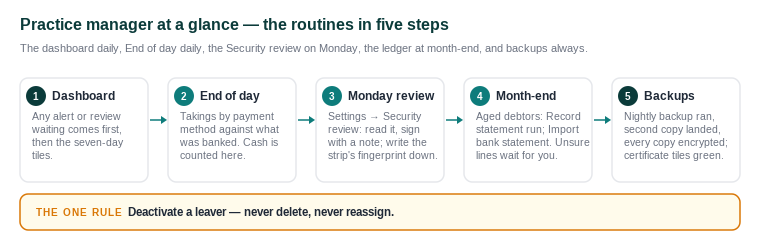
The routines
| When | Do | More |
|---|---|---|
| Daily | Dashboard: alerts and a review waiting come first | KB-064 — Sign off the weekly Security review, and act on alerts and audit-log check warnings |
| Daily | End of day — takings by payment method | KB-053 — Month-end and end of day: aged debtors, statement runs and bank reconciliation |
| Monday | Sign off the Security review; note the audit-log strip's fingerprint | KB-064 — Sign off the weekly Security review, and act on alerts and audit-log check warnings |
| Weekly | More → Utilities → Data quality and Duplicate patients | KB-081 — Fix data-quality gaps before they become rejected claims or lost letters |
| Monthly | Statement run, bank reconciliation, and make restore-drill at the server |
KB-067 — Set up nightly backups, a second copy and a monthly restore drill |
| Monthly | More → Utilities → Storage → Encryption at rest: every row Encrypted | KB-166 — Check that the server's disks are encrypted |
Before you call support
Clinic cannot see patients? Call 1300 XXX XXX, option 1 (KB-006 — How to report a clinic-down emergency (and what happens next)).
The one rule
Deactivate a leaver — never delete, never reassign. Their account name stays in a log kept seven years and shown to accreditors (KB-084 — New staff onboarding and offboarding checklist).
Start here: KB-095 — Start here: I'm the practice manager.
Related articles
- KB-114 — Your Curaeon licence: seats, renewal, and requesting more from Settings → Practice — Your Curaeon licence: seats, renewal, and requesting more from Settings → Practice
- KB-115 — Find your way around Settings: every section, who can open it, and where to read more — Find your way around Settings: every section, who can open it, and where to read more
- KB-133 — Find your way around Utilities: every section, what it is for and who can open it — Find your way around Utilities: every section, what it is for and who can open it
- KB-163 — Read the Reports screen: My dashboard, Performance and the Billing & claims summary — Read the Reports screen: My dashboard, Performance and the Billing & claims summary
- KB-164 — What to do when Curaeon cannot be reached — What to do when Curaeon cannot be reached