Practice-manager setup checklist: everything to configure before your first consulting day
Work down these tables once and your practice opens with the calendar offering the right slots, claims that can be sent, letters that arrive, and a backup that has already run.
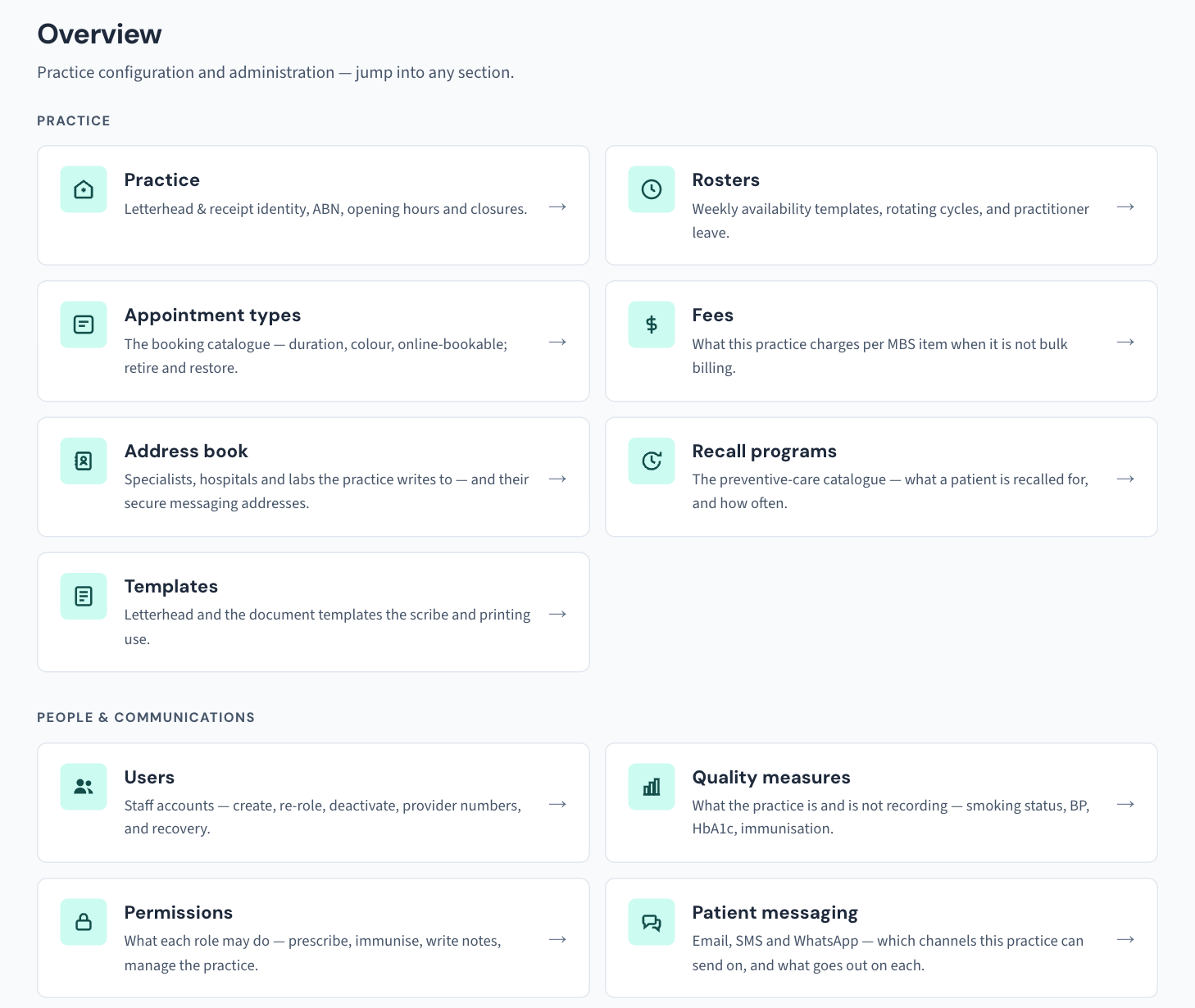
Most of this lives under Settings. The administrator's sections need the Admin role (KB-034 — Choose the right role and permissions for a new staff member); a few open for other roles too, and KB-115 — Find your way around Settings: every section, who can open it, and where to read more lists who can open what. The operational console under Utilities — backups, sessions, datasets — is for the practice administrator only. Nothing here needs a call to us; where the manual does not say which screen a task lives on, the last section says so.
Tip: Print this page and tick it. Every configuration change you make — fees, opening hours, appointment types, roster lines, recall types, messaging channels, templates, the backup schedule — is recorded in the Audit log with its old and new values, so the log is your record of what was set up and by whom.
The practice and its people
| Task | Why it matters | Where | Read |
|---|---|---|---|
| Enter the practice's name, address, ABN, opening hours and timezone | Booking checks opening hours; the Audit log's dates are the practice's days; "after hours" in the Security review is judged by the hours you set here | Settings → Practice | KB-116 — Set up your practice's details, opening hours and closures in Settings → Practice |
| Add each staff member with their work email and the narrowest role that covers their work | Roles are enforced by the server, not just hidden in the screen | Settings → Users | KB-034 — Choose the right role and permissions for a new staff member |
Grant any one-off extra (for example utilities.run) rather than moving someone up a role |
Changes to who may do what are recorded and listed in the weekly Security review | Settings → Permissions | KB-034 — Choose the right role and permissions for a new staff member |
| Have every person complete their first sign-in and two-factor enrolment | First sign-in enrols the authenticator app; ten recovery codes; the QR screen times out after five minutes | Their own first sign-in | KB-031 — Set up two-factor sign-in for Curaeon, and fix a code that is rejected, already used or timed out |
| Appoint a second administrator | If the only administrator is locked out, the fix is a command at the server | Settings → Users | KB-032 — Reset a colleague's password or 2FA, or recover when the only administrator is locked out |
| Set the idle sign-out | 15 minutes unless you change it, between 5 and 120; applies at once to everyone signed in | Utilities → Active sessions | KB-033 — Change how long Curaeon waits before signing you out, and end a session left open |
| Make every workstation and locum laptop trust the practice's certificate | Until it does, the browser warns and the scribe cannot use the microphone | Whoever looks after the computers | KB-035 — Make a new PC, Mac or locum laptop trust Curaeon ("Your connection is not private") |
The appointment book
| Task | Why it matters | Where | Read |
|---|---|---|---|
| Enter each practitioner's and nurse's availability, and leave as exceptions | Booking checks the roster; nurses have their own columns and rosters | Settings → Rosters | KB-040 — Set up rosters, leave and online-bookable appointment types, and handle online booking requests |
| Create appointment types with names and durations; switch Online on only for the ones patients may request | The time grid offers starts stepped by the type's own length; anything with Online off is never offered on the portal | Settings → Appointment types | KB-040 — Set up rosters, leave and online-bookable appointment types, and handle online booking requests |
| Decide whether to run the public booking portal, and who confirms requests in Bookings | A request is not in the diary until someone confirms it | Bookings | KB-022 — Booking system sync issues — first steps |
| Define the practice's standard recalls and their intervals | Recalls raised from results and care plans pick from these | Settings → Recall programs | KB-051 — Run recalls: book from a recall, and why a recall stays open or comes back |
Clinical and correspondence
| Task | Why it matters | Where | Read |
|---|---|---|---|
| Check which reference data is loaded — MBS, PBS and the coding catalogues — and note the update command for each | Record bills from the MBS schedule loaded, and prescribing searches the PBS catalogue loaded. (Interaction screening is not one of these datasets; it is not yet connected at any practice, KB-045 — "Interactions not checked": what the prescribing screen is telling you, and why there is nothing to load yet.) | Utilities → Clinical datasets | KB-138 — Read Utilities → Storage and Clinical datasets: how big the database is, and which reference data is loaded |
| Upload the letter library (Word, RTF or plain text) and add snippets | A Word file with a picture, header, tracked changes or merged cells is refused with the reason | Settings → Templates | KB-049 — Build and import letter templates: Word upload, merge fields, pronoun fields, snippets |
| Write or import care plan templates | A new plan of that kind opens with these conditions, goals, actions and services | Settings → Care plan templates | KB-102 — Start a care plan from a template, share templates between sites, and keep Plan reviews and INR clear |
| Check the provider directories and the address book | Directory sources shows whether HealthLink's live service is configured and which HealthShare extract is loaded | Settings → Address book | KB-048 — Refer a patient: find a provider in HealthLink/HealthShare, or record a referral without a letter |
| Set up SMS, email and WhatsApp channels, what goes out on which, DKIM signing and the bounce mailbox, then run Check DNS records | Every channel shows whether it can actually deliver; this is one of the two checks the manual asks for before you call | Settings → Patient messaging | KB-060 — Patient emails or SMS reminders not arriving: check Settings → Patient messaging |
| Record vaccine stock and cold-chain details | Immunisations record vaccine, batch, site, route and who gave them | Settings (the manual does not name the screen) | KB-079 — Record an immunisation and work the AIR backlog |
Money
| Task | Why it matters | Where | Read |
|---|---|---|---|
| Enter the practice fee schedule | Consult-issue checks flag items not priced | Settings → Fees | KB-052 — Raise, correct and claim an invoice, including when "Send to Medicare…" is blocked |
| Complete Tyro Health Online onboarding | Until it completes, Send to Medicare… is an honest preview that creates nothing | Tyro, and the invoice's Send to Medicare… button | KB-052 — Raise, correct and claim an invoice, including when "Send to Medicare…" is blocked |
| Import outstanding balances from the previous system | They land as Brought forward, beside the aged buckets and never inside them | Settings → Import patients | KB-070 — Import patients, documents, appointments and balances from your previous system, and read the reconciliation report |
| Agree who runs End of day and imports the bank statement | Cash is counted at End of day; deposits are matched on Bank reconciliation | Billing → Aged debtors / End of day | KB-053 — Month-end and end of day: aged debtors, statement runs and bank reconciliation |
Data brought across
| Task | Why it matters | Where | Read |
|---|---|---|---|
| Preview, approve and print the reconciliation report for each import | Every import writes nothing until approved; the report, with its sign-off line, is the record the old system is retired on | Settings → Import patients | KB-070 — Import patients, documents, appointments and balances from your previous system, and read the reconciliation report |
| Work the data-quality list while patients are at the desk | Missing Medicare numbers, dates of birth, mobiles and postcodes become rejected claims and letters that never arrive | Utilities → Data quality | KB-081 — Fix data-quality gaps before they become rejected claims or lost letters |
| Review likely duplicates | Nothing merges by itself; each pair opens Settings → Merge patients for a person to decide | Utilities → Duplicate patients | KB-042 — Find and merge duplicate patient records |
Security, backup and the appliance
| Task | Why it matters | Where | Read |
|---|---|---|---|
| Run a backup now, set the nightly schedule, point the second copy at an encrypted NAS directory, and turn on the failed-backup alert | Every place a backup is kept must be encrypted — a condition of HI Service access | Utilities → Database backup | KB-067 — Set up nightly backups, a second copy and a monthly restore drill |
| Have whoever runs the server rehearse the restore, and diarise it monthly | Having backups and knowing they restore are different facts | make restore-drill at the server |
KB-067 — Set up nightly backups, a second copy and a monthly restore drill |
| Bookmark the standalone admin console on the administrator's computer | It keeps working when the main app is broken; finish your first sign-in in the main app first | http://<practice-server>:8080/admin |
KB-068 — Use the standalone admin console when the main app won't load |
| Check every certificate tile is green | A tile turns red 30 days before expiry, which means automatic renewal has stopped | Settings → Certificates | KB-036 — A certificate is red in Settings → Certificates: what it means and who to tell |
| Check the appliance's health and that Link security is on, with its certificate days in the clear | An expired link certificate stops the scribe | Settings → AI Appliance | KB-057 — Check appliance health and link security in Settings → AI Appliance, and revoke a certificate |
| Set the records retention period and write the practice's destruction procedure | Nothing is destroyed automatically; the RACGP Standards ask for the procedure in writing | Settings → Records retention | KB-066 — Keep, hold or destroy patient records past retention |
| Fill in the accreditation, registration and licensing register | Status and expiry in one place | Settings → Accreditation | — |
| Put the weekly Security review sign-off in someone's Monday | A week with something in it will not sign without a note | Settings → Security review | KB-064 — Sign off the weekly Security review, and act on alerts and audit-log check warnings |
Important: Do not click past a browser warning that the connection is not private, on any computer, at any point in setup. It is the only sign that a computer is talking to something other than the practice's server.
Where the manual is silent
Three things practice managers ask for: a practitioner's provider number is set on their account in Settings → Users (KB-120 — Manage staff accounts in Settings → Users: add, change a role, seats, provider numbers, deactivate), and a missing one blocks Send to Medicare…; a provider's secure messaging address is kept on their contact in Settings → Address book (KB-124 — Keep the practice address book in Settings → Address book: add, edit and retire a contact); and letterheads are edited in Settings → Templates (KB-049 — Build and import letter templates: Word upload, merge fields, pronoun fields, snippets). The practice connects to one secure messaging network at a time, and that connection is made on the server with us: raise a ticket under Integrations to set it up.
Still stuck? Raise a ticket at support.curaeon.com.au or call 1300 XXX XXX. If your clinic can't see patients right now, call and choose option 1. Support is staffed Monday to Friday, 8:00–18:00 Sydney time; outside those hours a call or text to the same number is answered on a best-effort basis.
Related articles
- KB-095 — Start here: I'm the practice manager — Start here: I'm the practice manager
- KB-084 — New staff onboarding and offboarding checklist — New staff onboarding and offboarding checklist
- KB-073 (internal) — New-site implementation: phase-by-phase runbook
- KB-102 — Start a care plan from a template, share templates between sites, and keep Plan reviews and INR clear — Start a care plan from a template, share templates between sites, and keep Plan reviews and INR clear
- KB-105 — Read Quality measures, registers and preventive care due — and why they are not the PIP QI extract — Read Quality measures, registers and preventive care due — and why they are not the PIP QI extract
- KB-114 — Your Curaeon licence: seats, renewal, and requesting more from Settings → Practice — Your Curaeon licence: seats, renewal, and requesting more from Settings → Practice
- KB-115 — Find your way around Settings: every section, who can open it, and where to read more — Find your way around Settings: every section, who can open it, and where to read more
- KB-133 — Find your way around Utilities: every section, what it is for and who can open it — Find your way around Utilities: every section, what it is for and who can open it
- KB-131 — Set up Preferences: your start screen, calendar view, colours, notifications and privacy — Set up Preferences: your start screen, calendar view, colours, notifications and privacy